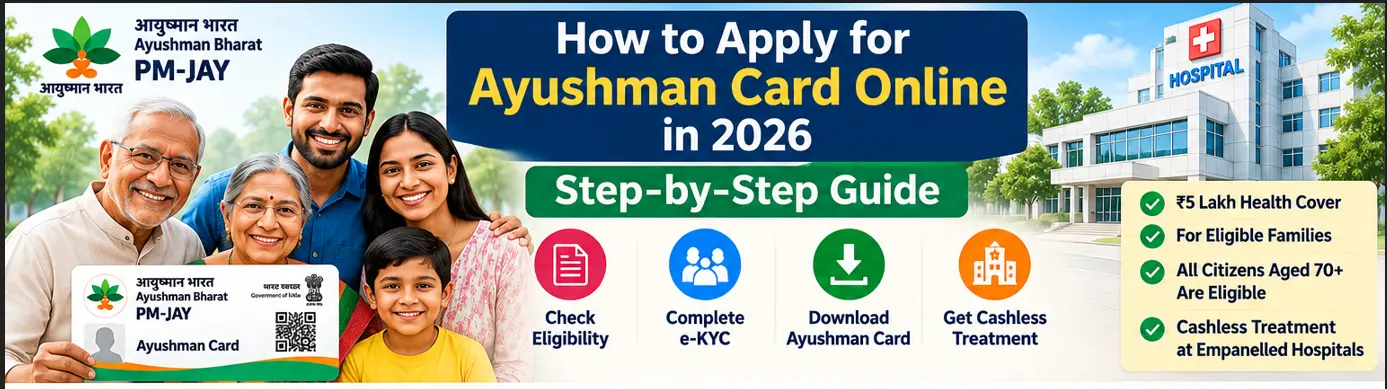
An Ayushman Card can help eligible beneficiaries access cashless treatment under Ayushman Bharat Pradhan Mantri Jan Arogya Yojana (AB PM-JAY) at empanelled hospitals.
But how do you apply for the card? Can you complete the process from your mobile phone? What documents are required? And what should you do if your e-KYC is pending?
The good news is that eligible beneficiaries can use the official PM-JAY beneficiary portal or Ayushman App to complete the applicable enrolment and card-generation process. Assistance is also available through Common Service Centres and empanelled hospitals.
This guide explains how to apply for Ayushman Card online in simple steps, including the separate process for senior citizens aged 70 years and above.
Quick answer: First check whether your beneficiary record is available or whether you qualify under an expanded category. Then sign in to the official PM-JAY beneficiary portal or use the official Ayushman App, complete the required e-KYC and follow the card-generation instructions. The card becomes available for download after the applicable verification and approval process.
Who Can Apply for an Ayushman Card?
You must belong to an eligible PM-JAY beneficiary category.
These include:
- Families identified under the applicable original PM-JAY beneficiary criteria.
- Eligible ASHA workers and their covered family members.
- Eligible Anganwadi Workers and Anganwadi Helpers and their covered family members.
- All citizens aged 70 years and above, irrespective of socio-economic status, under the expanded senior-citizen coverage.
- Other beneficiary groups covered through applicable state-level arrangements.
The government has expanded PM-JAY beyond its original beneficiary base, including the 70+ senior-citizen category.
Important: Applying for an Ayushman Card does not automatically make an otherwise ineligible person a PM-JAY beneficiary. Eligibility must be established through the official system.
Official Websites and Apps for Ayushman Card Application
Use these official channels:
| Service | Official channel |
|---|---|
| Beneficiary portal | beneficiary.nha.gov.in |
| PM-JAY scheme information | pmjay.gov.in |
| National Health Authority | nha.gov.in |
| Mobile application | Official Ayushman App |
| Assisted application | Common Service Centre or empanelled hospital |
The NHA identifies the beneficiary portal, Ayushman App, empanelled hospitals, and Common Service Centres as enrolment channels for eligible 70+ senior citizens.
How to Apply for Ayushman Card Online: Step-by-Step Process
Follow these steps to complete the online process.
Step 1: Visit the official PM-JAY beneficiary portal

Open:
https://beneficiary.nha.gov.in
Make sure you are using the official National Health Authority website.
Step 2: Select Beneficiary Login

Choose the beneficiary login option.
Enter your mobile number and complete OTP verification as requested by the portal.
Follow the on-screen instructions. The portal layout and available options may change as the National Health Authority updates its services.
Step 3: Search for your beneficiary record
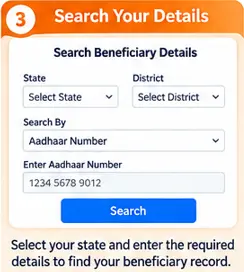
After logging in, use the available search facility.
Select the relevant state and beneficiary category, then enter the information requested by the system.
Depending on the available workflow, you may be asked for details such as:
- Name or family details
- District
- Aadhaar or another permitted identification detail
- Ration card or family identification information, where applicable
If the portal finds your record, check that the displayed details are correct before moving forward.
Step 4: Select the beneficiary and start e-KYC
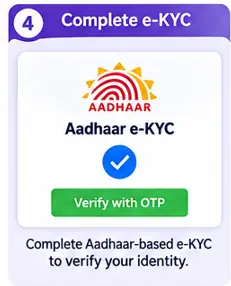
If the system provides an e-KYC or card-generation option, select the relevant beneficiary.
Complete the authentication method displayed by the official system.
For eligible beneficiaries, Aadhaar-based e-KYC is used for card creation and verification.
Step 5: Complete Aadhaar authentication
Follow the on-screen Aadhaar authentication instructions.
Depending on the available method, authentication may involve an OTP or another supported verification process.
Make sure that the mobile number linked to Aadhaar is accessible if the selected method requires an OTP.
Never share your OTP with an unknown person. Enter it only on the official government service you have opened yourself.
Step 6: Submit the details for verification
Review the information displayed and submit the e-KYC details as instructed.
Some records may require additional verification or approval before the card becomes available.
Do not assume that submitting e-KYC means the card has already been approved.
Step 7: Check the application or card status
Return to the beneficiary portal or the relevant section of the Ayushman App.
Check whether the card is approved, pending or requires further action.
If the system asks for additional information, follow the instructions provided.
Step 8: Download your Ayushman e-card
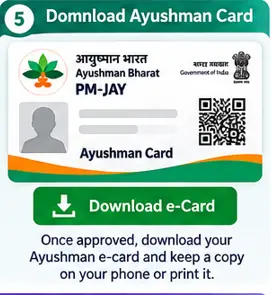
Once the card is generated and made available, use the download option shown in the portal or app.
Save the PDF to your mobile phone and keep a copy for future reference.
You can also print the e-card if you prefer carrying a physical copy.
How to Apply for Ayushman Card Through the Mobile App
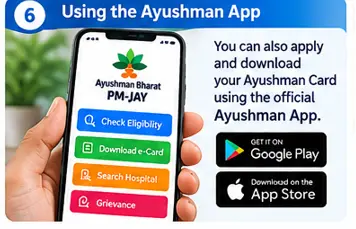
If you prefer using a smartphone, you can use the official Ayushman App.
Steps to follow
- Open Google Play Store or the relevant official app store.
- Search for the Ayushman App published by the National Health Authority.
- Verify the publisher before installing.
- Open the application.
- Select the beneficiary-related service.
- Complete the requested login and verification.
- Search for your beneficiary record.
- Follow the available e-KYC and card-generation process.
- Download the card when it is available.
The official Ayushman App provides beneficiary services such as eligibility verification and e-card download.
Tip: Avoid downloading unofficial applications that use similar names or logos.
How Can Senior Citizens Aged 70+ Apply for an Ayushman Card?
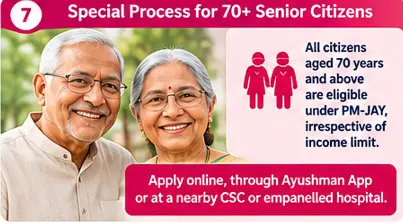
The application process for senior citizens aged 70 years and above is particularly important because their eligibility does not depend on household income or socio-economic status.
All citizens aged 70 and above are eligible under the expanded PM-JAY coverage.
Online application process for 70+ senior citizens
Step 1: Visit beneficiary.nha.gov.in.
Step 2: Choose the beneficiary login option.
Step 3: Complete mobile OTP verification.
Step 4: Select the relevant senior-citizen enrolment option, where displayed.
Step 5: Enter the required details and complete Aadhaar-based e-KYC.
Step 6: Follow the instructions to submit the enrolment request.
Step 7: Check the status and download the Ayushman Vay Vandana Card once it is generated.
Documents required for 70+ senior citizens
According to the National Health Authority’s senior-citizen FAQ:
- Aadhaar is the required document for enrolment.
- Aadhaar-based e-KYC is mandatory.
- The age recorded in Aadhaar is used to determine eligibility.
National Housing Authority
What if both parents are aged 70 or above?
The NHA FAQ explains that once the first eligible senior citizen in a family is enrolled, other family members aged 70 or above can be added through the portal’s Add Member feature.
Each eligible senior citizen should have the required verification completed.
Can You Apply for an Ayushman Card at a CSC or Hospital?
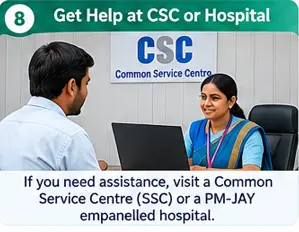
Yes. If you cannot complete the online process yourself, you can seek assistance at:
- A nearby Common Service Centre (CSC).
- A PM-JAY empanelled hospital.
- An authorised Ayushman beneficiary assistance desk, where available.
Take the relevant identification and family details for your beneficiary category.
Ask the operator to verify your eligibility and explain whether your record needs e-KYC, additional documents or approval.
The National Health Authority has identified CSCs and empanelled hospitals as assisted enrolment channels.
Documents Required for Ayushman Card Application
The required documents depend on the beneficiary category and the official verification process.
The following information may be useful:
| Document or information | Purpose |
|---|---|
| Aadhaar card | Identity and e-KYC, where required |
| Mobile number | Login and OTP verification |
| Ration card | Family identification, where applicable |
| Other accepted identity proof | As requested by the applicable process |
| Family details | Beneficiary identification and verification |
Is Aadhaar mandatory for everyone?
The precise identification requirements can differ by beneficiary category and applicable process.
For senior citizens aged 70 and above, the NHA specifically requires Aadhaar-based e-KYC for enrolment and card issuance.
Do not assume that every beneficiary category follows the same document checklist.
How Long Does It Take to Get an Ayushman Card?
There is no single processing time that should be assumed for every application.
The time may depend on:
- Whether your beneficiary record is already available.
- Whether e-KYC is completed successfully.
- Whether additional verification is required.
- Whether the application is awaiting approval.
- Whether the portal is experiencing technical issues.
Check the status through the official portal or app. If it remains pending, seek assistance through a CSC or empanelled hospital.
What If Your Ayushman Card Application Is Rejected or Pending?
A pending or unsuccessful application does not always mean that you are permanently ineligible.
First, check the status and read any remarks or instructions shown by the system.
Common issues may include:
- Incorrect personal or family details.
- Aadhaar authentication failure.
- Mobile OTP problems.
- Missing or mismatched beneficiary information.
- Additional verification requirements.
- Technical problems with the portal.
What should you do?
- Review the information you submitted.
- Correct any errors where the portal permits it.
- Retry the authentication process if instructed.
- Visit a CSC or empanelled hospital for assistance.
- Contact the official PM-JAY helpline at 14555 if the problem continues.
Do not pay an unknown agent who promises guaranteed approval or a card in exchange for unofficial fees.
Is an Ayushman Card Free?
The PM-JAY beneficiary card is an identification document for eligible beneficiaries. The scheme provides covered treatment through its empanelled hospital network according to the applicable rules.
Use official channels for enrolment and verification. Be cautious if anyone demands money in exchange for guaranteed eligibility or approval.
What Can You Do After Receiving Your Ayushman Card?
After the card is generated:
- Save the digital card on your phone.
- Keep a printed copy if convenient.
- Check the details for accuracy.
- Find a PM-JAY empanelled hospital before planned treatment.
- Confirm that the required treatment is covered under the applicable package.
- Carry the card and required identification when visiting the hospital.
You can find hospital information through the official PM-JAY website and its hospital-search service.
Remember, an Ayushman Card does not mean every medical expense or outpatient consultation is automatically covered. Benefits depend on the scheme’s applicable treatment packages and rules.
Final Takeaway
Applying for an Ayushman Card is easier when you first understand your eligibility and then follow the official enrolment process.
You can use the PM-JAY beneficiary portal or Ayushman App to complete the available online steps. If you need assistance, a Common Service Centre or PM-JAY empanelled hospital can help you with beneficiary verification and card generation.
For senior citizens aged 70 and above, the expanded coverage offers an additional route to enrolment without an income restriction, although Aadhaar-based e-KYC remains mandatory.
Keep your details accurate, use official government channels and save your e-card once it is generated.
At Benefitomics, we believe that understanding a benefit is the first step towards accessing it.
Frequently Asked Questions
Q1. How can I apply for an Ayushman Card online in 2026?
Visit beneficiary.nha.gov.in, sign in using the beneficiary login, search for your record and follow the available e-KYC and card-generation steps.
Q2. Can I apply for an Ayushman Card using my mobile phone?
Yes. Eligible beneficiaries can use the official Ayushman App or the beneficiary portal on a compatible device.
Q3. Can I apply for an Ayushman Card for my parents?
You can help your parents complete the process if they are eligible. For senior citizens aged 70 and above, Aadhaar-based e-KYC is mandatory.
Q4. Can a person aged 70+ apply even if they have private health insurance?
Yes. The government has clarified that eligible senior citizens aged 70 and above with private health insurance can also receive PM-JAY benefits.
Q5. Is there an income limit for the 70+ Ayushman Card?
No. The expanded coverage applies to all citizens aged 70 and above irrespective of socio-economic status.
Q6. Can I download my Ayushman Card after e-KYC?
You can download it once the applicable verification and approval process is complete and the card is available in the official portal or app.
Q7. What is the helpline number for Ayushman Bharat PM-JAY?
The PM-JAY beneficiary helpline is 14555.
Q8. Can I get an Ayushman Card from a government hospital?
You can seek assistance at a PM-JAY empanelled hospital that provides beneficiary services. Confirm the availability of the relevant help desk before visiting.
Related posts
Ayushman Bharat PM-JAY Guide 2026: Eligibility, ₹5 Lakh Cover, Card & Hospital Benefits-Pillar post
Ayushman Bharat PM-JAY Eligibility 2026: Who Can Get ₹5 Lakh Health Cover?
How to Check Ayushman Card Eligibility Online in 2026
How to Check Ayushman Card Eligibility Online
| From article | Suggested anchor text | Destination |
|---|---|---|
| Post 2 | /?p=76 | |
| Post 2 | /?p=708 | |
| Post 2 | /apply-for-ayushman-card-online/ | |
| Post 2 | /government-scheme-finder/ | |
| Post 3 | /?p=76 | |
| Post 3 | Ayushman Bharat PM-JAY Eligibility 2026 | /?p=708 |
| Post 3 | How to Check Ayushman Card Eligibility Online | /check-ayushman-card-eligibility-online/ |
| Post 3 | Ayushman Card Download 2026 | Add when published |
The two articles should also link back to the main pillar, and the pillar should link to both supporting articles. This creates a clear topic cluster.
Sources referred
Use these as contextual, preferably DoFollow, links in the articles:
- PM-JAY Beneficiary Portal — for eligibility checking and card services.
- National Health Authority — for official scheme information.
- Official PM-JAY Website — for scheme details.
- NHA Senior Citizen FAQs — for 70+ eligibility and enrolment rules.
- Government update on PM-JAY implementation, July 2026 — for the latest national implementation information.