
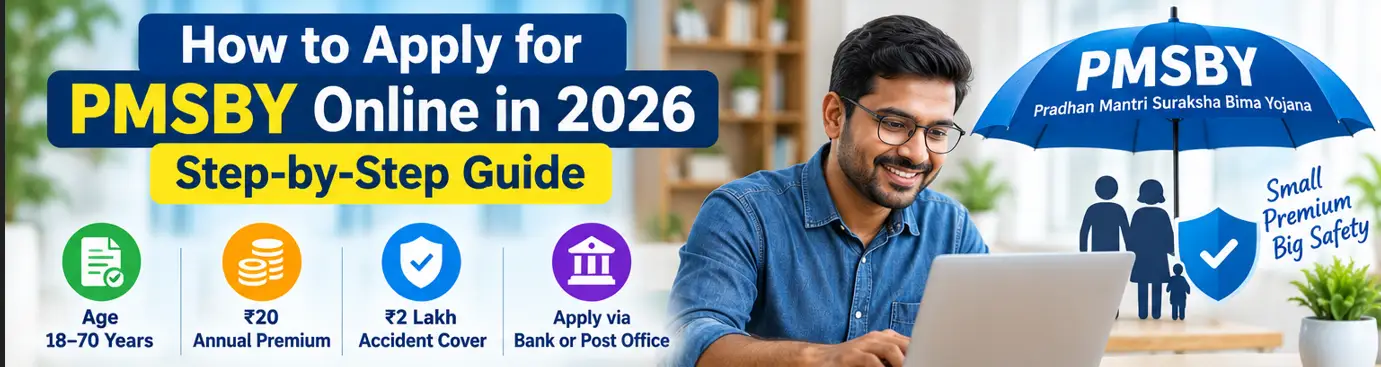
You can apply for the Pradhan Mantri Suraksha Bima Yojana (PMSBY) through a participating bank or post office. Depending on your institution, enrolment may be available through mobile banking, internet banking or a branch. You need to meet the scheme’s eligibility conditions, provide the required details and authorise the annual premium deduction of ₹20.
There is no need to assume that one central online application portal is available for every applicant. The process can differ between banks and post offices.
This guide explains how to apply for PMSBY online, how to enrol through a branch, what details you may need and how to check that your cover has started.
Who can apply for PMSBY?
Before applying, check the main eligibility conditions.
- You must be aged 18 to 70, subject to the scheme’s age rules.
- You must hold an eligible individual account with a participating bank or post office.
- You must consent to join the scheme and authorise auto-debit of the premium.
- You must not rely on a duplicate enrolment through another account; cover is restricted to one account per person.
The current annual premium is ₹20 per enrolled member. PMSBY provides ₹2 lakh for accidental death or specified permanent total disability and ₹1 lakh for specified permanent partial disability, subject to the scheme conditions.
For a full explanation, read our PMSBY Guide 2026 and PMSBY Eligibility 2026.
How to apply for PMSBY online
If your bank offers PMSBY enrolment through its digital banking service, you may be able to apply without visiting a branch.
The exact menu names and screens differ between institutions. Use the following general process.
Step 1: Open your bank’s official app or website
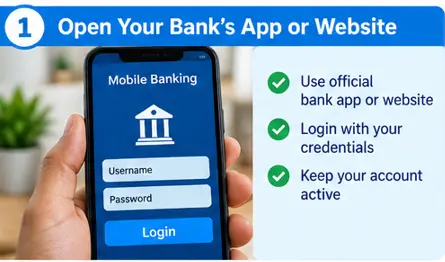
Open the official mobile banking app or internet banking website of the bank where you hold an eligible account.
Use the bank’s verified website or its official app listing. Do not enter your banking password, PIN or OTP on an unfamiliar website claiming to offer government insurance enrolment.
Step 2: Look for insurance or government schemes
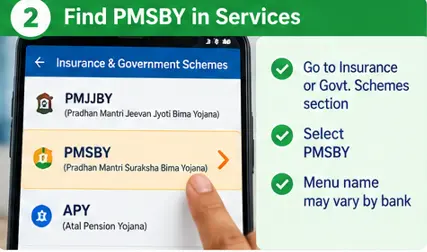
After signing in, look for a section such as insurance, social security schemes or government-backed insurance.
If PMSBY is available, select Pradhan Mantri Suraksha Bima Yojana.
The exact location may differ from one bank to another. If you cannot find the scheme, contact the bank or visit a branch to confirm the available enrolment method.
Step 3: Check your personal and account details
Review the details requested by the bank. These may include your name, date of birth, account details, contact information and nominee details.
Make sure the information matches the bank’s records and your supporting documents. Incorrect details can create difficulties when the institution verifies enrolment or processes a future claim.
Step 4: Read the declaration and authorise auto-debit
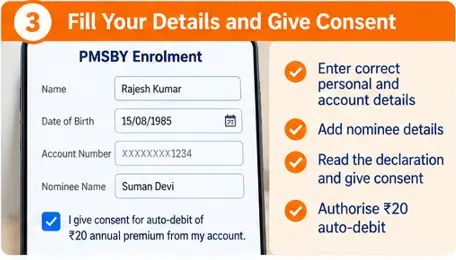
Read the scheme declaration and confirm that you understand the conditions.
You will need to consent to the annual premium deduction from your designated account. The current premium is ₹20 per member per year.
Do not approve the enrolment until you understand the scheme and the deduction you are authorising.
Step 5: Submit the application

Review your details and submit the enrolment request using the bank’s prescribed process.
If the digital process is successful, save the acknowledgement or reference number if one is provided. Do not assume that an application is complete simply because you opened the scheme page or entered your details.
Step 6: Check the premium deduction and confirmation
Check your account statement for the PMSBY premium deduction and keep the confirmation provided by your bank.
The official scheme rules state that risk cover for new enrolment begins from the date the premium is auto-debited. Therefore, confirm the deduction date rather than assuming that coverage started when you first opened the application.
How to apply for PMSBY through a bank branch
If online enrolment is unavailable or you prefer assistance, you can contact a participating bank branch or post office.
Follow these steps:
- Ask whether the institution offers PMSBY enrolment.
- Request the prescribed application or consent-cum-declaration form.
- Read the form and complete the requested details.
- Provide the required account and identification information.
- Give consent for the ₹20 annual premium to be deducted from the eligible account.
- Submit the form and ask for an acknowledgement or confirmation.
- Check that the premium has been deducted and your enrolment has been recorded.
The official PMSBY forms page provides application and claim forms. You can use it to review the prescribed paperwork, but follow your participating institution’s instructions for submission.
What documents or details may be required?
The exact requirements can vary according to the bank or post office and the information already held in your account.
You may be asked for:
- Your eligible bank or post office account details.
- Personal details, including your date of birth.
- Contact information.
- Nominee details.
- The completed enrolment form or digital declaration.
- Consent for the annual premium auto-debit.
Ask the participating institution whether any additional documents are required. Do not assume that every applicant needs to upload the same documents when applying online.
Keep a copy of the submitted form or digital acknowledgement wherever possible.
What happens after you apply?
After you submit your application, the bank or post office processes the enrolment and the premium deduction.
Check the following:
- Was your enrolment request accepted or recorded?
- Was the ₹20 premium deducted?
- Do you have an acknowledgement, reference number or confirmation?
- Is the deduction date recorded correctly?
- Have you kept the scheme details and nominee information for future reference?
If the premium has not been deducted, contact your bank or post office. Ask whether the application is pending, rejected or incomplete and what you need to do next.
Do not assume you are insured merely because you filled in a form. Confirm the enrolment and applicable cover start date.
When does PMSBY coverage start?
For a new enrolment, the official scheme rules state that risk cover starts from the date the premium is auto-debited from the subscriber’s account.
The annual coverage period runs from 1 June to 31 May, subject to enrolment and the scheme conditions.
Eligible people who join later or rejoin after leaving the scheme may be able to obtain cover by paying the annual premium. However, cover does not automatically apply retrospectively to an accident that occurred before the applicable start date.
You can confirm the latest terms on the official Department of Financial Services PMSBY page.
What if you cannot apply online?
Not every participating institution offers the same online facilities. If PMSBY does not appear in your banking app or internet banking service:
- Contact the bank using its official customer service channel.
- Ask whether PMSBY enrolment is available through your account.
- Visit a participating branch or post office if required.
- Request the prescribed form and instructions.
- Keep the acknowledgement and verify the premium deduction.
Avoid unofficial websites or agents that promise guaranteed enrolment or ask for your banking PIN or OTP.
Common mistakes to avoid when applying for PMSBY
Assuming every bank has the same online process: Digital options and menu names vary by institution.
Entering incorrect personal details: Check your date of birth, name and account information before submitting.
Forgetting the auto-debit authorisation: Enrolment requires the prescribed consent and premium deduction process.
Assuming the form alone proves active cover: Check the premium deduction and enrolment confirmation.
Enrolling through multiple accounts: PMSBY cover is restricted to one account per person.
Ignoring renewal: Check your account around the annual renewal period and confirm that the deduction was successful.
Frequently asked questions
Is there a single official website to apply for PMSBY?
PMSBY enrolment is handled through participating banks and post offices. Some institutions may provide digital enrolment, while others may direct applicants to a branch. Do not assume that one central public application portal supports every applicant.
Can I apply for PMSBY using my mobile phone?
Yes, if your participating bank provides a suitable mobile banking enrolment facility. Otherwise, contact the bank or use its prescribed branch-based process.
What is the PMSBY application fee?
The current annual premium is ₹20 per enrolled member. Confirm the latest terms with the participating institution before applying.
Can I apply for PMSBY without a bank account?
You need an eligible account with a participating bank or post office through which the premium can be deducted. Ask your institution about account eligibility if you are unsure.
How do I know whether my PMSBY application is successful?
Check for the bank’s enrolment confirmation and verify that the premium has been deducted. If you are uncertain, contact the bank or post office and ask it to confirm the enrolment and cover start date.
Can I apply for PMSBY if I already have PMJJBY?
Yes, an eligible person can enrol in both schemes, subject to each scheme’s conditions. PMJJBY provides life insurance, while PMSBY covers qualifying accidental death and specified permanent disabilities. Read our PMJJBY vs PMSBY comparison for the differences.
What should I do if my PMSBY premium was not deducted?
Contact your bank or post office to confirm whether your application or renewal was processed. Ask what steps are required to enrol or renew and when your cover would begin. Do not assume coverage is active without confirmation.
Final takeaway
Applying for PMSBY is generally straightforward when you use a participating bank or post office. Check your eligibility, complete the prescribed enrolment, authorise the ₹20 annual premium deduction and retain your confirmation.
Most importantly, verify that your enrolment and premium payment have been recorded. That simple check can help you avoid uncertainty about whether your accident cover is active.
Related Posts
- PMSBY Guide (2026): ₹2 Lakh Accident Cover, Eligibility, Premium & Claim Process
- PMSBY Eligibility 2026: Who Can Get ₹2 Lakh Accident Cover?
- PMSBY Premium 2026: ₹20 Annual Premium and Auto-Debit Rules
- PMSBY Claim Process 2026: Documents Required and How to Claim
- PMSBY Claim Rejected or Delayed? Reasons and What to Do
- PMSBY Benefits 2026: Accidental Death, Disability Cover and Exclusions
Official sources
- Department of Financial Services: PMSBY
- Jan Suraksha: PMSBY application and claim forms
- Official PMSBY application form
Benefitomics is an independent information website, not an official government portal. Enrolment availability, documentation and cover are subject to the scheme’s current terms and the procedures of your participating institution.