
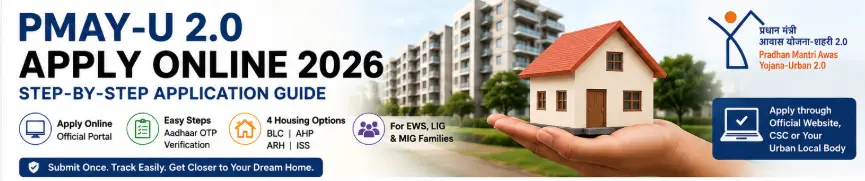
To apply for PMAY-U 2.0 online, start from the official PMAY-U 2.0 website and select the option to apply for the scheme. You then need to understand the four housing verticals, complete the eligibility check, authenticate your Aadhaar using OTP, fill in the beneficiary survey form, provide the required household, address, and bank details, submit the application, and save the acknowledgement or PDF.
You can also apply through a Common Service Centre (CSC) or by approaching the concerned Urban Local Body or Municipality if you need assistance with the application.
The important part is this:
Do not choose a PMAY-U 2.0 vertical casually.
The official eligibility page says that once you select one of the four verticals, you cannot change it later through the application process. Also, submitting the form does not guarantee that you will receive the benefit because your eligibility must still be verified by the relevant authorities.
Before You Apply for PMAY-U 2.0
Don’t begin the application just because you found the online form.
First, make sure you understand the basic eligibility.
PMAY-U 2.0 is intended for eligible families living in urban areas who fall within the applicable EWS, LIG or MIG income categories and do not own a pucca house anywhere in India. Applicants who have received a housing benefit from a Central, State or Local Government housing scheme during the previous 20 years are also not eligible under the current rules.
The standard annual household income categories are:
| Category | Annual household income |
|---|---|
| EWS | Up to ₹3 lakh |
| LIG | Above ₹3 lakh up to ₹6 lakh |
| MIG | Above ₹6 lakh up to ₹9 lakh |
But income is only one part of the eligibility test.
Before applying, also check your:
- Urban residence
- Family details
- House ownership
- Previous housing benefits
- Aadhaar details
- Bank account information
- Required documents
- Suitable PMAY-U 2.0 vertical
If you are unsure about these conditions, read our main guide first:
Internal Link: PMAY-U 2.0 Guide 2026: Eligibility, Benefits, Housing Options & How to Apply
Which PMAY-U 2.0 Option Should You Select?
PMAY-U 2.0 has four verticals.
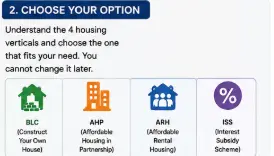
| Vertical | Mainly for |
|---|---|
| BLC | Eligible EWS families constructing a new house on available land |
| AHP | Eligible EWS beneficiaries purchasing an affordable house in an eligible project |
| ARH | Eligible EWS/LIG households needing affordable rental housing |
| ISS | Eligible EWS/LIG/MIG households with qualifying home loans |
The official portal asks applicants to carefully understand these options before making their selection.
BLC
Beneficiary-Led Construction is for eligible EWS families who want to construct a new pucca house on their own available land.
AHP
Affordable Housing in Partnership is for eligible EWS beneficiaries obtaining an affordable house through an eligible housing project.
ARH
Affordable Rental Housing is meant for eligible urban residents who need affordable rental accommodation rather than immediate home ownership.
ISS
Interest Subsidy Scheme is linked to qualifying home loans for eligible EWS, LIG and MIG households.
If you are taking a home loan, don’t confuse ISS with the construction-assistance options.
The current official ISS rules apply to qualifying home loans sanctioned and disbursed on or after 1 September 2024.
PMAY-U 2.0 Apply Online: Step-by-Step Process
Now let’s go through the actual application process.
Step 1: Open the Official PMAY-U 2.0 Website
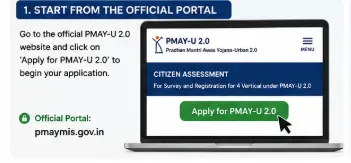
Start with the official PMAY-U 2.0 website.
The Government’s current application manual says users can access PMAY-U 2.0 through the PMAY-U website and select Apply for PMAY-U 2.0, which directs them to the official PMAY-U 2.0 MIS website.
Use the official Government portal rather than a website that claims to submit the application for you.
The PMAY-U 2.0 MIS is maintained by the Ministry of Housing and Urban Affairs through the Government’s National Informatics Centre infrastructure.
Official PMAY-U 2.0 portal: PMAY-U 2.0 official portal
Step 2: Click “Apply for PMAY-U 2.0”
Look for the application option on the official PMAY-U 2.0 website.
The current Government user manual identifies this as the starting point of the online submission process.
The system then takes you to the PMAY-U 2.0 application area.
Don’t enter personal information until you are sure you are on the official Government website.
Step 3: Read the Four Vertical Options
The next stage is not simply about filling in your name and mobile number.
The official application instructions first ask the applicant to understand the four verticals before selecting one.
This is important because the choice affects the rest of your application.
Take a few minutes here.
If you need to construct a house on eligible land, BLC may be relevant.
If you are looking at an affordable housing project, AHP may be relevant.
If you need affordable rental accommodation, ARH may be relevant.
If you have or are seeking a qualifying home loan, ISS may be relevant.
Don’t select an option simply because you saw the highest assistance figure attached to it.
Step 4: Check Your Eligibility
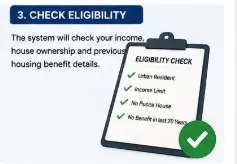
After reviewing the scheme information, the portal takes you through an eligibility check.
The current official system checks important conditions such as income, pucca-house ownership, and previous housing-scheme benefits.
For BLC and AHP, the application manual identifies an annual household income ceiling of ₹3 lakh for eligibility under those verticals.
For ISS, the income ceiling is ₹9 lakh, with EWS, LIG, and MIG categories having their respective income limits.
The system also checks whether:
- You own a pucca house anywhere in India
- You have received a housing benefit under a government housing scheme during the previous 20 years
If you fail the applicable eligibility conditions, you should not attempt to manipulate the information just to proceed.
Government verification can happen later.
Step 5: Complete Aadhaar Authentication
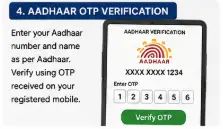
If you pass the eligibility stage, the next important step is Aadhaar authentication.
The official user manual says you need to enter:
- Aadhaar number
- Name as per Aadhaar
You then generate an OTP and enter the OTP received to complete authentication.
One important point from the official manual:
A single Aadhaar number can be used to fill only one form.
So don’t keep creating multiple applications with the same Aadhaar details.
If your Aadhaar name and application information do not match, stop and resolve the discrepancy rather than repeatedly trying to submit the form.
Step 6: Fill the Beneficiary Survey Form
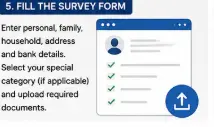
After Aadhaar authentication, the system takes you to the Beneficiary Survey Form.
This is where the application becomes more detailed.
The official manual divides the form into different sections, including:
- Personal details
- Family member details
- Household details
- Address
- Bank details
- State-sponsored scheme information
- Vertical-specific information
Let’s look at these carefully.
Step 7: Enter Your Personal Details
Some information such as your name, Aadhaar details, and selected vertical can be auto-filled by the system.
You still need to complete the remaining personal information.
The form also has provisions for different circumstances.
For example, the official manual explains that certain applicants can select options such as “Late” or “NA” for specific parent-related fields where applicable.
Don’t select an option simply because it lets you move to the next page.
Choose the option that actually describes your situation.
Step 8: Enter Family Member Details
The application also asks for family information.
The official PMAY-U 2.0 definition of a beneficiary family includes the husband, wife, and unmarried children.
The current application manual says some family information may be auto-filled based on the personal details already entered.
Review the information carefully.
For example, the manual specifically notes that a married male applicant should provide his wife’s details.
Don’t assume that only the primary applicant’s information matters.
Step 9: Declare Any Special Focus Group
PMAY-U 2.0 gives special focus or preference to several groups.
These include groups such as:
- Safai Karmis
- Street vendors identified under PMSVANidhi
- PM Vishwakarma artisans
- Anganwadi workers
- Building and construction workers
- Slum and chawl residents
- Widows
- Single women
- Persons with disabilities
- Senior citizens
- Transgender persons
- SC/ST and minority groups
If you fall within a relevant category, provide the information requested by the application.
Where the portal asks for an identification number or supporting certificate, provide the correct details.
The official application manual also says that applicants selecting certain caste categories may need to upload the relevant certificate.
This is one reason you should keep your documents ready before beginning.
Step 10: Complete Household Details
The household section is important because it contains information related to:
- Household category
- Annual household income
- House ownership
- Type of existing house
- Years of residence in the town or city
The current application manual says some household information may be automatically populated, but applicants must provide or upload the required information, such as the income certificate, and complete the relevant house-ownership fields.
You may need to identify whether the existing accommodation is:
- Kutcha
- Semi-pucca
- Pucca
- No house
You may also need to provide information about the roof type.
Be truthful here.
This information is directly connected to the housing eligibility assessment.
Step 11: Enter Your Address
The application can require different address details depending on the vertical.
The general survey includes:
- Present address
- Permanent address
- Construction site address where applicable
For BLC applications, the construction-site address becomes particularly important because the proposed house is being constructed on available land.
For AHP, the application can ask for project-location information.
Check every address before continuing.
A spelling mistake in a locality or an incorrect PIN code may seem small now but can create unnecessary confusion later.
Step 12: Enter Bank Account Details
The bank section requires your:
- Bank account number
- IFSC code
According to the official application manual, the system generates the bank details after these details are entered and the applicant must verify them before proceeding.
This is a section where you should slow down.
Check the account number digit by digit.
Check the IFSC code.
Don’t copy bank details from memory.
Use your passbook, bank statement, or official banking information.
Step 13: Provide State-Sponsored Scheme Details
The application may also ask whether you have benefited from certain Central or State-sponsored programmes listed in the form.
The official manual gives examples such as AMRUT 2.0 and Swachh Bharat Mission-related schemes.
This does not mean that receiving any government service automatically makes you ineligible.
The purpose is to capture relevant scheme information and convergence.
Answer the question exactly as asked.
Step 14: Additional Information for BLC
If you select BLC, there is an important additional requirement.
The official PMAY-U 2.0 manual states that land documents are mandatory for BLC applications.
You should therefore keep your land ownership document ready before starting a BLC application.
The official BLC page also says applicants can approach the ULB/implementing agency or register demand through the Unified Web Portal with necessary documents, including proof of land ownership.
Remember that BLC is for construction of a new pucca house.
It is not a general house-repair scheme.
Step 15: Additional Information for AHP
If you select AHP, the application asks for information related to the AHP project.
The official user manual says applicants need to provide:
- Present address
- Permanent address
- AHP project location
- State
- District
- City
- Whether they have identified an AHP project
- Relevant project details
This makes sense because AHP is connected to eligible affordable housing projects.
If you have already identified an eligible project, enter the requested information carefully.
Step 16: Additional Information for ISS
The ISS process is different because it is connected to a home loan.
If you have already taken a home loan, the application asks you to select “Yes” and enter the required loan details.
If you have not yet taken a home loan, the official manual says you can select “No”, choose your State, and select five different Primary Lending Institutions from which you want to avail the loan.
This is important because ISS is not the same as simply applying for a housing grant.
The current official ISS information says the subsidy applies to qualifying home loans sanctioned and disbursed on or after 1 September 2024.
Step 17: Review Everything Before Final Submission
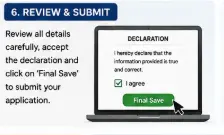
Now comes the part people often rush through.
Don’t.
Before final submission, check:
| Check | What to verify |
|---|---|
| Name | Matches Aadhaar and documents |
| Aadhaar | Correct number |
| Mobile | Correct and accessible |
| Family | All relevant members included |
| Income | Correct annual household income |
| House ownership | Correct declaration |
| Address | Present and permanent address |
| Bank | Account number and IFSC |
| Vertical | Correct BLC/AHP/ARH/ISS selection |
| Documents | Correct files uploaded |
| Special category | Supporting details if applicable |
| Land | Correct documents for BLC |
| Loan | Correct details for ISS |
This five-minute check can save you from a much bigger problem later.
Step 18: Accept the Declaration
The final stage includes an acknowledgement that the information you have provided is accurate.
The official user manual says the applicant must check the acknowledgement box confirming the accuracy of the information and then select Final Save to submit the form.
Don’t treat this checkbox as a formality.
You are confirming that the information you supplied is correct.
Step 19: Submit the PMAY-U 2.0 Application
Click Final Save after reviewing the application.
According to the official manual, this completes the application submission process.
At this stage, your application has been submitted.
But that does not mean the housing benefit has already been approved.
The official eligibility page is very clear about this point: submitting the application does not entitle the citizen to the PMAY-U 2.0 benefit until eligibility is verified by the appropriate State/UT, ULB, Central Nodal Agency or Primary Lending Institution.
Step 20: Save or Print Your Application
This is something I strongly recommend.
After submission, the official manual says applicants can use the Print option to save a PDF copy of the application or print it.
Save the PDF somewhere safe.
You can also keep a screenshot of the submission details if the portal provides a reference or acknowledgement number.
Don’t depend on your browser history to find the application later.
What Happens After You Apply?
Your job does not necessarily end when you click Final Save.
The application enters the relevant verification and processing system.
The responsible authority depends on the PMAY-U 2.0 vertical.
The official FAQ says the Unified Web Portal is designed to allow beneficiaries to apply and track their application status in real time.
So after submission, keep your application details safe and monitor the status.
If additional information or verification is required, respond through the appropriate official channel.
Can You Apply for PMAY-U 2.0 Through a CSC?
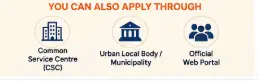
Yes.
If you are uncomfortable completing the online application yourself, the official PMAY-U 2.0 FAQ lists Common Service Centres, along with the Unified Web Portal and concerned Urban Local Bodies/Municipalities, as application channels.
A CSC can help you with the online process.
But remember one important thing:
A CSC does not guarantee approval.
The eligibility and application still have to pass the Government’s verification process.
Also review the information entered by the operator before the final submission.
What Documents Are Required for PMAY-U 2.0?
The exact documents depend on the vertical and applicant.
The official FAQ lists:
- Aadhaar
- Bank account details
- Eligibility undertaking
- Land ownership documents for BLC
- Other documents specified by States, UTs, ULBs or PLIs
You may also need supporting documents for income, special categories, caste or home-loan/property details depending on your application.
Don’t upload documents that are unrelated simply because someone at a third-party website asks for them.
PMAY-U 2.0 Application: What You Should Not Do
Don’t use a third-party application website
Start from the official Government portal.
Don’t choose a vertical just to see what happens
The official portal says the selected vertical cannot later be changed through the application process.
Don’t provide false income information
Your application is subject to verification.
Don’t hide house ownership
The scheme specifically checks the no-pucca-house condition.
Don’t submit multiple applications using the same Aadhaar
The official application manual says one Aadhaar number can be used for only one form.
Don’t assume submission means approval
Verification still has to happen.
Don’t forget to save your application
Download or print the submitted form.
PMAY-U 2.0 Online Application Checklist
Before clicking Final Save, ask yourself:
☐ I am applying through the official PMAY-U 2.0 system.
☐ I have selected the correct housing vertical.
☐ I have checked my eligibility.
☐ My Aadhaar information is correct.
☐ My family details are correct.
☐ My income information is accurate.
☐ My house-ownership declaration is correct.
☐ My address details are correct.
☐ My bank account and IFSC are correct.
☐ I have uploaded the required documents.
☐ My land documents are ready if I selected BLC.
☐ My project details are correct if I selected AHP.
☐ My home-loan information is correct if I selected ISS.
☐ I have reviewed the declaration.
☐ I will save the submitted application PDF.
Frequently Asked Questions
Q1. How can I apply for PMAY-U 2.0 online?
Go to the official PMAY-U 2.0 website, select the application option, choose the appropriate vertical after reading the instructions, complete the eligibility check and Aadhaar OTP authentication, fill the beneficiary survey form, submit the declaration, and save the final application.
Q2. Is PMAY-U 2.0 application free?
The official PMAY-U 2.0 application process does not state that applicants need to pay a Government application fee. If someone demands money by claiming that payment is required to guarantee PMAY approval, be extremely cautious.
Q3. Can I apply through a CSC?
Yes. CSCs are among the official application channels listed by PMAY-U 2.0. You can also apply through the Unified Web Portal or the concerned ULB/Municipality.
Q4. Can I change my PMAY-U 2.0 option after selecting it?
The current official eligibility page says the selected vertical cannot be changed at a later stage through the application process.
Q5. Can I use the same Aadhaar for two PMAY-U 2.0 applications?
The official application manual says a single Aadhaar number can be used to fill only one form.
Q6. What happens after PMAY-U 2.0 application submission?
The application goes through the applicable verification and processing process. Submission alone does not guarantee the benefit. The relevant authorities or institutions must verify eligibility.
Q7. Can I save my PMAY-U 2.0 application after submission?
Yes. The official user manual says you can use the Print option after submission to save the application as a PDF or print it.
Q8. What documents are required for PMAY-U 2.0?
Aadhaar, bank details, and an eligibility undertaking are among the core documents. BLC applicants also need land ownership documents, while other verticals may require additional documents.
Q9. Can I apply for ISS without already having a home loan?
The official application manual provides an option for applicants who have not yet availed a home loan to select “No” and provide their State and preferred lending institutions as part of the ISS application process.
Q10. What is the official PMAY-U 2.0 website?
The official PMAY-U 2.0 MIS website is maintained by the Ministry of Housing and Urban Affairs through the Government’s NIC infrastructure.
Final Takeaway
Applying for PMAY-U 2.0 online is not particularly complicated, but it is a process where rushing can create problems.
The sequence is straightforward:
Choose the correct vertical → Check eligibility → Authenticate Aadhaar → Complete the survey → Upload documents → Verify your details → Submit → Save the application
The most important decision comes near the beginning.
Choose the correct PMAY-U 2.0 vertical before proceeding.
The official portal specifically warns that the selected vertical cannot be changed later through the application process.
And don’t make the second common mistake: assuming that submitting the form means the Government has approved your housing benefit.
It doesn’t.
Your application still has to be verified.
If your information is accurate, your documents are ready, and you select the correct vertical, the online process becomes much easier to handle.
For anyone uncomfortable using the online portal, the Government also provides application access through CSCs and the concerned Urban Local Bodies or Municipalities.
Main guide:
PMAY-U 2.0 Guide 2026: Eligibility, Benefits, Housing Options & How to Apply
PMAY-U 2.0 BLC Guide: Land, Eligibility & Construction Assistance
PMAY-U 2.0 AHP Guide: Affordable Housing in Partnership
PMAY-U 2.0 ARH Guide: Affordable Rental Housing
PMAY-U 2.0 ISS Guide: Home Loan Interest Subsidy
PMAY-U 2.0 Documents Required
PMAY-U 2.0 Application Status: How to Check
PMAY-U 2.0 Rejected? Reasons & What to Do