

Have you applied for an Ayushman Card but have not received it yet? Have you wondered ever about ayushman card status check process? This post will guide you exactly. Perhaps you completed e-KYC and are waiting for approval, or you are unable to find the download option on the portal.
In such situations, checking your application status is the next step.
The online system allows beneficiaries to access their records and available card services. However, the exact status labels and options may vary depending on the beneficiary category and the current portal workflow.
This guide explains how to perform an Ayushman Card status check, what to do if your application is pending, how to understand common problems and where to seek official assistance.
Quick answer: Visit the official PM-JAY beneficiary portal, log in using the beneficiary option and search for your record. Check the verification and card-generation information displayed. If the status is unclear or remains pending, contact a CSC, PM-JAY empanelled hospital or the helpline at 14555.
Ayushman Card Status Check of Application
Use the following official channels:
| Channel | Purpose |
|---|---|
| PM-JAY Beneficiary Portal | Beneficiary login and available card services |
| Official Ayushman App | Beneficiary verification and e-card services |
| CSC | Assisted beneficiary verification |
| PM-JAY empanelled hospital | Help from the Ayushman Mitra or beneficiary desk |
| Helpline 14555 | Beneficiary assistance |
The NHA describes these digital and assisted services in its official beneficiary guidance.
How to do Ayushman Card Status check Online in 2026

Follow these steps to review your beneficiary record.
Step 1: Open the official beneficiary portal
Visit:
https://beneficiary.nha.gov.in
Make sure the website address is correct before entering any personal information.
Step 2: Choose Beneficiary Login
Select the beneficiary login option and enter the mobile number requested.
Complete OTP verification as instructed.
Step 3: Search for your beneficiary details
Select the relevant state and beneficiary category.
Enter the information requested by the portal and search for the record.
The search fields available may depend on the current system and beneficiary category.
Step 4: Select the correct beneficiary record
If a matching record appears, check the beneficiary’s details carefully.
Look for the available card, verification or status information.
Step 5: Review the current status and next action

Check whether the portal shows that your card is available or whether any verification or approval remains pending.
If an instruction or remark appears, read it carefully. Follow the action requested rather than submitting a fresh application without checking the existing record.
Step 6: Download the card if available
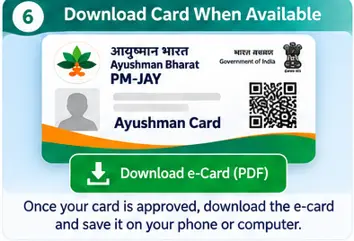
If the card has been approved and the download option is displayed, save the PDF.
If the option is missing, the card may not yet be available or the system may require additional action.
Understanding Different Ayushman Card Statuses
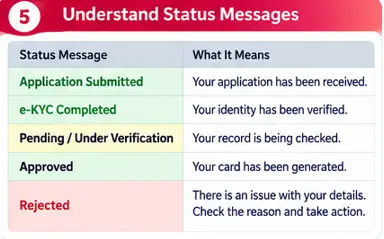
The exact wording on the official portal can change. The following table explains common process stages in simple terms. These are explanatory descriptions, not a guarantee that every portal account will display these exact labels.
| Process stage | What it generally means | What you should do |
|---|---|---|
| Record found | A matching beneficiary record has been located | Check the details |
| e-KYC pending | Identity verification is incomplete | Follow the displayed verification instructions |
| Verification submitted | Your information has been submitted for checking | Check again for updates |
| Pending approval | Further approval or validation is awaited | Follow any portal remarks |
| Approved | The required approval has been completed | Look for the card download option |
| Card generated | The digital card has been created | Download and check the PDF |
| Record not found | The search has not returned a matching record | Recheck details and seek assistance |
Important: Do not interpret an unfamiliar status label on your own. Ask an authorised beneficiary assistance centre to explain it if the next action is unclear.
What Does It Mean If Your Ayushman Card Status Is Pending?
A pending status usually indicates that the process is not yet complete.
Possible reasons include:
- e-KYC has not been completed.
- Identity details require verification.
- Beneficiary information needs validation.
- Approval is awaited.
- There is a technical issue with the portal.
The appropriate next step depends on the remarks shown against your record.
Do not repeatedly submit applications or share personal documents with unofficial agents in an attempt to speed up approval.
What If Your Ayushman Card Status Shows Rejected?
First, check whether the portal provides a reason or remark.
A rejection may relate to an identity mismatch, beneficiary information or a problem with the applicable eligibility record.
You can:
- Review the information entered during enrolment.
- Check the reason or remarks displayed.
- Visit an authorised CSC or empanelled hospital for clarification.
- Contact the official helpline if you need further assistance.
Do not assume that a rejection can always be corrected by simply applying again. Find out the actual reason first.
How to Check Ayushman Card Status for Senior Citizens Aged 70+
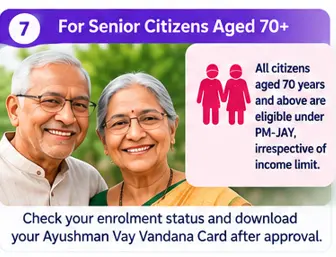
The expanded PM-JAY coverage includes all citizens aged 70 years and above, irrespective of socio-economic status.
Senior citizens who have applied for an Ayushman Vay Vandana Card can use the official beneficiary portal or Ayushman App to access the relevant enrolment and card services.
Aadhaar-based e-KYC is mandatory for this category.
If the card is not yet available:
- Check whether Aadhaar authentication was completed.
- Confirm the beneficiary details.
- Look for any pending verification instructions.
- Seek help from a CSC or empanelled hospital if necessary.
The NHA’s senior-citizen FAQ explains the age and Aadhaar-based verification requirements.
What If You Cannot Find Your Ayushman Card Status?
Try these checks before assuming that your application has failed.
- Make sure you selected the correct state.
- Check that you are using the right beneficiary category.
- Re-enter the required information carefully.
- Confirm that you are checking the correct family member.
- Try again later if the portal is temporarily unavailable.
- Use an authorised assistance centre if the record remains unclear.
If you are still unable to find your record, ask the official support channel to check the details.
How to Get Help With a Delayed Ayushman Card?
You do not need to depend on unofficial agents.
You can visit:
Common Service Centre (CSC): Ask for assistance with beneficiary record verification and the card process.
PM-JAY empanelled hospital: Contact the Ayushman Mitra or beneficiary assistance desk, where available.
PM-JAY helpline: Call 14555 for beneficiary assistance.
You can also consult the official PM-JAY website for scheme information and available support services.
Does Pending Ayushman Card Status Mean You Cannot Get Treatment?
Do not make this assumption without checking your beneficiary record.
Treatment access depends on whether you are an eligible and verified beneficiary and whether the hospital can authenticate your identity through the scheme system.
If you need treatment, contact a PM-JAY empanelled hospital and ask the beneficiary assistance desk to check your record. In an emergency, seek medical care promptly rather than delaying it to resolve a website issue.
Final Takeaway
If you have applied for an Ayushman Card, checking its status regularly can help you understand whether your beneficiary verification is complete and whether any further action is required.
Use the official PM-JAY portal or Ayushman App. If your record remains pending or the status is unclear, seek assistance through a CSC, empanelled hospital or the official helpline.
Avoid unofficial websites and agents who promise guaranteed approval.
At Benefitomics, we believe that clear information helps people take the right steps to access the government benefits available to them.
Frequently Asked Questions
Q1. How can I check my Ayushman Card status online in 2026?
Visit the official beneficiary portal, log in using the beneficiary option, search for your record and review the available verification and card information.
Q2. How do I check whether my Ayushman Card is approved?
Look for the approval or card-generation information in your beneficiary record. If the card download option is available, follow the official instructions to save it.
Q3. How long does Ayushman Card approval take?
There is no single processing time that should be assumed for all beneficiaries. It depends on the verification and approval requirements applicable to the record.
Q4. Why is my Ayushman Card status pending after e-KYC?
The record may still require validation or approval. Check the portal remarks and contact an authorised assistance centre if no clear next step is shown.
Q5. Can I check Ayushman Card status on my mobile?
Yes. You can use the official beneficiary portal through your mobile browser or the official Ayushman App.
Q6. What is the helpline number for Ayushman Card status enquiries?
The PM-JAY beneficiary helpline is 14555.
Q7. Can I download my card if the status is pending?
Usually, the card download option becomes available after the applicable verification and approval process is completed. Follow the instructions shown on the portal.
Q8. How can senior citizens check Ayushman Vay Vandana Card status?
They can use the official beneficiary portal or Ayushman App and complete the required Aadhaar-based e-KYC process.