
If you are planning to apply for PM Surya Ghar, it is important to prepare the PM Surya Ghar Documents Required at the right stages of the application. This guide explains the documents you may need for registration, installation, net metering, and subsidy processing.
Planning to apply for the PM Surya Ghar Muft Bijli Yojana?
Before starting the process, it is useful to keep your basic electricity, identity, and bank information ready.
But there is one thing many applicants misunderstand: you may not need to upload every document on the first day of your application.
Some documents and records become relevant later, particularly during installation, metering, commissioning, and subsidy processing.
In this guide, I will explain the PM Surya Ghar documents required at different stages, so you can prepare without collecting unnecessary paperwork.
Quick answer: Keep your electricity connection details, consumer number, registered mobile number, bank-account proof and required KYC information ready. After installation, additional records such as installation photographs, metering documents and commissioning-related information may be required through the National Portal.
PM Surya Ghar Documents Required: Complete Checklist
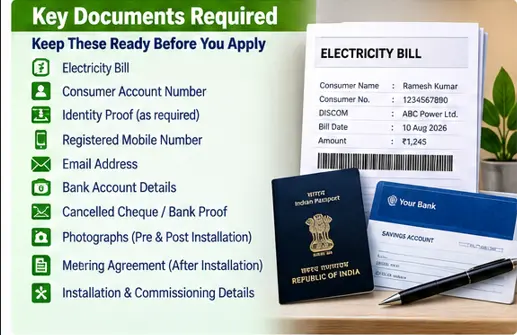
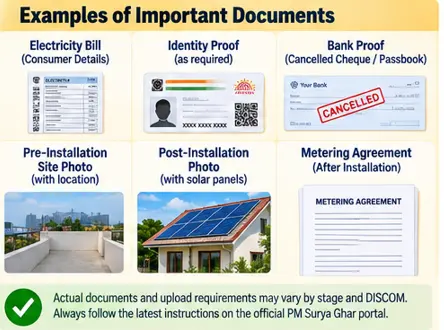
The PM Surya Ghar Documents Required can vary slightly depending on the stage of the application and the requirements of your DISCOM. Keep the following documents ready. Here is the practical checklist:
| Document/information | When it may be needed |
|---|---|
| Electricity bill | Application and consumer details |
| Consumer Account Number/electricity connection number | Registration/application |
| Registered mobile number | Registration and OTP/login |
| Email address | Registration/communication where applicable |
| Identity/KYC information | Applicant verification |
| Bank account details | Subsidy processing |
| Cancelled cheque/bank statement/passbook proof | Subsidy verification |
| Pre-installation site photograph | Applicable portal/documentation stage |
| Post-installation photographs | Installation/commissioning stage |
| Metering agreement | After installation, where applicable |
| Installation/plant details | Commissioning/subsidy process |
| DISCOM-related documents | As required during the process |
The exact documents and upload requirements can depend on the stage of the application and the applicable DISCOM process.
1. Electricity Bill
Your latest electricity bill is one of the most useful documents to keep ready.
It normally helps you identify important information such as:
- Consumer number
- Electricity connection details
- DISCOM name
- Sanctioned load
- Consumer name
- Address
You don’t want to enter the wrong consumer number while registering.
My practical suggestion: keep a clear photograph or PDF of your latest electricity bill on your phone or computer before starting the application.
2. Consumer Account Number
The electricity connection/Consumer Account Number is particularly important.
The PM Surya Ghar implementation guidelines state that an application uploaded on the National Portal must be associated with a valid electricity Consumer Account Number, and the portal assigns a unique Application ID to the application.
Your electricity bill is usually the easiest place to find this number.
However, the terminology can vary between DISCOMs.
You may see terms such as:
- Consumer Number
- Consumer Account Number
- CA Number
- Account Number
- Service Connection Number
Use the number requested by the portal for your electricity connection.
3. Registered Mobile Number
Keep the mobile number you use during registration accessible.
You may need it for:
- OTP verification
- Login
- Application communication
- Status updates
- Other portal-related communication
Use a number that you can access throughout the application process.
4. Email Address
An email address may also be required during registration or communication.
It is useful to use an email account that you check regularly.
If you are helping an elderly family member apply, make sure the applicant knows which mobile number and email address have been used.
That can save considerable trouble later.
5. Identity and KYC Information
Keep your identity/KYC information ready.
The exact information requested can depend on the portal and verification stage.
Before uploading any identity document, check the portal carefully to see what it specifically asks for.
Don’t upload unnecessary documents simply because somebody tells you that “everything is required.”
Only provide the information required by the official process.
6. Bank Account Details
This is particularly important for the subsidy.
The official PM Surya Ghar implementation guidelines state that consumer bank account information must be submitted on the National Portal for CFA processing. The account must be verifiable as belonging to the concerned consumer.
Therefore, keep your:
- Bank account number
- Account holder name
- IFSC
- Bank details
ready when required.
7. Cancelled Cheque or Bank Proof
The official guidelines specifically mention a cancelled cheque image, bank e-statement, passbook scan or another electronic document certifying that the bank account belongs to the concerned consumer.
This is important because the subsidy should reach the eligible beneficiary’s verified account.
Keep one of these available when requested:
- Cancelled cheque
- Bank statement
- Passbook scan
- Other acceptable bank-account proof
Make sure the account holder information is clearly visible.
8. Pre-Installation Site Photograph
The scheme guidelines provide for GPS-tagged photographs of the pre-installation site to be uploaded through the National Portal according to the prescribed requirements.
This means applicants may need to provide photographic evidence of the site before installation.
Don’t assume that an old photograph of your roof will always be acceptable.
Follow the portal’s instructions when the photograph is requested.
9. Post-Installation Photographs
Photographs are also relevant after the rooftop solar system has been installed.
The official guidelines require GPS-tagged photographs of the completed installation as part of the documentation process.
These help establish that the rooftop solar system has actually been installed.
The exact photograph requirements should be followed as specified by the portal.
10. Metering Agreement
After installation, the metering process becomes important.
The official guidelines state that the meter is installed by the DISCOM after rooftop installation, and the appropriate metering agreement is to be uploaded on the portal.
Therefore, don’t think of the application as ending when your solar panels are installed.
There are still DISCOM and commissioning steps.
11. Installation and Plant Details
After installation, information relating to the rooftop solar plant may need to be submitted through the portal.
This can include details associated with:
- Installed capacity
- Solar modules
- Inverter
- Installation
- Metering
- Commissioning
The exact fields depend on the portal process.
12. DISCOM Report and Commissioning
The official guidelines provide for a DISCOM Report (DR) generated digitally through the National Portal.
The Central Financial Assistance is processed only after the required physical verification, agreements and commissioning requirements have been completed.
So if your application is showing a status related to DISCOM inspection or commissioning, don’t immediately assume that something is wrong.
It may simply mean that the next stage has not yet been completed.
Documents Required at Different Stages
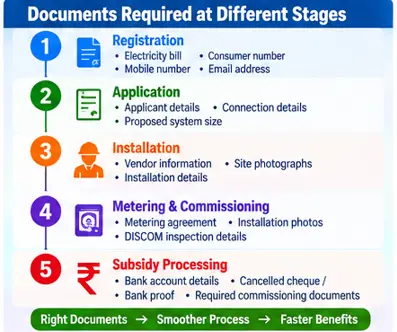
This is the easiest way to understand the process.
Stage 1 — Registration
Usually keep ready:
- Electricity bill
- Consumer number
- State/DISCOM information
- Mobile number
- Email address
Stage 2 — Application
You may need:
- Consumer/electricity connection details
- Applicant information
- Proposed solar capacity
- Other information requested by the portal
Stage 3 — Installation
You may need:
- Vendor-related information
- Site photographs
- Installation details
Stage 4 — Metering and commissioning
You may need:
- Metering agreement
- Installation photographs
- Plant details
- DISCOM inspection/verification information
Stage 5 — Subsidy processing
You should have:
- Bank account details
- Cancelled cheque/bank statement/passbook proof or other acceptable account verification
- Required commissioning documentation
The official guidelines connect CFA processing with physical verification, required agreements and commissioning.
Do You Need Aadhaar for PM Surya Ghar?
Don’t assume that every applicant must upload the same Aadhaar document at every stage.
The correct approach is to check what the official portal asks you to submit at the particular stage of your application.
If Aadhaar/KYC verification is requested, provide the required information through the official portal.
This avoids unnecessary document uploads.
Do You Need an Income Certificate?
For the standard residential rooftop solar application, an income certificate is not something you should assume is universally required.
PM Surya Ghar is a residential rooftop solar scheme for eligible consumers with grid-connected electricity connections. The government describes the scheme as demand-driven and available to residential consumers who meet the applicable conditions.
If a specific state or financing arrangement asks for additional information, follow that particular requirement.
Do You Need Property Papers?
You should not automatically collect a large set of property documents just because you are applying for rooftop solar.
The relevant requirement is that the premises and electricity connection meet the applicable scheme and DISCOM conditions.
If the portal or DISCOM requests a specific document relating to the premises, submit that document as instructed.
What Should You Keep Ready Before Applying?
I recommend creating one folder on your phone or computer called:
PM Surya Ghar Documents
Put inside it:
- Latest electricity bill
- Consumer number details
- Identity/KYC document if requested
- Bank proof
- Cancelled cheque if available
- Relevant roof/site photographs when requested
- Application acknowledgement
- Application ID
- Vendor quotation
- Installation documents
- Metering documents
- Commissioning information
This simple step can make the entire process easier.
Common Document Mistakes
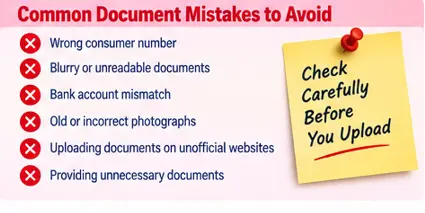
Wrong consumer number
A single-digit mistake can create problems.
Bank account mismatch
Make sure the account belongs to the concerned consumer and the information is entered correctly.
Blurry documents
Upload clearly readable documents.
Old roof photographs
Follow the current portal’s photograph requirements.
Using unofficial websites
Don’t upload your personal or bank documents to an unknown website claiming to process PM Surya Ghar applications.
The official National Portal is the correct starting point.
Frequently Asked Questions
Q1. What documents are required for PM Surya Ghar?
The PM Surya Ghar Documents Required generally include your electricity consumer details, identity/KYC information, bank details, installation-related photographs and documents required during metering and commissioning. The exact requirements can vary by application stage and DISCOM.
Q2. Is a cancelled cheque required for PM Surya Ghar subsidy?
The official guidelines allow a cancelled cheque image, bank e-statement, passbook scan or another electronic document that certifies the bank account belongs to the concerned consumer.
Q3. Do I need a bank account for the subsidy?
Yes, bank account information is part of the CFA processing requirements.
Q4. Do I need a solar panel photograph before installation?
The scheme guidelines provide for GPS-tagged pre-installation site photographs and photographs of the completed installation, according to the prescribed requirements.
Q5. Where can I apply for PM Surya Ghar?
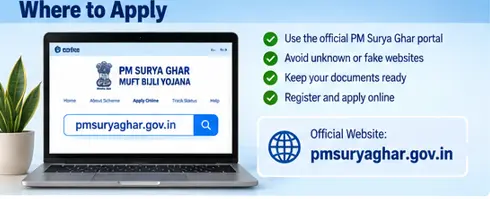
Use the official PM Surya Ghar National Portal:
Final Takeaway
You don’t need to panic and collect a huge file of documents before starting.
Start with the basics:
Electricity bill → Consumer number → Mobile/email → Applicant details
Then keep your bank proof, installation photographs, metering documents and commissioning records ready as the application moves forward.
The most important thing is to follow the document request shown on the official portal at each stage.
Related PM Surya Ghar Guides
- PM Surya Ghar Muft Bijli Yojana: Complete Guide
- PM Surya Ghar Eligibility 2026: Who Can Apply and Who Cannot?
- PM Surya Ghar Apply Online: Step-by-Step Application Guide
- PM Surya Ghar Subsidy 2026: How Much Subsidy Can You Get?
- PM Surya Ghar Solar System Cost 2026: 1 kW, 2 kW and 3 kW Price
- PM Surya Ghar Application Status: How to Check
- PM Surya Ghar Subsidy Status: How to Check Your Payment