Have you already applied for PM Surya Ghar and are now wondering:
“What is happening with my application?”
This is a common question.
The PM Surya Ghar process has several stages. Your application may move from registration to application submission, DISCOM approval, vendor selection, installation, inspection, commissioning and subsidy processing.
The PM Surya Ghar National Portal and the official PM Surya Ghar mobile application provide ways to track application progress. The current government mobile app specifically lists application-status tracking as one of its functions.
In this guide, I’ll explain how to check your PM Surya Ghar application status, what the major stages mean, and what you should do when an application appears to be pending.
Quick Answer: How to Check PM Surya Ghar Application Status
You can check the status through the official PM Surya Ghar system.
The basic process is:
Open the official portal → log in to your consumer account → open your application/dashboard → select the application → check the current status and pending action.
The official consumer manual also shows a Track Details function where applicants can see application progress and comments received from the DISCOM.
The official PM Surya Ghar mobile app also supports application-status tracking.
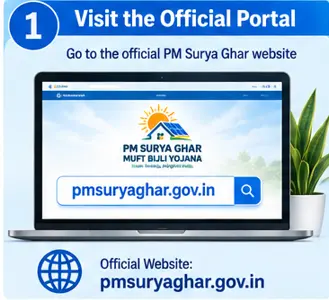
Step 1: Open the Official PM Surya Ghar Portal
Start with the official website:
The Ministry of New and Renewable Energy’s rooftop solar portal directs consumers to the PM Surya Ghar website for installation of rooftop solar.
Be careful with lookalike websites.
You will be entering personal, electricity, and potentially bank information, so use the official government portal.
Step 2: Log In to Your Account
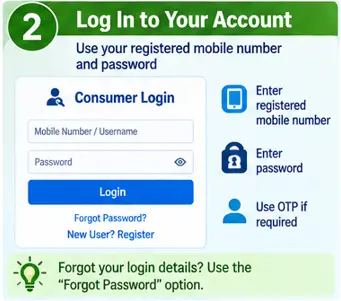
Use the login details associated with your PM Surya Ghar application.
The portal has a consumer-facing application process, while the broader rooftop solar system also has separate login areas for administrators and DISCOMs.
If you have forgotten your login information, the portal provides a password/username recovery facility using registered contact details and OTP verification.
Step 3: Open Your Application Details
Once you are logged in, open the relevant application.
If you have submitted more than one application, make sure you select the correct one.
Your application will have an Application ID/reference number associated with it.
The official implementation guidelines provide for a unique Application ID to be assigned to an application submitted with a valid electricity Consumer Account Number.
Save this Application ID.
It can be extremely useful when contacting the DISCOM, vendor or support team.
Step 4: Check Track Details
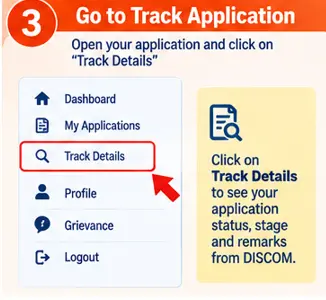
The consumer manual shows a Track Details option that allows applicants to see the status and comments received from the DISCOM.
Depending on the current portal interface, you may see a status timeline or application-stage information.
The wording and screen layout can change as the government updates the portal, so don’t worry if your screen doesn’t look exactly like an older screenshot.
Focus on:
- Current status
- Pending action
- Responsible party
- Comments/remarks
- Application/reference number
PM Surya Ghar Application Status Stages
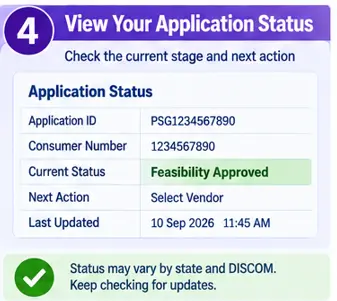
Understanding the stages is more useful than simply seeing the word “Pending.”
An application can move through several steps.
1. Registered
Your consumer account has been registered on the system.
2. Application Submitted
The rooftop solar application has been submitted.
3. Feasibility / DISCOM Approval
The DISCOM examines the application according to the applicable process.
4. Vendor Selected
The consumer selects an eligible vendor for the rooftop solar installation.
5. Installation
The rooftop solar system is installed.
6. Installation Details Submitted
The required installation information is submitted through the portal.
7. Inspection
The DISCOM carries out the required inspection/verification.
8. Metering
The required meter installation/agreement process takes place.
9. Commissioning
The system reaches the commissioning stage after the required approvals and verification.
10. Subsidy Processing
The required CFA/subsidy claim is processed after the applicable conditions are fulfilled.
The government consumer manual illustrates a tracking sequence covering registration, application submission, feasibility, agreement, vendor selection, installation, inspection, approval and subsidy claim.
What Does “Pending at DISCOM” Mean?
If your application shows something related to DISCOM pending, it generally means an action or verification is waiting with the electricity distribution company.
It does not automatically mean that your application has been rejected.
The next step depends on what the DISCOM needs to complete.
Check the comments or remarks shown against your application.
If the portal indicates that the consumer must provide something, complete that action.
If the status clearly indicates that the matter is with the DISCOM, you may need to wait or contact the relevant DISCOM.
What Does Feasibility Approval Mean?
Feasibility approval is an important stage because the rooftop solar system is being connected to the electricity network.
The DISCOM needs to process the application according to the applicable technical and connection requirements.
Do not install the system simply because you have submitted the application.
Follow the approval and vendor-selection process applicable to your connection.
What Does “Vendor Selected” Mean?
This means you have selected a vendor through the applicable PM Surya Ghar process.
At this point, make sure you have a clear written quotation.
Check:
- Solar panel brand/model
- Inverter
- System capacity
- Mounting structure
- Protection equipment
- Installation
- Warranty
- Service terms
- Other charges
Your cheapest quotation isn’t necessarily your best comparison point. Compare what is actually included.
What If the Status Shows Installation Pending?
If your vendor has not yet completed installation, contact the vendor first.
Ask:
- Has the installation been scheduled?
- Is any material pending?
- Is DISCOM approval complete?
- Is any document still required?
Keep the conversation documented.
What If Installation Is Complete but Status Has Not Changed?
Don’t immediately assume the application has failed.
The post-installation process can involve:
Installation → documentation → meter → inspection → commissioning → subsidy processing
The official guidelines state that CFA processing is linked to physical verification, the appropriate agreements, and commissioning after required DISCOM approvals.
So there may be a delay between physical installation and the next portal status.
What Does “Inspection Pending” Mean?
It generally means the required DISCOM inspection/verification has not yet been completed.
Check the application comments and contact your DISCOM if the status remains unchanged for an unusually long period.
Keep your installation documents and photographs available.
What Does “Commissioning” Mean?
Commissioning is an important milestone after the required installation, metering, and DISCOM verification processes.
The scheme guidelines require the system to be physically verified and commissioned before CFA processing.
So commissioning is not just another ordinary status update—it is connected to the subsidy-processing stage.
What If PM Surya Ghar Subsidy Is Still Pending?
Don’t confuse application status with subsidy status.
Your rooftop solar application may have progressed successfully while the subsidy is still undergoing the required verification and processing.
The official guidelines state that bank account information must be submitted and verified, while CFA processing follows the required installation, agreement, physical verification, and commissioning steps.
Check:
- Whether installation is complete
- Whether inspection is complete
- Whether commissioning is complete
- Whether bank details are correct
- Whether the required subsidy claim has been submitted
- Whether any portal/DISCOM remark requires action
Can I Check PM Surya Ghar Status on Mobile?
Yes.
The official PM-SURYA GHAR mobile application is available for Android and iOS, and its current listing states that it allows users to track their application status.
This can be useful if you don’t want to repeatedly open the website on a computer.
However, if the app is not displaying the latest information, check the official portal as well.
What If the Portal Is Not Working?
Government portals can occasionally experience technical problems.
If you cannot access your application:
First
Try again after some time.
Second
Check your internet connection and browser.
Third
Try another browser or device.
Fourth
Check whether the official PM Surya Ghar mobile application is working.
Fifth
Keep your Application ID and registered mobile number available when contacting support.
Don’t create a second application just because the first one temporarily doesn’t appear.
What If You Forgot Your Login Details?
The rooftop solar portal provides a Forgot Username/Password facility.
The current recovery page provides options involving the registered mobile number and email, along with OTP verification.
Use the recovery process rather than creating a duplicate account.
What Information Should You Keep While Checking Status?
Keep these handy:
- Application ID
- Consumer number
- Registered mobile number
- Electricity bill
- Vendor details
- DISCOM name
- Installation date
- Relevant documents
- Bank information used for subsidy
The Application ID is especially useful when discussing your application with the vendor or DISCOM.
When Should You Contact Your DISCOM?
Contact your DISCOM when:
- The application appears stuck at a DISCOM stage
- Feasibility approval is pending
- Inspection has not happened
- Metering is delayed
- The portal shows a DISCOM remark
- You need clarification about a connection-related issue
Use the contact details for your actual DISCOM rather than a random solar website.
The National Portal provides DISCOM contact information and portal links.
A Simple Way to Understand Your Status
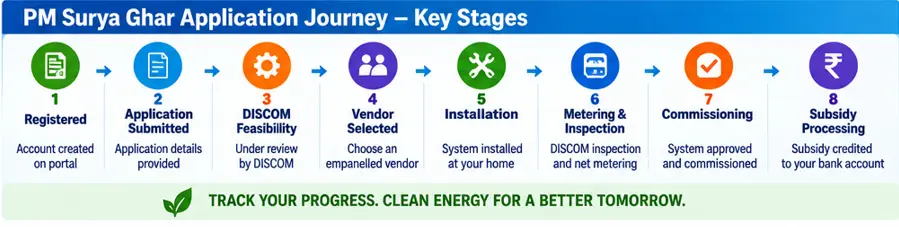
Think of your PM Surya Ghar application like this:
Application submitted
↓
DISCOM process
↓
Vendor selection
↓
Solar installation
↓
Metering
↓
DISCOM inspection
↓
Commissioning
↓
Subsidy processing
If the application is waiting at one of these stages, the most useful question is:
“Who has the next action?”
It could be:
- You
- Your vendor
- DISCOM
- Bank/account verification
- Portal/system
That is much more useful than simply worrying because the status says “pending.”
Frequently Asked Questions
Q1. How can I check my PM Surya Ghar application status?
Log in to the official PM Surya Ghar system and open your application/track-details section. The official consumer manual describes a Track Details function for checking application progress and DISCOM comments.
Q2. Can I track PM Surya Ghar status on mobile?
Yes. The official PM-SURYA GHAR mobile app currently lists application-status tracking as a feature.
Q3. What is the PM Surya Ghar Application ID?
It is the unique ID assigned to your application on the National Portal. The scheme guidelines state that an application submitted with a valid Consumer Account Number is assigned a unique Application ID.
Q4. Why is my PM Surya Ghar application pending at DISCOM?
It generally means the application is awaiting an action or verification associated with the DISCOM. Check the portal’s remarks and pending-action information before deciding what to do.
Q5. How long does PM Surya Ghar subsidy take?
There isn’t one universal timeline that applies to every application. Subsidy processing depends on completion of the required installation, agreements, physical verification, commissioning and bank-account verification steps.
Q6. Can I check my application without the Application ID?
The exact login and tracking options can change with the portal interface. If you have lost the Application ID, first log in to your registered account or use the portal’s recovery/support options rather than creating another application.
Final Takeaway
Checking your PM Surya Ghar application status is not just about seeing whether it says “pending” or “approved.”
Look at which stage your application has reached and who has the next action.
If the application is with the DISCOM, check the DISCOM-related status or remark. If installation is complete, look for the inspection, metering, and commissioning stages. If commissioning is complete but the subsidy has not arrived, check the bank details and subsidy-claim status.
Most importantly, keep your Application ID, consumer number, and application documents safely stored.
That small step can make follow-up much easier.
Related PM Surya Ghar Guides
- PM Surya Ghar Muft Bijli Yojana: Complete Guide
- PM Surya Ghar Eligibility 2026: Who Can Apply and Who Cannot?
- PM Surya Ghar Documents Required 2026: Complete Checklist
- PM Surya Ghar Apply Online: Step-by-Step Application Guide
- PM Surya Ghar Subsidy 2026: How Much Subsidy Can You Get?
- PM Surya Ghar Solar System Cost 2026: 1 kW, 2 kW and 3 kW Price
- PM Surya Ghar Subsidy Status: How to Check Your Payment