
PM Surya Ghar Subsidy Not Received? Here Is What You Should Check
Waiting for your PM Surya Ghar subsidy after installing rooftop solar can be frustrating, especially when you expected the amount to reach your bank account.
In many cases, a subsidy delay doesn’t automatically mean your application has been rejected. Payment depends on completing and verifying several steps, including installation, inspection, metering, commissioning, and submitting the required details.
This guide explains the common reasons for a PM Surya Ghar subsidy not being received, how to check your application status, and what you can do when the payment is delayed.
Important: Subsidy processing can depend on the National Portal, DISCOM verification, vendor actions and bank details. Do not assume that a delay means rejection.
Quick Answer: Why Has My PM Surya Ghar Subsidy Not Been Received?
The most common reasons include:
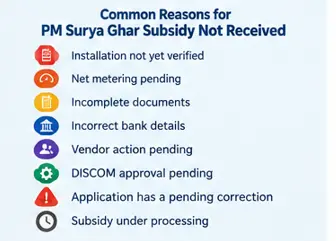
- Installation has not yet been verified by the DISCOM.
- Net metering or commissioning is still pending.
- Required documents or photographs are incomplete.
- Bank account details are incorrect or do not match.
- The vendor has not completed the required portal process.
- The DISCOM report has not been approved.
- Your application has a pending action or objection.
- The subsidy is still under processing.
The National Portal provides an online process covering registration through subsidy disbursal, while DISCOM verification remains an important part of the process.
What Happens Before PM Surya Ghar Subsidy Is Released?
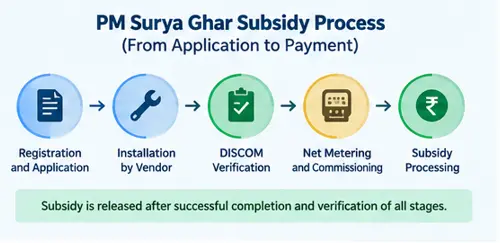
The subsidy is not normally triggered simply because solar panels have been purchased.
A typical process involves:
Registration → Application → DISCOM process → Vendor selection → Installation → Inspection → Metering/Agreement → Commissioning → Subsidy processing
After the rooftop solar system is installed, the DISCOM has to complete the relevant inspection and verification procedures. The scheme guidelines also provide for the CFA to be transferred to the beneficiary’s bank account or, where applicable, the loan account.
1. Check Whether Your Solar Installation Has Been Verified
One of the first things to check is whether the installation has completed the required verification process.
If the physical inspection or DISCOM report is still pending, subsidy processing may not be complete.
Check your application on the official National Portal and look for any pending action or status update.
Official portal:
PM Surya Ghar National Portal
2. Check Net Metering Status
Net metering is an important part of the rooftop solar process.
Depending on your DISCOM and the applicable process, the meter installation, agreement or related approval may need to be completed before commissioning.
If your solar system is installed but the metering process is incomplete, check with your DISCOM.
3. Check Your Bank Details
Incorrect bank information can create problems with subsidy payment.
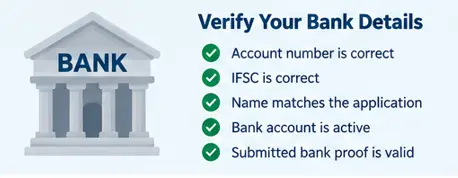
Check whether:
- The account number is correct.
- The IFSC is correct.
- The bank account belongs to the appropriate beneficiary.
- The submitted bank details match the application.
- Required bank proof was submitted correctly.
Do not share your bank password, PIN, or OTP with anyone claiming to help with subsidy processing.
4. Check Whether Your Vendor Has Completed Its Part
The vendor is involved in important stages of the rooftop solar installation process.
Ask the vendor whether:
- Installation has been updated on the portal.
- Required photographs have been uploaded.
- Installation details have been submitted.
- Inspection requirements have been completed.
- Any correction has been requested.
If the vendor says everything is complete, verify the status yourself rather than relying only on a verbal confirmation.
5. Look for a Pending Correction or Objection
Sometimes an application can remain pending because additional information or correction is required.
Check for:
- Incorrect consumer details
- Bank-detail mismatch
- Missing documents
- Incorrect installation information
- Metering-related issues
- Vendor-related pending actions
- DISCOM remarks
If a specific correction is requested, complete it through the appropriate official channel.
How to Check PM Surya Ghar Subsidy Status
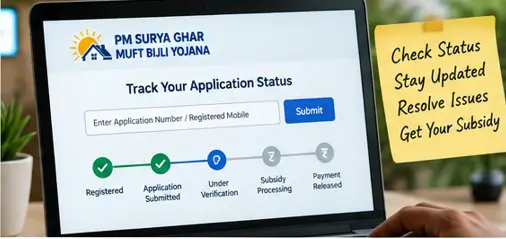
Start by checking your application through the official National Portal.
Keep these details available:
- Registered mobile number
- Electricity consumer details
- Application/reference information
- Installation details, if required
If your status shows that an action is pending, complete that action first.
If there is no clear explanation for the delay, contact your DISCOM or use the scheme’s grievance mechanism.
The National Portal provides a grievance facility and lists contacts for rooftop-solar scheme-related issues and portal-related technical problems.
What If the Subsidy Is Still Pending?

Follow this order:
Step 1: Check the portal
Look for the latest application status and any pending action.
Step 2: Contact the vendor
Ask whether all installation and documentation steps have been completed.
Step 3: Contact your DISCOM
If the issue relates to inspection, meter installation, commissioning, or approval, the DISCOM may be the appropriate point of contact.
Step 4: Use the grievance mechanism
If you cannot resolve the issue through the normal process, use the official grievance facility.
Keep screenshots, application numbers, and relevant documents for reference.
Can a Loan Affect PM Surya Ghar Subsidy Payment?
The subsidy can also be credited to the loan account where the beneficiary has opted for a loan for the rooftop solar installation, according to the scheme guidelines.
Therefore, if you financed the system, check whether the subsidy has been adjusted against the relevant loan account rather than assuming that it must appear as a separate credit in your savings account.
PM Surya Ghar Subsidy Amount
For standard residential CFA, the current structure provides:
| Solar capacity | Central CFA |
|---|---|
| 1 kW | ₹30,000 |
| 2 kW | ₹60,000 |
| 3 kW | ₹78,000 |
| Above 3 kW | Maximum standard CFA remains ₹78,000 |
The scheme’s CFA is capped at 3 kW for the standard residential structure.
Special-category rates can differ, so applicants should check the applicable official rules.
When Should You Contact the Government Support System?
Contact the appropriate official channel if:
- Your application has been stuck for an extended period.
- The portal shows an unexplained pending status.
- Your DISCOM says the process is complete, but the subsidy has not moved.
- You cannot determine what action is pending.
- There is a technical problem with the National Portal.
Avoid paying unofficial agents to “release” your subsidy.
Frequently Asked Questions
Q1. Why is my PM Surya Ghar subsidy not received?
The subsidy may be pending because installation verification, metering, commissioning, documentation, bank verification, or another application step has not been completed.
Q2. How can I check my PM Surya Ghar subsidy status?
Check your application through the official PM Surya Ghar National Portal and review the latest status or pending action.
Q3. Can subsidy be credited to a loan account?
Yes. The scheme guidelines allow CFA to flow to the beneficiary’s bank account or the loan account when a loan has been used for the rooftop solar installation.
Q4. What should I do if my vendor is not responding?
First, document the issue and check your portal status. If the pending step involves the DISCOM or scheme process, contact the relevant DISCOM or use the official grievance mechanism.
Q5. Does subsidy delay mean my application is rejected?
No. A pending payment should not automatically be interpreted as rejection. Check the application status and identify the specific pending step.
Final Takeaway
If your PM Surya Ghar subsidy is not received, don’t panic and don’t immediately assume that your application has failed.
First, check the National Portal, then verify installation, inspection, metering, commissioning, documents and bank details. If something is pending, identify the responsible party and follow it up through the official process.
Related PM Surya Ghar Guides
- PM Surya Ghar Muft Bijli Yojana (2026): Eligibility, Subsidy, Cost & How to Apply Pillar Post.
- PM Surya Ghar Apply Online: Step-by-Step Application Guide 2026
- PM Surya Ghar Documents Required
- PM Surya Ghar Application Status: How to Check
- PM Surya Ghar Subsidy Calculator
- PM Surya Ghar Solar System Cost