

PM-KISAN Registration Online: Who Can Apply?
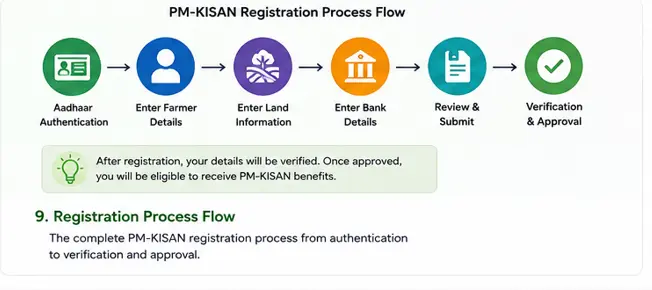
PM-KISAN registration online allows eligible farmers to apply for the PM-KISAN Samman Nidhi scheme through the official government portal. The process involves Aadhaar authentication, farmer and land details, bank information and verification before the application can be considered for benefits.
However, filling out the online form does not automatically make you a PM-KISAN beneficiary.
Your eligibility still has to satisfy the applicable scheme conditions and verification requirements.
The official PM-KISAN registration page currently begins with Aadhaar authentication and asks for the farmer’s Aadhaar number, mobile number and State. The portal states that registration can proceed only after Aadhaar authentication.
That distinction is important.
Registration is an application process. It is not an approval certificate.
What You Need Before Starting
Keep the following information ready:
- Aadhaar number
- Mobile number
- State
- Correct farmer details
- Land-related information
- Bank account information, where requested
- Other information required by the current registration form
You should also check whether the farmer’s land records are correctly updated.
PM-KISAN beneficiary identification is connected with land records maintained by the concerned State or Union Territory, so an online application cannot simply override an incorrect underlying land record.
Step 1: Open the Official PM-KISAN Website
Go to the official PM-KISAN website.
The Farmers section currently provides a New Farmer Registration facility along with other services such as Know Your Status and self-registration status.
For safety, use the official government website rather than entering your Aadhaar or banking information into an unofficial PM-KISAN website.
Visual Walkthrough: Find New Farmer Registration
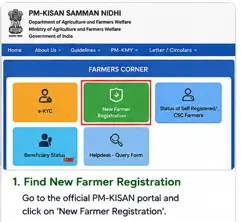
Step 2: Open New Farmer Registration
Select New Farmer Registration.
The current official registration page displays a form beginning with:
- Aadhaar number
- Mobile number
- State
- Captcha
It also contains an Aadhaar consent section.
Don’t rush through this page.
Aadhaar authentication is an important part of the current registration process.
Step 3: Enter Your Aadhaar Number
Enter the farmer’s own Aadhaar number.
The official portal states that the Aadhaar will be authenticated with UIDAI and that the applicant can proceed with registration only if the Aadhaar is authenticated.
Check Before Continuing
Make sure:
- You entered the correct Aadhaar number.
- You are using the correct farmer’s Aadhaar.
- The information being submitted relates to the person who is applying.
Never share your Aadhaar OTP with another person simply because they claim to be helping with PM-KISAN registration.
Step 4: Enter Mobile Number and State
Enter the mobile number requested by the registration form and select the appropriate State.
Then enter the captcha and continue with Aadhaar authentication.
The exact appearance of the PM-KISAN website can change, so don’t depend on an old YouTube video to tell you where every button should appear.
Follow the current official portal.
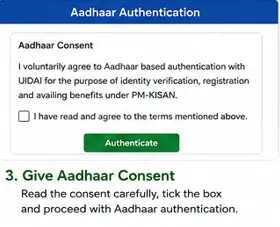
Step 5: Give Aadhaar Consent
The current registration form contains a detailed consent section explaining the use of Aadhaar information for authentication, registration and determining eligibility for PM-KISAN benefits.
Read the consent information before ticking the confirmation box.
Then continue with authentication.
What If Aadhaar Authentication Fails?
Don’t repeatedly submit the same information without finding the reason.
First check whether:
- The Aadhaar number was entered correctly.
- The farmer’s details are accurate.
- The mobile number is correct.
- The information being used matches the relevant records.
If the problem continues, the farmer may need assistance through the appropriate official channel.
The key point is simple:
An Aadhaar authentication failure should be investigated rather than bypassed.
Step 6: Complete the Farmer Registration
After successful authentication, continue with the information requested by the PM-KISAN system.
Depending on the current registration workflow, information associated with the farmer record can include details such as:
- Farmer name
- Gender
- Category
- Mobile number
- Aadhaar information
- Bank information
- Land-related information
The exact fields can change as the portal is updated, so use the fields currently displayed rather than copying information from an old guide.
Step 7: Check Your Land Information
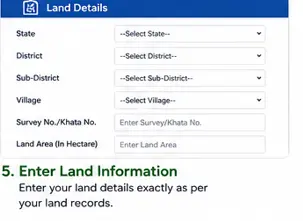
This is one of the most important checks before completing PM-KISAN registration.
If the farmer’s land ownership information is incorrect or outdated, simply submitting another online application may not solve the problem.
Check:
- Farmer’s name in the land record
- Ownership details
- Cultivable land information
- District and location
- Inheritance or succession updates
- Recent land transfers
A Common Mistake
A person may be cultivating land but still have difficulty establishing eligibility if the relevant land records don’t correctly reflect the ownership position required for the scheme.
That is why land records should be checked before assuming that an online registration will be approved.
Step 8: Enter Bank Details Carefully
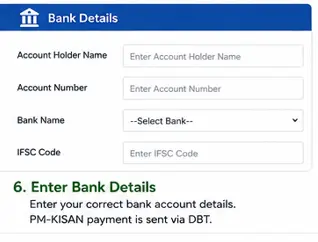
PM-KISAN benefits are transferred electronically to beneficiaries.
If the registration process asks for bank details, check every digit before submitting.
Verify:
- Account holder name
- Account number
- Bank name
- IFSC
- Account status
A single incorrect digit can create a payment problem later.
Practical Tip
Don’t type your account number from memory.
Keep your bank passbook or official bank document beside you and compare the number digit by digit.
Step 9: Review Everything Before Submission
Before clicking the final submission button, stop for a minute.
Check:
Personal details
↓
Aadhaar
↓
Mobile number
↓
Land information
↓
Bank information
↓
Eligibility
Then submit the registration.
The official PM-KISAN registration process should not be treated like a simple form where you can enter approximate information and correct everything later.
Accurate information at the beginning can prevent unnecessary problems later.
Does Registration Mean You Will Receive ₹2,000?
No.
This is probably the most important sentence in this article.
Submitting the PM-KISAN registration form does not automatically guarantee payment.
The application still has to satisfy the applicable eligibility and verification requirements.
The official PM-KISAN portal also provides a separate status facility for farmers who have registered themselves or through a CSC.
Step 10: Check Your Self-Registration Status
After completing registration, use the official Status of Self Registered Farmer / Farmer Registered Through CSC facility.
The current page asks for the farmer’s Aadhaar number and captcha.
This is useful if you have completed the registration but your name is not yet appearing as an active beneficiary.
Visual Walkthrough: Check Self-Registration Status
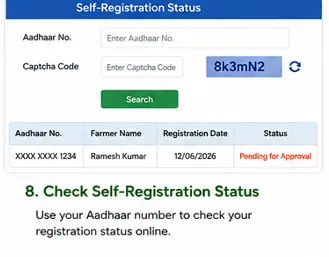
Caption:
Use the official PM-KISAN self-registration status facility to check the progress of a farmer registration submitted online or through a CSC.
Alt Text:
PM-KISAN self-registration status check using Aadhaar number
What If Your Registration Is Still Pending?
Don’t immediately submit another application.
First check the registration status.
Then determine whether the problem is related to:
- Aadhaar authentication
- Land records
- Eligibility
- Verification
- Bank information
- Other information requested by the portal
If necessary, use the official PM-KISAN grievance facility.
The current grievance page allows a temporary or registration number to be used for raising a grievance. It specifically notes that a Temporary ID can be used where registration is new or pending for approval at any level.
What If Your Farmer ID Has Not Been Generated?
The current PM-KISAN registration page includes a message asking whether the applicant wants to download information about the Farmer ID creation process when a Farmer ID has not been generated.
Therefore, don’t automatically assume that the absence of a Farmer ID means your registration has failed.
Follow the instructions shown by the current PM-KISAN portal.
Common PM-KISAN Registration online Mistakes
1. Using an unofficial website
Don’t enter Aadhaar or bank information into random websites claiming to offer PM-KISAN registration.
2. Entering somebody else’s Aadhaar
Use the Aadhaar information of the farmer concerned.
3. Assuming registration equals approval
It doesn’t.
4. Ignoring land records
Incorrect land records can become a major obstacle.
5. Entering the bank account number incorrectly
Check every digit before submission.
6. Applying again without checking the first application
If an earlier registration is pending or has a problem, find out why before submitting another application.
7. Following outdated screenshots
Government portals change.
A screenshot from two or three years ago may not match the current PM-KISAN registration page.
What If You Need Help With Registration?
If you cannot complete the process yourself, you can seek assistance through appropriate government service channels, including CSC facilities where applicable.
But remember:
Getting help with the form does not mean you should hand over control of your Aadhaar OTP or banking credentials.
Keep sensitive authentication information under your control.
PM-KISAN Registration Checklist
Before you submit:
☐ Aadhaar number checked
☐ Mobile number checked
☐ State selected correctly
☐ Personal information checked
☐ Land records checked
☐ Bank account checked
☐ IFSC checked
☐ Eligibility checked
☐ Aadhaar consent understood
☐ Application submitted
☐ Registration status checked afterward
Frequently Asked Questions
Can I register for PM-KISAN online?
Yes. The official PM-KISAN portal currently provides a New Farmer Registration facility.
Is Aadhaar required for new PM-KISAN registration?
The current New Farmer Registration form begins with Aadhaar authentication and states that the applicant can proceed only after Aadhaar authentication.
Does PM-KISAN registration guarantee ₹6,000?
No. Registration does not by itself guarantee payment. The farmer must satisfy the applicable eligibility and verification requirements.
How can I check my PM-KISAN registration status?
Use the official Status of Self Registered Farmer / Farmer Registered Through CSC facility and follow the current verification process.
What if my registration is pending?
Check the registration status first. If the issue remains unresolved, the official PM-KISAN grievance facility can be used. A Temporary ID can be used in cases where a new registration is pending approval at any level.
Can I register again if my first application is pending?
Don’t automatically submit another application. First determine the status and reason for the pending registration.
What if my land details are wrong?
The underlying State or UT land records may need correction. Fixing the land record may be necessary before the PM-KISAN eligibility issue can be resolved.
Official PM-KISAN Links
For this article, use official government resources wherever possible.
- PM-KISAN Official Portal
- New Farmer Registration
- Self-Registration Status
- Know Your Status
- PM-KISAN Grievance Form
Final Takeaway
PM-KISAN registration is not difficult, but it is important to do it carefully.
Start with the official PM-KISAN portal, complete Aadhaar authentication, enter the requested farmer and land information accurately, check your bank details and submit the application only after reviewing everything.
Then check your self-registration status instead of assuming that the application has been approved.
And if something goes wrong, don’t immediately submit another application. Find the actual problem first.
That simple approach can save a lot of unnecessary confusion.
Related PM-KISAN Guides
Main guide:
[PM-KISAN Samman Nidhi Guide India (2026): Eligibility, eKYC, Installments & Status Check]
Next supporting guide:
How to Complete PM-KISAN eKYC Online (2026)