
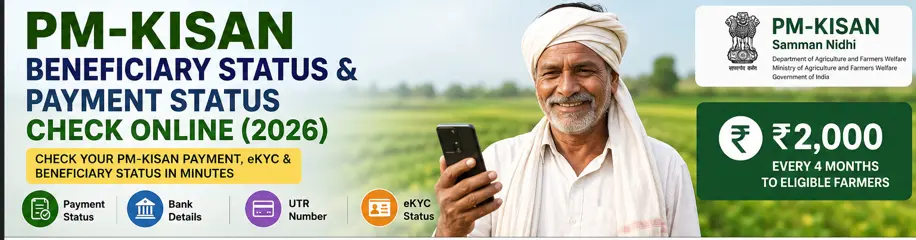
How to Check PM-KISAN Beneficiary Status Online
If you are registered under PM-KISAN and want to know whether your application is active, whether your eKYC is completed or whether an instalment has been credited, the quickest place to start is the official PM-KISAN Know Your Status facility.
The current portal provides information such as:
- Payment status
- Bank name
- UTR number
- Payment mode
- Whether the account was credited
- Date on which the amount was credited
- Financial-year-wise eKYC information
This means you don’t have to depend only on an SMS or a bank statement to understand what is happening with your PM-KISAN payment.
Step 1: Open the Official PM-KISAN Status Page
Go to the official PM-KISAN website and open Know Your Status.
PM-KISAN Official Know Your Status
The current page is maintained by the Department of Agriculture and Farmers Welfare, Ministry of Agriculture and Farmers Welfare, Government of India, and the site is designed and hosted by NIC.
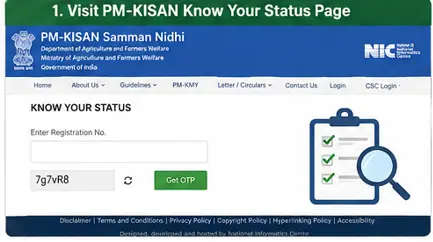
Visual Walkthrough 1: PM-KISAN Know Your Status
Step 2: Enter Your Registration Number
The current Know Your Status page asks for your PM-KISAN Registration Number.
Enter the registration number carefully and complete the captcha shown on the page.
If you don’t remember your registration number, don’t guess.
Use the official facility available on the PM-KISAN portal to retrieve or check your registration details.
Why the Registration Number Matters
Your registration number identifies the PM-KISAN beneficiary record.
It is different from simply knowing your Aadhaar number or bank account number.
Keep your PM-KISAN registration number somewhere safe after obtaining it.
Step 3: Verify With OTP
The current Know Your Status page states that an OTP will be sent to the eKYC-registered mobile number.
Enter the OTP when requested.
Don’t share this OTP with a person claiming to be a PM-KISAN representative or someone offering to check your payment.
You should enter the OTP yourself.
Step 4: View Your PM-KISAN Status
Once the verification is completed, the current page provides an Account Details section.
It can show:
Payment Status
Bank Name
UTR No.
Payment Mode
Account Credited
Credited On
The page also contains financial-year-wise eKYC information.
This is the section you should examine when you are trying to understand why a PM-KISAN instalment has or has not reached your bank account.
What Does PM-KISAN Payment Status Mean?
The exact status displayed can depend on the current state of your beneficiary record and payment transaction.
Don’t interpret one word in isolation.
For example, if your payment is shown as credited, look at the bank name, UTR number and credited date as well.
The current PM-KISAN status page specifically provides these transaction-related details.
If Payment Shows as Credited
If the status says the account was credited, check:
- Bank name
- Credited date
- Payment amount
- UTR number
- Your bank statement
The UTR number is particularly useful when you need the bank to trace a transaction.
Don’t immediately conclude that the money has disappeared simply because you haven’t received an SMS.
Check your actual bank account or statement.
If Payment Is Not Showing as Credited
Don’t immediately submit another PM-KISAN application.
First check:
- Whether your beneficiary status is active
- Whether eKYC is completed
- Whether the payment has been processed
- Whether there is any eligibility or verification issue
- Whether your bank details are correct
- Whether the payment is shown as pending or otherwise unresolved
Then take action based on the actual status.
If Payment Is Pending
A pending payment does not automatically mean permanent rejection.
There may be an outstanding verification or processing issue.
Check the information available in Know Your Status before deciding what to do next.
If Payment Has Failed
A failed transaction needs a different response from a payment that has not yet been processed.
Check your bank details and the information shown in your PM-KISAN record.
Older official PM-KISAN operational guidance explains that unsuccessful transactions can be reported back through the banking system for verification and reprocessing.
For a current case, however, follow the status and instructions displayed by the current PM-KISAN portal rather than relying on an old transaction workflow.
How to Check PM-KISAN eKYC Status
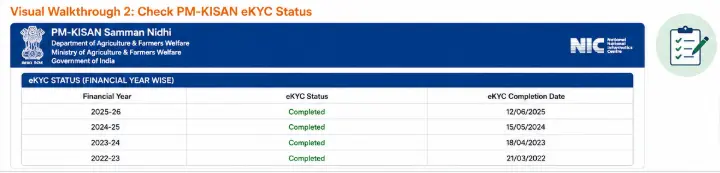
The current Know Your Status page contains a financial year-wise e-KYC section.
This is useful because a farmer may have completed eKYC but still be unsure whether the beneficiary record reflects it.
If your eKYC has recently been completed, allow time for the status to update.
The official PM-KISAN eKYC documentation states that eKYC status can be reflected in beneficiary status after processing, and directs farmers to the KYS module and Kisan-eMitra for status checking.
Visual Walkthrough 2: Check PM-KISAN eKYC Status
How to Check Your PM-KISAN Payment Details
The current status page gives you several useful pieces of information instead of simply saying whether payment was made.
Bank Name
This tells you the bank associated with the payment information shown on the PM-KISAN record.
UTR Number
The UTR can help when discussing a credited transaction with your bank.
Payment Mode
The status page displays the payment mode associated with the transaction.
Account Credited
This indicates whether the payment is recorded as credited.
Credited On
This provides the date associated with the credit shown in the PM-KISAN record.
Visual Walkthrough 3: PM-KISAN Payment Details

What Is the PM-KISAN UTR Number?
UTR stands for Unique Transaction Reference.
If your PM-KISAN status shows a UTR number, keep it available when discussing the transaction with your bank.
For example, suppose your PM-KISAN status says:
Payment Status: Credited
Account Credited: Yes
UTR No.: Available
but the amount isn’t visible in your bank account.
Don’t immediately file a PM-KISAN complaint.
First, take the UTR and credited date to your bank and ask the bank to check the transaction.
This is much more useful than simply saying:
“My PM-KISAN money has not come.”
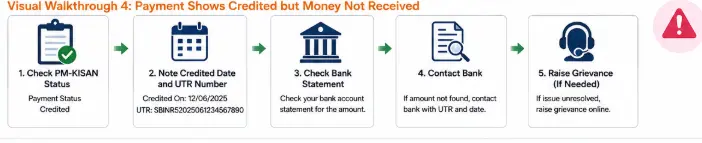
PM-KISAN Payment Shows Credited, But Money Is Not in Bank
This is a common situation where people become confused.
If the official PM-KISAN status says the payment was credited, but you cannot see the amount in your account:
First
Check the bank name displayed in PM-KISAN.
Second
Check the credited date.
Third
Note the UTR number.
Fourth
Check your bank statement rather than relying only on SMS notifications.
Fifth
Ask the bank to trace the transaction using the UTR.
If the bank cannot locate the transaction, then you can move to the next step and use the appropriate PM-KISAN grievance channel.
Visual Walkthrough 4: Payment Shows Credited but Money Not Received
Why Your PM-KISAN Payment May Not Be Released
There isn’t one universal reason.
The current PM-KISAN portal specifically warns that the Department has identified certain suspected cases that may fall under exclusion criteria and says benefits for such cases have been temporarily withheld pending physical verification.
The portal gives examples including:
- Farmers who acquired land ownership after 1 February 2019
- Cases where more than one family member is receiving PM-KISAN benefits
The official website advises affected farmers to check their eligibility status through Know Your Status, the PM-KISAN mobile app, or Kisan-eMitra.
This is why you shouldn’t assume that every missing instalment is a bank problem.
It could be a beneficiary eligibility or verification issue.
What If Your Name Is Missing From the Beneficiary List?
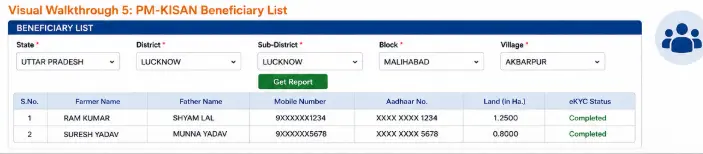
The Beneficiary List is a separate PM-KISAN facility.
The current official page asks you to select:
- State
- District
- Sub-District
- Block
- Village
and then view the beneficiary list for the selected area.
Visual Walkthrough 5: PM-KISAN Beneficiary List
What If Your Registration Is Still Pending?
If you recently applied for PM-KISAN, use the official Status of Self Registered Farmer / Farmer Registered Through CSC facility.
The current page provides an Aadhaar-number-based status facility.
This is different from checking the payment status of an already established beneficiary.
That distinction matters:
New application → Check self-registration status
Existing beneficiary → Check Know Your Status
Don’t confuse the two.
PM-KISAN Status vs Beneficiary List vs Payment Status
| What you want to know | Where to check |
|---|---|
| New registration progress | Status of Self-Registered Farmer |
| Existing beneficiary details | Know Your Status |
| eKYC information | Know Your Status |
| Payment status | Know Your Status |
| UTR number | Know Your Status |
| Bank/credit information | Know Your Status |
| Whether your name appears in village list | Beneficiary List |
This simple distinction can save you a lot of time.
What If PM-KISAN Status Is Not Showing Correctly?
Don’t immediately submit a new application.
Instead:
Check registration status
↓
Check eKYC
↓
Check beneficiary status
↓
Check payment details
↓
Check bank account
↓
Identify the actual problem
↓
Use grievance facility if necessary
This approach is much better than repeatedly submitting forms without knowing what is wrong.
How to Check the Latest PM-KISAN Instalment
The official PM-KISAN website currently states that the 23rd instalment was released on 20 June 2026 from Tarakeswar, Hooghly, West Bengal.
However, don’t make the mistake of assuming that a released instalment means every registered farmer receives it automatically on the same day.
The portal itself provides beneficiary and payment-status facilities because individual records can have different verification and payment situations.
For the latest instalment information, check the official PM-KISAN website rather than relying on old articles, social-media posts, or forwarded WhatsApp messages.
Common PM-KISAN Status Checking Mistakes
1. Using an unofficial status website
Use the official PM-KISAN domain.
2. Checking only the bank SMS
An SMS is useful, but your bank statement is a better transaction record.
3. Ignoring the UTR
If a UTR is displayed, keep it.
4. Applying again without checking the existing registration
Find out what happened to the existing application first.
5. Assuming eKYC alone guarantees payment
It doesn’t.
eKYC is mandatory for registered farmers, but other eligibility and verification conditions still matter.
6. Using old screenshots as if they are current
Government portals change.
The current PM-KISAN Know Your Status page has been updated and now clearly displays registration-number-based status checking and payment details.
Frequently Asked Questions
Q1. How can I check PM-KISAN beneficiary status online?
Use the official PM-KISAN Know Your Status facility. The current page asks for your Registration Number and captcha and uses OTP verification through the eKYC-registered mobile number.
Q2. How can I check PM-KISAN payment status?
Use Know Your Status. The current facility displays payment status, bank name, UTR number, payment mode, account credited status, and credited date.
Q3. How can I find my PM-KISAN UTR number?
Check the Account Details section of the official Know Your Status page. If a payment transaction has been recorded with a UTR, it will be displayed there.
Q4. What should I do if PM-KISAN says payment credited but I didn’t receive it?
Check the bank name, credited date and UTR shown in PM-KISAN. Then ask your bank to trace the transaction using the UTR. Check your bank statement before raising a PM-KISAN grievance.
Q5. How do I check whether my PM-KISAN eKYC is complete?
Use the Know Your Status facility. The current page includes financial-year-wise eKYC information.
Q6. How do I check my PM-KISAN beneficiary list?
Use the official Beneficiary List facility and select your State, District, Sub-District, Block and Village.
Q7. My PM-KISAN registration is pending. What should I do?
Use the Status of Self Registered Farmer / Farmer Registered Through CSC facility first. It is specifically designed for checking self-registered and CSC-registered farmer status.
Q8. Does completed eKYC guarantee my PM-KISAN payment?
No. eKYC is mandatory for registered farmers, but payment also depends on applicable eligibility and verification requirements. The current PM-KISAN portal specifically notes that certain suspected cases can have benefits withheld pending physical verification.
Final Takeaway
Checking your PM-KISAN status is not simply about finding out whether ₹2,000 has arrived.
The official Know Your Status facility now gives you several pieces of information that help identify where the problem actually lies: payment status, bank name, UTR number, payment mode, credited status, credited date, and eKYC information.
If your payment is missing, don’t immediately register again or assume the bank is responsible.
First, check your PM-KISAN record.
Then check your bank account.
If a UTR is available, use it to trace the transaction.
And if the problem appears to be related to eligibility or verification, use the appropriate PM-KISAN support or grievance route.
That is the fastest way to move from “My PM-KISAN money hasn’t come” to knowing exactly what needs to be fixed.
Related PM-KISAN Guides
Main Guide: PM-KISAN Samman Nidhi Guide India (2026): Eligibility, eKYC, Instalments & Status Check
Supporting Post 1: How to Register for PM-KISAN Online (2026)
Supporting Post 2: How to Complete PM-KISAN eKYC Online (2026)