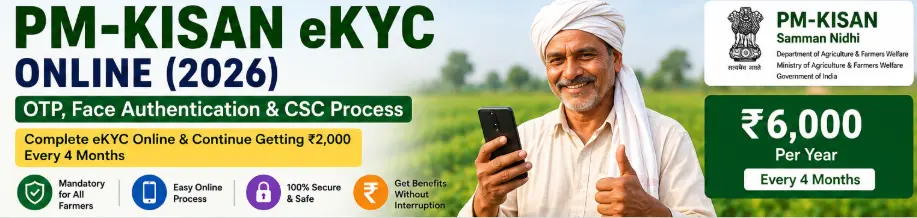
If you are already registered under PM-KISAN, completing PM-KISAN eKYC online is an important step because eKYC is mandatory for registered PM-KISAN farmers.
The good news is that you don’t necessarily have to visit a government office. Depending on your situation, eKYC can be completed through the PM-KISAN portal, the PM-KISAN mobile app, or with biometric authentication at a CSC or other authorised centre. The official PM-KISAN portal supports OTP-based, biometric, and face-authentication methods.
The method you should use mainly depends on whether your Aadhaar-linked mobile number is available and whether you want to complete the process yourself or through a service centre.
PM-KISAN eKYC Methods Available in 2026
There are three main routes:
| Method | Where it is done | What you generally need |
|---|---|---|
| OTP-based eKYC | PM-KISAN website/app | Aadhaar-linked active mobile number |
| Face-authentication eKYC | PM-KISAN mobile app | Smartphone and required app setup |
| Biometric eKYC | CSC/SSK or authorised centre | Aadhaar and biometric authentication |
The official PM-KISAN note describes all three methods.
For most farmers who have access to their Aadhaar-linked mobile number, OTP-based eKYC is the simplest place to start.
What Is PM-KISAN eKYC?
eKYC means electronic Know Your Customer verification.
In simple terms, it helps the PM-KISAN system verify the identity of the registered farmer using Aadhaar-based authentication.
The purpose is not merely to complete another formality. The government uses Aadhaar authentication and related verification mechanisms to help ensure that scheme benefits reach eligible beneficiaries. The official PM-KISAN material describes eKYC as a measure intended to help deliver benefits to the intended beneficiaries.
What You Need Before Starting PM-KISAN eKYC
Before starting, keep these ready:
- Your Aadhaar number
- The mobile number associated with Aadhaar, if using OTP-based eKYC
- Your PM-KISAN registered mobile number
- Smartphone, if using the mobile app
- Internet connection
- PM-KISAN registration details
Most importantly, make sure you are completing eKYC for the correct PM-KISAN beneficiary record.
Method 1: How to Complete PM-KISAN eKYC Online Using OTP
This is generally the easiest method if your Aadhaar-linked mobile number is active.
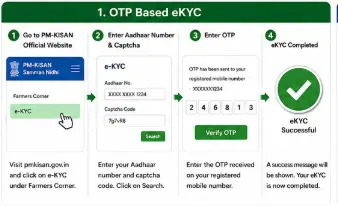
The official PM-KISAN eKYC instructions describe the process as visiting the PM-KISAN portal, selecting eKYC, entering the Aadhaar number, and completing authentication using the OTP.
Step 1: Open the Official PM-KISAN Website
Go to the official PM-KISAN portal.
Do not use an unknown website offering to complete PM-KISAN eKYC for you.
This is particularly important because you may be entering Aadhaar-related information during the process.
Step 2: Select eKYC
Look for the eKYC option on the PM-KISAN website.
The exact appearance of the portal can change when the government updates its website, so the button may not look exactly like an older screenshot or YouTube tutorial.
Visual Walkthrough 1: PM-KISAN eKYC Option
Step 3: Enter Your Aadhaar Number
Enter the Aadhaar number of the registered PM-KISAN beneficiary.
Check the number carefully before proceeding.
A simple typing mistake can cause authentication to fail.
Step 4: Request OTP
After entering the required details, proceed with authentication.
An OTP is used for Aadhaar-based verification when using the OTP method. The official PM-KISAN documentation states that an Aadhaar-linked active mobile number is required for OTP-based eKYC.
Step 5: Enter the OTP
Enter the OTP received on the appropriate registered mobile number.
Do not share this OTP with a person claiming to be from PM-KISAN, a bank, CSC, or another organisation.
You should enter the OTP yourself.
Step 6: Complete eKYC
After successful authentication, the eKYC process should be completed.
However, don’t immediately assume everything is updated everywhere.
The official PM-KISAN material notes that the eKYC status may take time to reflect in the beneficiary status after completion.
What If OTP Does Not Arrive?
This is one of the most common problems.
First check:
- Whether the mobile network is working
- Whether you entered the correct Aadhaar number
- Whether the relevant mobile number is active
- Whether you are using the correct PM-KISAN beneficiary details
- Whether the OTP message has been delayed
Don’t repeatedly request OTPs without checking the underlying problem.
If your Aadhaar-linked mobile number is no longer available, OTP-based eKYC may not be the most practical route for you.
In that situation, consider the other available methods.
Method 2: PM-KISAN eKYC Through Face Authentication
PM-KISAN also provides a face-authentication route through its mobile application.
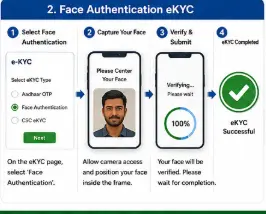
The official PM-KISAN material describes face-authentication eKYC as a mobile-based option. It instructs farmers to use the PM-KISAN mobile application together with the Aadhaar Face RD application, log in using the registered mobile number, and complete face scanning when eKYC is pending.
This can be useful when you want to complete the process yourself using your smartphone.
How to Complete PM-KISAN Face eKYC
Step 1: Install the Required Applications
Use the official app sources to install the PM-KISAN mobile application and the required Aadhaar Face RD application.
Don’t download APK files from random websites.
Step 2: Open the PM-KISAN App
Open the PM-KISAN application and use the registered mobile number as required by the current app.
Step 3: Open Beneficiary Status
Go to the beneficiary status area.
Check whether your eKYC status is already completed.
If it is already completed, don’t unnecessarily repeat the process.
Step 4: Start eKYC
If the status indicates that eKYC is not completed, select the eKYC option.
The official process then requires Aadhaar information and consent for face scanning.
Step 5: Complete Face Authentication
Follow the instructions on the phone and allow the required face scan.
Keep your face properly visible to the camera and follow the app’s instructions.
Visual Walkthrough 2: PM-KISAN Face Authentication eKYC
Step 6: Check the eKYC Result
After successful face authentication, the eKYC process should be completed.
Give the system some time to update the beneficiary record before assuming that something has gone wrong.
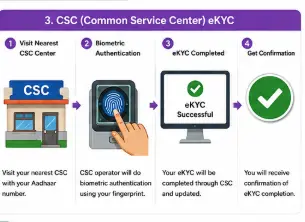
Method 3: PM-KISAN Biometric eKYC Through CSC
If OTP-based or mobile face authentication is not convenient, biometric eKYC is another documented route.
The official PM-KISAN note states that biometric eKYC is available through Common Service Centres and State Seva Kendras. The current PM-KISAN portal also confirms the availability of biometric-based eKYC through CSC VLE logins and other authorised users.
How It Works
Visit an appropriate CSC or authorised centre with the required identification information.
The operator can assist with Aadhaar-based biometric authentication.
The official PM-KISAN material also provides a CSC locator for finding a nearby centre.
Visual Walkthrough 3: PM-KISAN Biometric eKYC at CSC
Which PM-KISAN eKYC Method Should You Choose?
Use this simple guide:
You have an active Aadhaar-linked mobile number
Try OTP-based eKYC first.
You want to complete eKYC using your smartphone
Use the PM-KISAN mobile app and face-authentication route if available to you.
You cannot complete mobile-based authentication
Visit a CSC or authorised centre for biometric eKYC.
There is no need to visit a centre merely because someone tells you that online eKYC cannot be done.
First, check which method is available to you.
How to Check Whether PM-KISAN eKYC Is Completed
This is an important step that many farmers skip.
Completing the authentication process and confirming that the beneficiary record reflects the updated eKYC status are not things you should casually assume are identical.
The current Know Your Status facility includes a financial-year-wise eKYC section and account information such as payment status, bank name, UTR number, and credited date.
Check PM-KISAN Know Your Status
Visual Walkthrough 4: Check PM-KISAN eKYC Status

What If eKYC Still Shows “No”?
Don’t panic.
First, consider when you completed the authentication.
The official PM-KISAN documentation indicates that eKYC status may take time to reflect in the beneficiary record.
Then check:
- Whether authentication actually succeeded
- Whether you used the correct Aadhaar
- Whether you checked the correct beneficiary record
- Whether the status has had time to update
If the problem continues, use the official PM-KISAN status and grievance facilities rather than repeatedly submitting the same eKYC request.
PM-KISAN eKYC Failed: Common Reasons
Aadhaar-linked mobile number is unavailable
OTP-based verification can become difficult if the required mobile number is no longer active.
Consider the face-authentication or biometric route where available.
Aadhaar details don’t match
Differences in identity information can cause authentication problems.
Check the relevant Aadhaar details before repeatedly trying.
Poor internet connection
A weak connection can interrupt OTP or app-based authentication.
Try again using a stable connection.
Face authentication fails
Make sure:
- Your face is clearly visible
- Lighting is adequate
- You follow the app instructions
- Your camera is working properly
eKYC was completed, but the status has not updated
Allow some time for the record to reflect the completed eKYC and then check the beneficiary status again.
Does Completing eKYC Guarantee PM-KISAN Payment?
No.
This is an important distinction.
eKYC is a required verification step for registered PM-KISAN farmers, but completing eKYC alone does not override the scheme’s eligibility rules or other verification requirements.
The current PM-KISAN portal itself warns that certain suspected cases may have benefits temporarily withheld pending physical verification.
So if your eKYC is complete but your payment is still not received, you should check your overall beneficiary status rather than assuming eKYC is the only issue.
Important Safety Tips
Never share:
- Aadhaar OTP
- Banking OTP
- UPI PIN
- ATM PIN
- Internet banking password
with anyone claiming to complete PM-KISAN eKYC for you.
A legitimate assistance process should not require you to hand over control of your OTP.
Also avoid unofficial websites and APK files.
For PM-KISAN services, start with the official government portal and official application channels.
Final Takeaway
Completing PM-KISAN eKYC online is straightforward when your Aadhaar and mobile details are in order.
If you have an Aadhaar-linked active mobile number, start with OTP-based eKYC. If you prefer mobile-based verification, the PM-KISAN app provides a face-authentication route. And if online authentication isn’t suitable, biometric eKYC through a CSC or authorised centre is another documented option.
After completing eKYC, check your PM-KISAN status rather than assuming the process is finished simply because authentication was successful.
Most importantly, use the official PM-KISAN portal and never give your OTP or banking credentials to someone else.
Frequently Asked Questions
Q1. Is PM-KISAN eKYC mandatory?
Yes. The official PM-KISAN portal currently states that eKYC is mandatory for registered PM-KISAN farmers.
Q2. Can I complete PM-KISAN eKYC online?
Yes. OTP-based eKYC is documented through the PM-KISAN portal, while mobile-based face authentication is also available through the PM-KISAN application.
Q3. Can I complete PM-KISAN eKYC without an Aadhaar-linked mobile number?
OTP-based eKYC requires an Aadhaar-linked active mobile number. If that is not available, other documented routes such as biometric authentication through CSC or face authentication through the mobile app may be relevant, depending on your circumstances and the current service availability.
Q4. Can I complete PM-KISAN eKYC through CSC?
Yes. The official PM-KISAN documentation describes biometric eKYC through CSCs and State Seva Kendras.
Q5. How long does PM-KISAN eKYC status take to update?
The official PM-KISAN material indicates that eKYC status may take time to reflect in the beneficiary record. Check your status again rather than assuming that a successful authentication immediately changes every status screen.
Q6. What should I do if PM-KISAN eKYC fails?
Check your Aadhaar details, mobile number, network connection, and the authentication method you are using. If OTP authentication isn’t practical, consider the face-authentication or biometric route where available.
Q7. Does eKYC mean my PM-KISAN payment is guaranteed?
No. eKYC is one important requirement, but beneficiaries must still meet the applicable eligibility and verification conditions.
Related PM-KISAN Guides
Main Guide: PM-KISAN Samman Nidhi Guide India (2026): Eligibility, eKYC, Installments & Status Check
Previous Supporting Post: How to Register for PM-KISAN Online (2026)
Next Supporting Post: How to Check PM-KISAN Beneficiary Status & Payment Status