
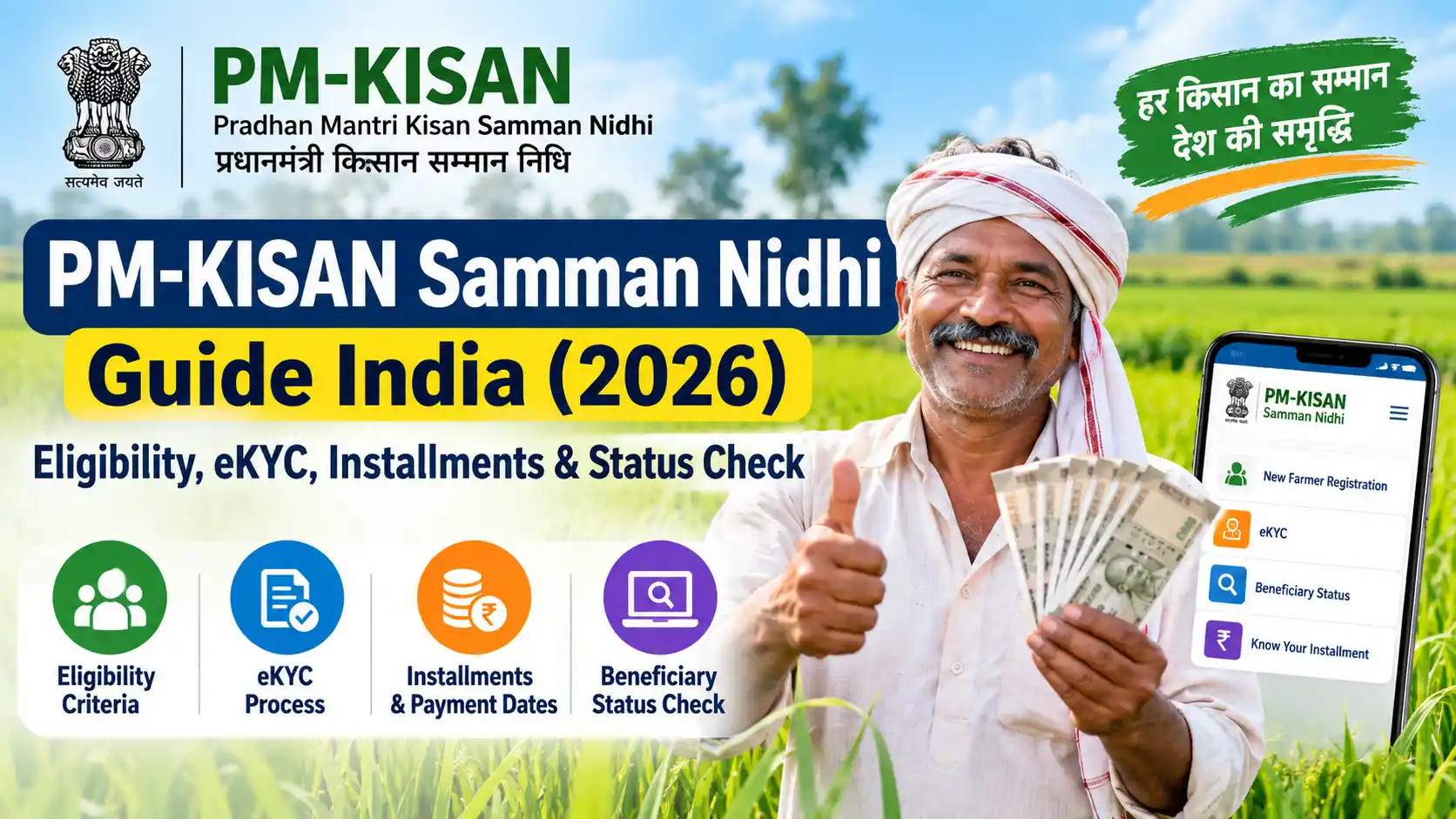
What Is PM-KISAN Samman Nidhi?
Pradhan Mantri Kisan Samman Nidhi (PM-KISAN) is a Central Sector Scheme of the Government of India that provides income support to eligible landholding farmer families.
The scheme became operational on 1 December 2018. Under the current scheme structure, eligible farmer families receive ₹6,000 per year in three ₹2,000 instalments, paid directly into their bank accounts through Direct Benefit Transfer (DBT). The amount is provided in three equal instalments of ₹2,000 each.
The objective is to provide financial support to eligible farming families for agricultural inputs and other household needs.
Importantly, PM-KISAN is not simply a scheme for anyone who cultivates land. Eligibility is linked to the definition of a landholding farmer family and is subject to specific exclusion categories under the scheme guidelines.
How Much Money Do Farmers Receive Under PM-KISAN?
The annual benefit is:
| Instalment | Amount |
|---|---|
| First instalment | ₹2,000 |
| Second instalment | ₹2,000 |
| Third instalment | ₹2,000 |
| Total per year | ₹6,000 |
The money is transferred directly to the eligible beneficiary’s bank account through DBT.
The exact timing of an instalment should always be checked on the official PM-KISAN portal rather than relying on old social-media posts or unofficial websites.
Current 2026 Update
The official PM-KISAN portal currently records the 23rd instalment as released on 20 June 2026 from Tarakeswar, Hooghly, West Bengal.
Instalment dates can change, so check the official PM-KISAN portal for the latest payment announcement rather than relying on old social media posts.
What Is a Farmer Family Under PM-KISAN?
For PM-KISAN purposes, a farmer family is defined as:
Husband, wife, and minor children who own cultivable land according to the land records of the concerned State or Union Territory.
The identification of beneficiaries is therefore primarily connected with land records maintained by the respective State or UT.
This is why two people who are both involved in farming may not necessarily receive separate PM-KISAN benefits.
The family definition matters.
Who Is Eligible for PM-KISAN?
The current scheme covers eligible landholding farmer families having cultivable land, subject to the exclusion categories specified in the PM-KISAN guidelines.
Eligibility therefore involves more than simply saying:
“I am a farmer, so I will receive ₹6,000.”
You should consider:
- Whether the family owns cultivable land.
- Whether the land ownership is reflected in the relevant land records.
- Whether the family falls into any exclusion category.
- Whether the required beneficiary information has been correctly recorded.
- Whether mandatory eKYC requirements have been completed.
Important: PM-KISAN Does Not Cover Everyone Who Farms
This is one of the most important points readers should understand.
The scheme guidelines contain exclusion categories. These include institutional landholders and certain individuals belonging to specified categories, including certain constitutional post holders, government employees, higher-level pensioners, income-tax payers, and specified professionals.
For example, the current official PM-KISAN information excludes:
- Institutional landholders
- Certain present and former constitutional post holders
- Certain present and former ministers and legislators
- Certain serving or retired government employees
- Certain pensioners receiving a monthly pension of ₹10,000 or more
- Persons who paid income tax in the previous assessment year
- Certain practising registered professionals such as doctors, engineers, lawyers, chartered accountants and architects
There are specific exceptions within some categories, so readers should not determine eligibility from a single bullet point alone. The latest official guidelines should be checked before applying.
Visual Walkthrough 1: Who Can Get PM-KISAN?
What Is eKYC in PM-KISAN?
eKYC means electronic Know Your Customer verification.
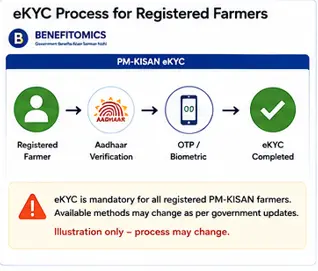
For PM-KISAN beneficiaries, eKYC is not optional. The current official portal clearly states:
eKYC is mandatory for PM-KISAN registered farmers.
The official system currently provides different ways of completing eKYC, including OTP-based verification and biometric-based options through authorised channels.
Why Is PM-KISAN eKYC Important?
Completing eKYC helps establish the identity of the registered beneficiary.
If eKYC remains incomplete, the farmer may face problems with receiving benefits.
The current PM-KISAN portal specifically directs registered farmers to complete mandatory eKYC and provides a Know Your Status (KYS) facility to check account-related information.
Visual Walkthrough 2: PM-KISAN eKYC
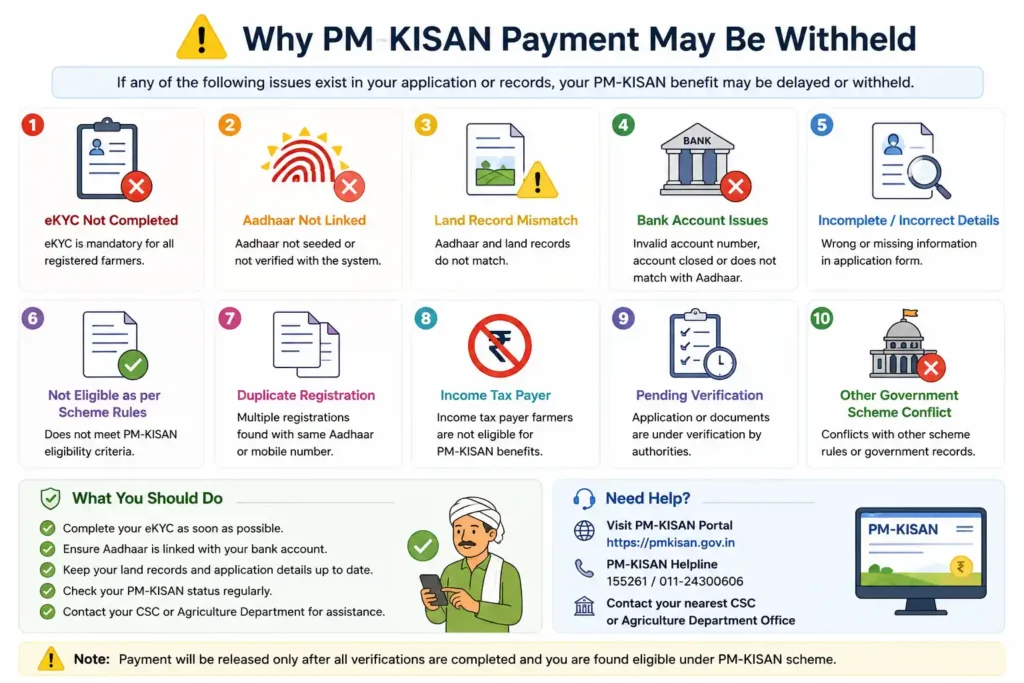
What Happens If PM-KISAN Benefits Are Temporarily Withheld?
This is another current issue worth explaining.
The official PM-KISAN portal says that the Department has identified some suspected cases that may fall under exclusion criteria. Examples currently mentioned include:
- Farmers who acquired land ownership after 1 February 2019
- Cases where more than one family member is receiving PM-KISAN benefits
In such cases, benefits may be temporarily withheld until physical verification is completed. The official portal directs farmers to check their status through Know Your Status (KYS), the PM-KISAN mobile app or Kisan eMitra for further information.
This is much better information to provide than simply telling readers “payment is delayed.”
Visual Walkthrough 3: Check PM-KISAN Status
The official Know Your Status page currently asks the user to enter the registration number and captcha and provides account information such as payment status, bank name, UTR number, payment mode, and credit date.
Quick Eligibility Checklist
Before assuming that you are eligible, check:
☐ My family owns cultivable land.
☐ The land is recorded in the relevant State or UT land records.
☐ My family does not fall under an applicable exclusion category.
☐ My PM-KISAN registration details are correct.
☐ My eKYC is completed.
☐ My bank details are correct.
☐ I have checked my PM-KISAN status if payment has not been received.
Consultant’s Corner
One mistake we should avoid on Benefitomics is telling a farmer that land ownership alone guarantees payment.
It doesn’t.
PM-KISAN involves land records, the scheme’s family definition, exclusion criteria, beneficiary identification, and mandatory eKYC. A farmer who appears eligible at first glance can still have a verification or eligibility issue.
The practical approach is to check the official PM-KISAN status rather than assuming that a missed payment automatically means the government has stopped the scheme.
Key Takeaway
PM-KISAN currently provides ₹6,000 per year in three ₹2,000 instalments to eligible landholding farmer families, subject to the scheme’s exclusions and verification requirements. eKYC is mandatory for registered beneficiaries, and the official portal provides a Know Your Status facility for checking registration and payment information.
How to Register for PM-KISAN Online in 2026
If you believe your farmer family is eligible for PM-KISAN but is not yet registered, the first step is to use the New Farmer Registration facility on the official PM-KISAN portal.
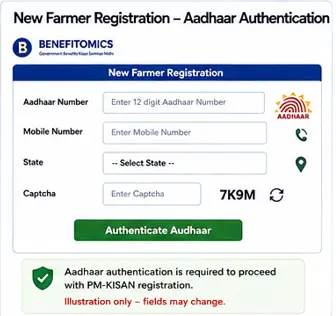
The current registration form starts with Aadhaar authentication. It asks for the farmer’s Aadhaar number, mobile number, state, and captcha, followed by an Aadhaar consent declaration. The official portal states that registration can proceed only after the Aadhaar is authenticated.
The important point is that online registration does not mean automatic approval. PM-KISAN eligibility is ultimately connected with the relevant land records and verification process of the State or Union Territory.
Step 1: Open the Official PM-KISAN Website
Go to the official PM-KISAN website.
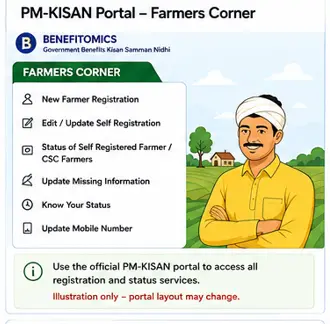
In the Farmers Corner, you will find options including:
- New Farmer Registration
- Edit / Update Self Registration
- Status of Self-Registered Farmer / CSC Farmers
- Update Missing Information
- Know Your Status
- Update Mobile Number
The official portal currently lists these services under Farmers Corner.
Do not use an unofficial website to enter your Aadhaar or bank information.
Step 2: Select New Farmer Registration
Click New Farmer Registration.
The current official registration page opens a form asking for:
- Aadhaar Number
- Mobile Number
- State
- Captcha
The portal then authenticates the Aadhaar before allowing the registration process to continue.
Important
Use the farmer’s own correct details.
Do not enter somebody else’s Aadhaar number simply because they are a family member.
Step 3: Complete Aadhaar Authentication
Enter the Aadhaar number and complete the authentication process shown by the portal.
The current registration form contains an Aadhaar consent declaration explaining that Aadhaar and demographic information may be used for identity authentication and determining eligibility for PM-KISAN.
If Aadhaar authentication fails, don’t keep submitting the same information repeatedly.
First, check whether the personal information being used for PM-KISAN matches the relevant records.
Step 4: Complete the Farmer Registration Details
Once Aadhaar authentication is successful, continue with the registration information requested by the portal.
The exact fields displayed can change as the PM-KISAN system and State-level verification processes are updated, so users should follow the fields currently displayed on the official portal rather than relying on an old screenshot or video.
Information associated with PM-KISAN beneficiary records includes details such as:
- Farmer’s name
- Age
- Gender
- Category, where applicable
- Aadhaar
- Bank account
- Mobile number
- Land-related information
The PM-KISAN operational guidelines also make clear that States and UTs have responsibility for identifying eligible landholding farmer families and maintaining the beneficiary database.
Visual Walkthrough 4: New Farmer Registration
Step 5: Check Your Land Records
This is one of the most important parts of PM-KISAN registration.
PM-KISAN uses the existing land-ownership system of the concerned State or UT to identify beneficiaries. The official guidelines emphasise that land records should be clear and updated.
Therefore, before registering, check whether:
- The cultivable land is recorded correctly.
- The farmer’s name appears correctly in the relevant land records.
- Ownership or succession records have been updated where necessary.
- The location of the cultivable land is correctly recorded.
This is particularly important when land has recently been inherited, transferred or divided among family members.
Don’t make this mistake
Being in physical possession of agricultural land is not by itself enough to assume that PM-KISAN registration will be approved.
The official beneficiary identification process relies on land records and State/UT verification.
Step 6: Provide Correct Bank Details
PM-KISAN benefits are transferred directly to beneficiaries’ bank accounts.
The beneficiary database includes bank account information, and the scheme’s implementation guidelines provide for the direct electronic transfer of the benefit.
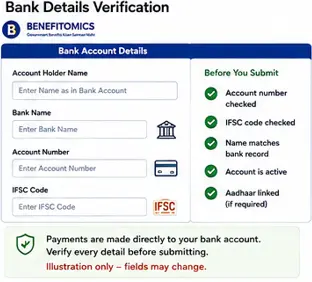
Before submitting your details, carefully check:
- Account number
- Bank name
- IFSC
- Name of account holder
A wrong account number or other incorrect banking information can create problems with receiving the payment.
Practical Tip
Use an active bank account that belongs to the beneficiary and carefully compare the account number with the bank document before entering it.
Visual Walkthrough 5: Bank Details Verification
Step 7: Submit the Registration
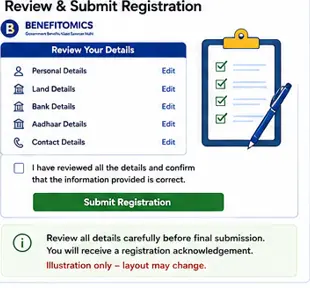
After entering the required information, review everything before submitting.
Pay particular attention to:
- Name
- Aadhaar details
- Mobile number
- State
- Land-related information
- Bank account details
Once submitted, don’t assume that the ₹2,000 instalment will immediately appear in your bank account.
The registration still needs to pass the applicable verification and eligibility checks.
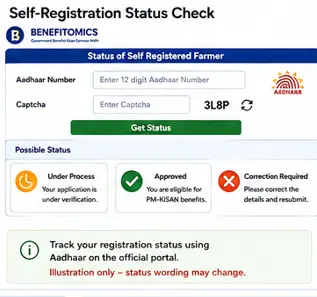
Step 8: Check the Status of Your Self-Registration
PM-KISAN provides a separate facility called:
Status of Self-Registered Farmer / Farmer Registered Through CSC
The current official page allows the farmer to enter an Aadhaar number and captcha to check the registration status.
This is particularly useful if you have completed registration but don’t yet see yourself as an active beneficiary.
Visual Walkthrough 6: Review & Submit PM-KISAN Registration
Status of Self-Registered Farmer
↓
Aadhaar Number
↓
Captcha
↓
Submit
↓
Registration Status
Use three possible visual states:
🟡 Under Process
🟢 Approved
🔴 Rejected / Correction Required
Do not present these as the exact wording of the official portal. They are an explanatory visual to help the reader understand the possible stages.
Step 9: Complete eKYC
Registration and eKYC should not be treated as the same thing.
The current PM-KISAN portal states clearly that eKYC is mandatory for registered PM-KISAN farmers. It also currently states that biometric-based eKYC is available through CSC VLE logins, the PM-KISAN mobile application, and authorised State users.
The method available to you may therefore depend on the service channel and current portal arrangements.
Important
Don’t follow an old YouTube tutorial that says a particular eKYC method is the only method available.
The official PM-KISAN portal should be treated as the current source.
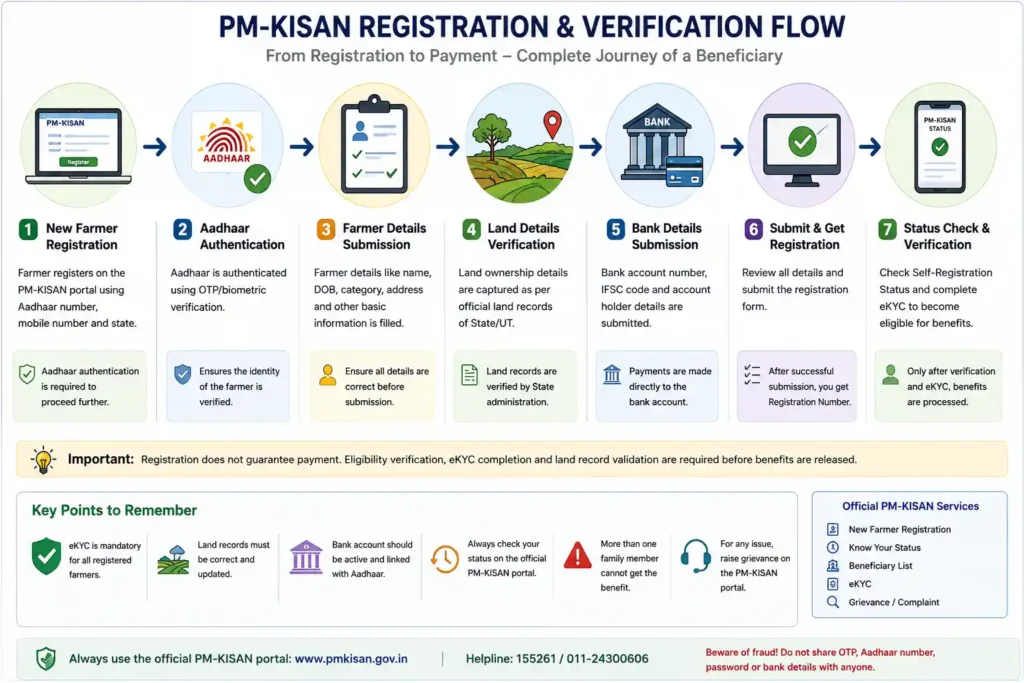
Visual Walkthrough 7: PM-KISAN Registration & Verification Flow
What If Your Farmer ID Has Not Been Generated?
This is a current issue worth mentioning because the new registration system itself displays a message asking whether the applicant wants to download information about Farmer ID creation when a Farmer ID has not been generated.
So don’t assume that the absence of a Farmer ID automatically means your PM-KISAN application has failed.
Follow the instructions displayed by the current portal and, where necessary, use the relevant State-level farmer database or verification mechanism.
What If Your Land Details Are Wrong?
This can be a serious problem because PM-KISAN beneficiary identification depends on land records.
If the land information is incorrect, first determine whether the problem is:
- Incorrect State or district
- Incorrect land ownership record
- Name mismatch
- Inheritance not updated
- Land transfer not reflected
- Incorrect cultivable-land location
The PM-KISAN portal currently provides correction facilities for certain beneficiary information, including an address/location correction process for cases where the beneficiary has been marked ineligible because the beneficiary does not belong to the recorded State or district. The portal states that cultivable-land documentation may be required in such cases.
This is why we should never tell readers to simply “edit the form” without identifying what is actually wrong.
Common PM-KISAN Registration Mistakes
1. Assuming registration means approval
Registration is only the beginning.
Eligibility and verification still matter.
2. Entering incorrect Aadhaar information
Aadhaar authentication can fail if the information doesn’t match.
3. Ignoring land records
This is one of the biggest mistakes.
PM-KISAN beneficiary identification is linked to the State/UT land-record system.
4. Entering the wrong bank account
A small typing error can create payment problems.
5. Not completing eKYC
The official portal states that eKYC is mandatory.
6. Relying on old information
PM-KISAN’s portal and processes are updated periodically.
Always check the current official portal before taking action.
💡 Benefitomics Practical Tip
If a farmer tells you:
“I registered for PM-KISAN but didn’t receive ₹2,000.”
Don’t immediately assume that the payment has been rejected.
Check the case systematically:
Registration
↓
Eligibility
↓
Land Record
↓
eKYC
↓
Bank Details
↓
Beneficiary Status
↓
Payment Status
This troubleshooting approach is much more useful than simply telling the farmer to “wait for the next instalment.”
PM-KISAN Registration Checklist
Before completing registration:
☐ Aadhaar details checked
☐ Mobile number correct
☐ Land records checked
☐ Farmer name correctly recorded
☐ Bank account number verified
☐ IFSC verified
☐ Eligibility exclusions checked
☐ Registration submitted
☐ Self-registration status checked
☐ eKYC completed
Key Takeaway
The PM-KISAN registration process is not simply an online form. The farmer’s identity, land records, eligibility, bank information, and mandatory eKYC all matter.
The safest approach is to register through the official PM-KISAN portal, carefully enter the information requested, check the self-registration status, and then monitor the beneficiary and payment status.
PM-KISAN Beneficiary Status, Payment Status & What to Do When ₹2,000 Is Not Received
Getting registered for PM-KISAN is only one part of the process. The question most farmers eventually ask is much simpler:
“Has my PM-KISAN money been released?”
If the ₹2,000 instalment has not appeared in your bank account, don’t immediately assume that you have been removed from the scheme. There can be several reasons for a payment not being credited.
The good thing is that PM-KISAN now provides an official Know Your Status facility where a farmer can check important account and payment information, including payment status, bank name, UTR number, payment mode, and the date on which the account was credited.
How to Check PM-KISAN Beneficiary Status
The official PM-KISAN website provides a Know Your Status facility for registered farmers.
Step 1: Open Know Your Status
Go to the official PM-KISAN website and select Know Your Status from the Farmers Corner.
The current status page asks for your Registration Number and captcha. An OTP is sent to the mobile number registered for eKYC.
Step 2: Enter Your Registration Number
Enter your PM-KISAN registration number carefully.
If you don’t remember your registration number, use the facility provided on the official portal to retrieve it.
Step 3: Complete OTP Verification
The current Know Your Status page states that the OTP will be sent to the eKYC-registered mobile number.
Enter the OTP and continue.
Step 4: View Your Account Details
After successful verification, the portal displays information such as:
- Payment status
- Bank name
- UTR number
- Payment mode
- Whether the account was credited
- Credit date
- Financial-year-wise eKYC information
This is much more useful than relying on a message received through WhatsApp or a local social-media group.
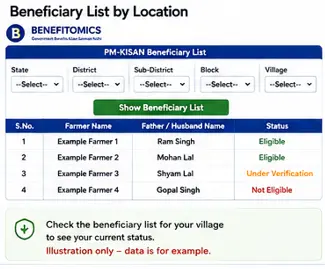
Visual Walkthrough 8: PM-KISAN Beneficiary List Search
How to Check PM-KISAN Payment Status
Once you access Know Your Status, don’t just look for the words Payment Status.
Look at the entire payment record.
Payment Status
This tells you the current status shown by the PM-KISAN system.
Bank Name
Check whether the bank shown is the bank where you expect the benefit to be credited.
UTR Number
A UTR number is a transaction reference that can help identify the payment transaction.
If the portal shows a UTR number and says the account has been credited, but you cannot find the money in your bank account, compare the transaction details with your bank statement.
Payment Mode
The status page also displays the payment mode.
Account Credited
This is particularly important because it tells you whether the system records the payment as credited.
Credited On
The portal can also display the date on which the account was credited.
What If PM-KISAN Payment Has Not Been Received?
This is where you should troubleshoot systematically.
Don’t immediately submit another application.
First check the following:
Registration
↓
Eligibility
↓
eKYC
↓
Beneficiary Status
↓
Payment Status
↓
Bank Details
↓
UTR / Credit Information
This approach can save a farmer from submitting unnecessary applications or making changes that create additional problems.
Reason 1: eKYC Is Not Complete
The current PM-KISAN website clearly states that eKYC is mandatory for registered PM-KISAN farmers.
If your eKYC is incomplete, check the status through the official PM-KISAN system and complete the required verification.
Don’t assume that registration automatically completes eKYC.
It doesn’t.
Reason 2: Bank Details Have a Problem
A payment can become problematic when the bank information associated with the beneficiary record is incorrect or requires verification.
Check:
- Bank name
- Account number
- IFSC
- Account status
- Whether the account belongs to the beneficiary
If your bank account has changed recently, don’t ignore the old information in the PM-KISAN record.
Reason 3: Eligibility Verification Is Pending
The current PM-KISAN portal says that certain suspected cases may have their benefits temporarily withheld while physical verification is completed.
The portal specifically mentions examples such as:
- Farmers who acquired land ownership after 1 February 2019
- Cases where more than one family member is receiving PM-KISAN benefits
The Department says affected farmers should check their status through Know Your Status, the PM-KISAN mobile app, or Kisan eMitra.
This is important because a temporarily withheld payment does not necessarily mean that the entire scheme benefit has been permanently cancelled.
Reason 4: Land Records Need Attention
PM-KISAN beneficiary identification depends heavily on the land records maintained by the relevant State or Union Territory.
If the farmer’s name, ownership details, or other land information are not properly reflected in the records, the PM-KISAN verification process can be affected.
This becomes particularly important after:
- Inheritance
- Partition of agricultural land
- Sale or purchase
- Transfer of ownership
- Correction of land records
If the underlying land record is wrong, repeatedly submitting the PM-KISAN form is unlikely to solve the problem.
The underlying record may need to be corrected first.
Reason 5: More Than One Family Member Is Receiving the Benefit
PM-KISAN is based on the defined farmer family, not simply on the number of people in a household who cultivate land.
The current portal specifically identifies cases where multiple family members are receiving benefits as suspected cases requiring verification.
So if both husband and wife are receiving separate PM-KISAN payments, don’t assume that both payments are automatically valid.
The official system should be checked.
Visual Walkthrough 9: Why Payment May Be Withheld
PM-KISAN Payment Check
eKYC complete?
↓
Yes / No
Land records verified?
↓
Yes / Pending
Eligibility clear?
↓
Yes / Verification Required
Bank details correct?
↓
Yes / Correction Required
Payment processed?
↓
Bank credited
The bottom of the graphic should say:
How to Check the PM-KISAN Beneficiary List
The official PM-KISAN website also provides a Beneficiary List facility.
The current page asks you to select:
- State
- District
- Sub-District
- Block
- Village
The portal then provides the relevant beneficiary information for the selected location.
This can be useful when a farmer wants to check whether their name appears in the beneficiary records.
Don’t confuse the Beneficiary List with Payment Status
These are two different checks.
Beneficiary List
Tells you whether your name appears in the relevant beneficiary records.
Know Your Status
Provides individual account and payment-related information.
Bank Statement
Confirms what has actually been credited to your bank account.
A farmer should use the appropriate check depending on the problem.
Visual Walkthrough 10: PM-KISAN Payment Shows Credited but Money Not Received

PM-KISAN Beneficiary List
State
↓
District
↓
Sub-District
↓
Block
↓
Village
↓
Show Beneficiary List
Then show an example table:
| Farmer | Status |
|---|---|
| Example Farmer 1 | Eligible |
| Example Farmer 2 | Eligible |
| Example Farmer 3 | Under Verification |
Again, clearly label it:
Illustrative example — not an official beneficiary list.
What Is UTR and Why Is It Important?
If your PM-KISAN status shows a UTR number, keep it safely.
A UTR or transaction reference can help when investigating a payment that the system shows as processed but that you cannot locate in your bank account.
For example:
PM-KISAN status
Payment: Credited
↓
UTR available
↓
Check bank statement
↓
If necessary, discuss the transaction with the bank using the available reference information.
Don’t publish your actual UTR number, bank account number, or other financial information online when asking for help.
What if eKYC Is Complete but ₹2,000 Is Still Not Received?
Follow this sequence.
Step 1
Check Know Your Status.
Step 2
Check whether the payment status has been updated.
Step 3
Check whether the bank account shown is correct.
Step 4
Check the UTR number if one is displayed.
Step 5
Check your bank statement.
Step 6
Check whether your eligibility is under verification.
Step 7
If the issue remains unresolved, use the official PM-KISAN grievance mechanism.
This is much better than registering again.
How to Raise a PM-KISAN Grievance
The official PM-KISAN website provides a Grievance Query Form.
The current form allows users to:
- Raise a grievance
- Check grievance status
- Enter a temporary or registration number
- Select a category
- Describe the problem
- Upload supporting documents where applicable
An important detail is that the official page says a Temporary ID can be used when the registration is new or still pending approval at any level.
That is useful information for newly registered farmers.
Visual Walkthrough 11: Raise a PM-KISAN Grievance
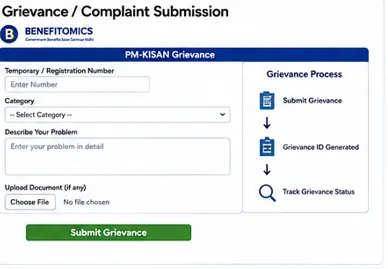
PM-KISAN Grievance
↓
Temporary / Registration Number
↓
Select Category
↓
Describe Problem
↓
Upload Document
↓
Raise Grievance
↓
Grievance ID Generated
The graphic should include:
Keep your Grievance ID for future tracking.
Alt Text
PM-KISAN grievance submission process for unresolved farmer payment issues
When Should You Contact the Bank?
Contact the bank when the PM-KISAN system indicates that the payment has been credited or provides transaction information, but the amount is not visible in your account.
Take with you:
- Bank account details
- Relevant transaction information
- UTR/reference number if available
- PM-KISAN status information
Don’t give your Aadhaar OTP or banking password to anyone claiming to be a PM-KISAN representative.
PM-KISAN Troubleshooting Table
| Problem | What to Check First | What to Do |
|---|---|---|
| ₹2,000 not received | Payment status | Check Know Your Status |
| eKYC pending | eKYC status | Complete the required eKYC |
| Bank details incorrect | Bank information | Follow the official correction process |
| Payment shows credited | UTR and bank statement | Check with bank |
| Name missing from beneficiary list | Registration and eligibility | Check registration/status |
| Registration pending | Self-registration status | Wait for verification or raise a grievance if appropriate |
| Land details incorrect | State land records | Correct the underlying land record |
| Benefit temporarily withheld | Eligibility/verification status | Check KYS and follow the official instructions |
| Multiple family members receiving benefit | Family eligibility | Check the official eligibility position |
Don’t Apply Again Without Finding the Problem
This deserves a separate warning.
If your existing PM-KISAN registration has a problem, submitting another application may not solve it.
First identify whether the issue is:
Identity
Land
Eligibility
eKYC
Bank
Payment
Verification
Then take the appropriate corrective step.
💡 Consultant’s Corner
A practical way to investigate a delayed government benefit is to work backwards from the payment.
Instead of asking only:
“Why haven’t I received the money?”
ask:
“At which stage did the process stop?”
For PM-KISAN, the sequence is broadly:
Registration → Verification → Eligibility → eKYC → Payment Processing → Bank Credit
Finding the exact stage is more useful than repeatedly submitting the same application.
PM-KISAN Final Checklist
Before contacting anyone about a missing instalment, check:
☐ PM-KISAN registration completed
☐ Registration number available
☐ eKYC completed
☐ Eligibility checked
☐ Land records correct
☐ Bank details correct
☐ Beneficiary status checked
☐ Payment status checked
☐ UTR checked, if available
☐ Bank statement checked
☐ Grievance raised if necessary
This checklist can also become a downloadable Benefitomics PDF later.
Final Thoughts
PM-KISAN is a straightforward scheme on paper, but individual payment problems can become confusing because several different systems are involved.
A farmer may have completed registration but still have an eKYC issue. Another may have completed eKYC but have a land-record problem. Someone else may have a processed payment but a banking issue.
That’s why the best way to deal with a missing instalment is not to guess.
Check the status. Find the problem. Then take the appropriate action.
The official PM-KISAN portal should always be treated as the final authority for current registration procedures, eligibility requirements, payment information, and correction processes.
At Benefitomics, we aim to make these government processes easier to understand without hiding the complicated parts. The goal isn’t simply to tell you that a scheme exists. It is to help you understand whether you may qualify, how the process works, where it can fail, and what to do next.
Frequently Asked Questions
Q1. How much does PM-KISAN provide?
The scheme provides ₹6,000 per year to eligible landholding farmer families, paid in three equal instalments of ₹2,000, subject to applicable eligibility and exclusion rules.
Q2. Is eKYC mandatory for PM-KISAN?
Yes. The current PM-KISAN portal states that eKYC is mandatory for registered PM-KISAN farmers.
Q3. How can I check my PM-KISAN payment?
Use the official Know Your Status facility. It currently provides payment status, bank name, UTR number, payment mode, and credit information.
Q4. What if my payment shows credited but I haven’t received it?
Check the UTR and credit information displayed by PM-KISAN and compare it with your bank statement. If necessary, contact your bank with the available transaction information.
Q5. Can I check whether my name is on the PM-KISAN beneficiary list?
Yes. The official portal provides a Beneficiary List facility where you can select your State, District, Sub-District, Block, and Village.
Q6. What if my PM-KISAN registration is still pending?
Check the self-registration status. If the issue remains unresolved, the official grievance facility can be used. The grievance system specifically allows a Temporary ID for new registrations or registrations pending approval.
Q7. What if my eKYC is complete but my payment is still pending?
Check your Know Your Status page and look at eligibility, payment, and bank information. eKYC is necessary, but it does not by itself guarantee payment because other eligibility and verification conditions also apply.
Q8. What if my land records are wrong?
The underlying State or UT land record may need to be corrected. PM-KISAN beneficiary identification depends on the relevant land records, so correcting the underlying record may be necessary before the PM-KISAN issue can be resolved.
Official PM-KISAN Resources
For this article, I strongly recommend linking directly to the official sources rather than third-party websites:
- Official PM-KISAN Portal
- PM-KISAN Know Your Status
- PM-KISAN Grievance Form
- PM-KISAN Beneficiary List
- Kisan e-Mitra
The official portal also provides links to the PM-KISAN mobile app, FAQ, helpdesk, and other farmer services.
Related PM-KISAN Guides
These should become the supporting articles around this pillar:
- How to Register for PM-KISAN Online (2026)
- How to Complete PM-KISAN eKYC Online (2026)
- How to Check PM-KISAN Beneficiary Status & Payment Status
- PM-KISAN ₹2,000 Not Received? Causes & Solutions
- How to Correct PM-KISAN Registration Details
- PM-KISAN Beneficiary List: How to Check Your Name
- PM-KISAN Mobile App & Kisan e-Mitra Guide