
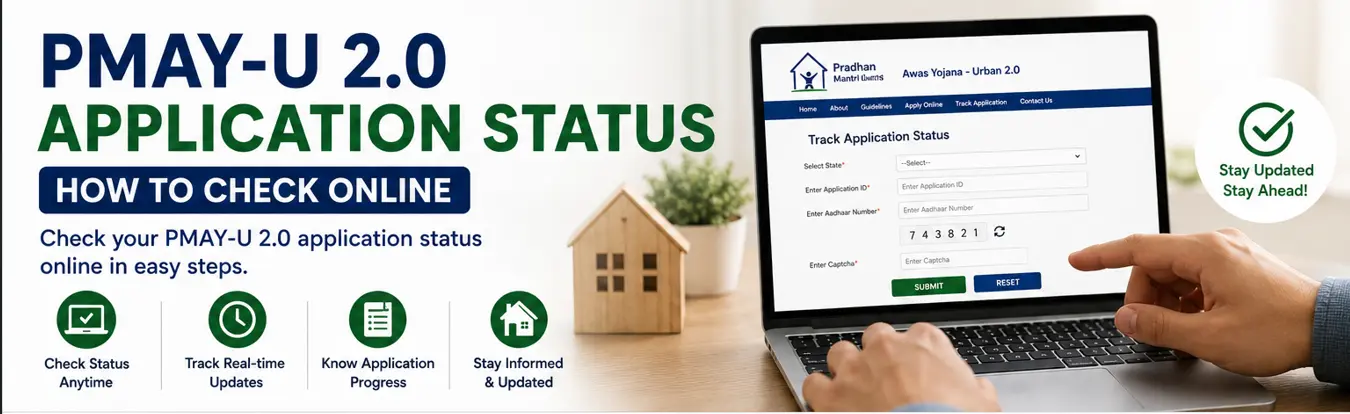
After submitting a PMAY-U 2.0 application, the next obvious question is: How do I know whether my application has been submitted, is under process, or requires further action?
The good news is that the official PMAY-U 2.0 system allows applicants to view their application information online.
However, there is one important point to understand.
Seeing “Application Submitted” does not mean your PMAY-U 2.0 benefit has already been approved.
Your application may still go through verification and processing depending on the selected PMAY-U 2.0 vertical and the concerned authority or lending institution.
This guide explains how to check your PMAY-U 2.0 application status using the official system.
Quick Answer: How to Check PMAY-U 2.0 Application Status
You can generally check your PMAY-U 2.0 application through the official PMAY-U 2.0 Unified Web Portal.
The official beneficiary application process shows that applicants can:
- Open the official PMAY-U 2.0 portal.
- Go to the applicant login section.
- Enter Aadhaar details.
- Generate and verify the OTP.
- Access the submitted application.
- View the application number and available application status information.
Before You Check Your Status
Keep the following ready:
- Aadhaar number used for the application
- Mobile phone for OTP verification
- Registered mobile number, where applicable
- PMAY-U 2.0 application number, if available
Using the same details entered during the application process will help you locate the correct application.
Step-by-Step: How to Check PMAY-U 2.0 Application Status
Step 1: Open the Official PMAY-U 2.0 Portal

Go to the official PMAY-U 2.0 Unified Web Portal.
The portal is maintained by the Ministry of Housing and Urban Affairs and provides PMAY-U 2.0 application-related services.
Step 2: Find the Applicant Login Option
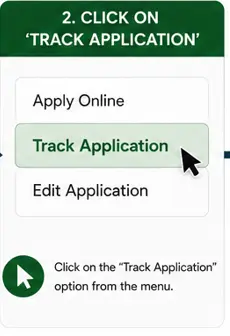
Look for the Applicant Login or relevant beneficiary login option on the official PMAY-U 2.0 system.
The official portal provides applicant login access for beneficiary-related application information.
Be careful not to confuse:
- Applicant login
- Officer login
- State/ULB/PLI login
Applicants should use the beneficiary or applicant login facility relevant to their application.
Step 3: Enter Your Aadhaar Details
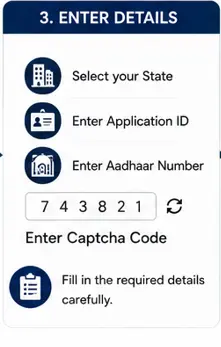
The official beneficiary application manual shows an applicant login process using details such as:
- Aadhaar number
- Name as per Aadhaar
The system then provides an OTP verification process.
Enter the information carefully.
Your name should match the relevant Aadhaar record.
Step 4: Generate the OTP
Click the option to generate an OTP.
You will need to enter the OTP received through the applicable verification process.
Do not share your OTP with anyone.
Step 5: Submit the OTP
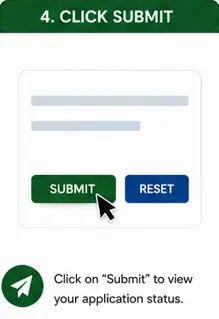
After entering the OTP, submit the details.
The official beneficiary application manual indicates that the system can display applications submitted by the user after successful login.
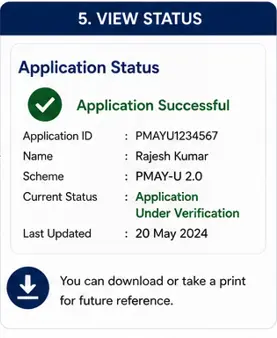
Step 6: View Your PMAY-U 2.0 Application Status
Once your submitted application is displayed, the application information can include details such as:
- Application number
- Applicant name
- Date of birth
- Selected PMAY-U 2.0 vertical
- Mobile number
- Application submission date
- Application status
The exact information visible may depend on the stage of processing and portal updates.
What Does “Application Submitted” Mean?
If your PMAY-U 2.0 application status shows Application Submitted, it generally means that your application has been successfully submitted through the system.
It does not necessarily mean that:
- Your eligibility has been finally approved.
- You have been sanctioned for financial assistance.
- Your house has been allotted.
- Your subsidy has been credited.
Further verification and processing may still be required.
This distinction is particularly important because PMAY-U 2.0 is implemented through different verticals and agencies.
PMAY-U 2.0 Application Status May Differ by Vertical
PMAY-U 2.0 operates through four major verticals:
- Beneficiary Led Construction (BLC)
- Affordable Housing in Partnership (AHP)
- Affordable Rental Housing (ARH)
- Interest Subsidy Scheme (ISS)
Your application process and subsequent verification can differ depending on the vertical you selected.
BLC Application Status
For a BLC applicant, the application may go through verification and processing involving the relevant State, UT, or Urban Local Body.
Your submitted application should not be treated as final approval until the relevant process is completed.
AHP Application Status
AHP applicants may have application processing linked to the relevant affordable housing project and implementing authorities.
Therefore, the application status should be understood together with the specific project process.
ARH Application Status
Affordable Rental Housing processes may depend on the applicable ARH project and implementing agency.
The information displayed to an applicant can vary according to the project and the applicable process.
ISS Application Status
For ISS, the PMAY-U 2.0 process also involves the relevant Primary Lending Institution because the benefit is linked to an eligible home loan.
Therefore, portal registration and home loan approval are not the same thing.
An application can require further processing by the concerned lending institution and scheme authorities.
What Information Can You See in Your Application?
The official beneficiary application manual shows an application status section containing information including:
| Information | What It Helps You Check |
|---|---|
| Application Number | Identifies your application |
| Applicant Name | Confirms the applicant record |
| Selected Vertical | Shows the PMAY-U 2.0 category selected |
| Mobile Number | Shows the application contact number |
| Submission Date | Shows when the application was submitted |
| Application Status | Shows the current available status |
The exact screen and wording may change as the government portal is updated.
Where Can You Find Your PMAY-U 2.0 Application Number?
Your application number is important.
It may be shown after successful application submission and can also appear when your submitted application is displayed through the applicant login process.
If you have your application number, save it safely.
It can help you identify the correct PMAY-U 2.0 application during future follow-up.
Good Practice
Take a screenshot or write down:
- Application number
- Application submission date
- Selected vertical
Do not publicly share screenshots containing Aadhaar numbers or other sensitive personal information.
PMAY-U 2.0 Status Not Showing? Try These Checks

If you cannot see your application, do not immediately assume that it has been rejected.
First, check the following.
1. Check Your Aadhaar Number
Make sure you entered the same Aadhaar number used during the application.
Do not use another family member’s Aadhaar number unless the application was actually submitted using that person’s details.
2. Check the Name as per Aadhaar
The official applicant login process uses Aadhaar-related information.
A spelling mismatch may create a problem.
Enter the name exactly as required by the portal.
3. Check Your OTP
An OTP may expire after a limited time.
If the OTP does not work, generate a new OTP through the official system where available.
Never share your OTP with a third party.
4. Check Whether the Application Was Successfully Submitted
Sometimes applicants complete several form pages but do not complete the final submission.
If the system shows an application number and a submitted application record, that provides evidence that the application entered the system.
5. Check the Official Portal Again Later
Government portals can occasionally experience:
- Technical maintenance
- Heavy traffic
- Temporary service interruptions
If the portal is temporarily unavailable, wait and try again later rather than repeatedly submitting a new application.
6. Do Not Submit a Duplicate Application Without Checking
If you cannot immediately see your status, do not automatically submit another application.
Duplicate or repeated applications can create unnecessary complications.
First verify your existing application through the official portal or the concerned authority.
PMAY-U 2.0 Application Submitted but No Further Update
If your application continues to show only an initial status, remember that the next stage may depend on verification by the concerned agency.
Possible authorities involved can include:
- Urban Local Body
- State or Union Territory
- Implementing agency
- Primary Lending Institution for ISS
- Other scheme authorities, depending on the vertical
The official PMAY-U 2.0 portal was designed to allow applicants to track application information in real time, while supporting due diligence and scheme processing.
However, processing time can vary.
I would not recommend relying on unofficial websites or YouTube videos that promise a fixed approval date.
How Long Does PMAY-U 2.0 Application Approval Take?
There is no single reliable approval time that applies to every PMAY-U 2.0 applicant.
The processing period can depend on:
- Selected vertical
- Location
- Verification requirements
- Document completeness
- Urban Local Body workload
- Project availability
- Home loan processing for ISS
Therefore, avoid articles or videos claiming that every PMAY-U 2.0 application will be approved within a specific number of days unless an official authority has announced such a timeline.
PMAY-U 2.0 Application Status vs Approval Status
These two terms are not always the same.
Application Status
This tells you about the current position of your submitted application in the available system.
For example, the application may show that it has been submitted.
Approval or Sanction Status
This relates to whether the relevant benefit, assistance, project or subsidy has been approved according to the applicable scheme process.
A submitted application should not be confused with final approval.
This is one of the most important points for applicants to understand.
Can You Withdraw a PMAY-U 2.0 Application?
The official beneficiary application manual shows a withdrawal option for a submitted application through the applicant login system.
However, you should not withdraw an application casually.
Before withdrawing, understand why you are doing so.
For example:
- Was the wrong vertical selected?
- Was incorrect information submitted?
- Are you applying through the correct beneficiary record?
The PMAY-U 2.0 application process and the consequences of withdrawal can depend on your stage of processing.
If you are uncertain, contact the relevant official authority before withdrawing an application.
PMAY-U 2.0 Application Status Checklist
Before contacting support, check:
- Is the Aadhaar number correct?
- Did you use the correct applicant details?
- Is the name entered as required by the Aadhaar verification process?
- Did you complete OTP verification?
- Do you have an application number?
- Did you select the correct PMAY-U 2.0 vertical?
- Did you check the official applicant login?
- Have you waited for the portal to update if the application was recently submitted?
What to Do If Your Application Shows an Error
If you see an error that you cannot resolve:
- Take a screenshot of the error.
- Do not share Aadhaar numbers publicly.
- Note your application number, if available.
- Check the official FAQs.
- Contact the relevant official authority or support channel.
The official PMAY-U 2.0 portal currently lists support contact information, including telephone numbers, WhatsApp, and support email addresses.
For direct portal access and current support information, use:
Common Mistakes When Checking PMAY-U 2.0 Application Status
Using an Unofficial Website
Many websites use scheme-related names to attract visitors.
Use the official PMAY-U 2.0 government portal.
Avoid entering your Aadhaar number or OTP on an unfamiliar website.
Assuming “Submitted” Means “Approved”
This is probably the most common misunderstanding.
A submitted application may still require verification and further processing.
Applying Again Because the Status Has Not Changed
Do not submit duplicate applications without first checking your existing record.
Sharing Your OTP
Government officials, banks, and support agents should not require you to publicly disclose your OTP.
Treat OTP information as confidential.
Ignoring the Selected Vertical
Your PMAY-U 2.0 status must be understood in the context of whether you applied under:
- BLC
- AHP
- ARH
- ISS
Each vertical has a different implementation process.
Frequently Asked Questions
Q1. How can I check my PMAY-U 2.0 application status?
Use the official PMAY-U 2.0 Unified Web Portal and access the applicant login process using the required Aadhaar and OTP verification details. The submitted application record can display the available application status.
Q2. What does “Application Submitted” mean in PMAY-U 2.0?
It generally means your application has been successfully submitted into the system. It does not by itself confirm final eligibility, sanction or benefit approval.
Q3. Can I check PMAY-U 2.0 status with my application number?
The application number is an important identifier for your application. The currently available official beneficiary process also provides an applicant login method to view submitted application information.
Q4. Why is my PMAY-U 2.0 application status not changing?
Processing may depend on the selected vertical and verification by the relevant authority or lending institution. There is no single official processing period that applies to every applicant.
Q5. Does application submission mean my PMAY-U 2.0 benefit is approved?
No. Application submission and final benefit approval are different stages.
Q6. Can I withdraw my PMAY-U 2.0 application?
The official beneficiary application manual shows a withdrawal option for a submitted application. Before withdrawing, make sure you understand whether it is the right action for your situation.
Final Takeaway
Checking your PMAY-U 2.0 application status is relatively straightforward through the official PMAY-U 2.0 system.
The most important thing is not just checking whether your application appears on the portal, but understanding what the displayed status actually means.
Remember:
- Application Submitted is not the same as Approved.
- Your selected PMAY-U 2.0 vertical affects the next steps.
- Verification and processing can involve different authorities.
- Keep your application number safe.
- Do not share Aadhaar details or OTPs with unofficial websites or individuals.
My recommendation is simple: check your status through the official government portal and avoid submitting another application unless you have confirmed that your earlier application was unsuccessful or withdrawn.
Related Benefitomics Guides
- PMAY-U 2.0 Guide (2026): Eligibility, Benefits, Housing Options & How to Apply
- PMAY-U 2.0 Eligibility 2026: Who Can Apply and Who Is Not Eligible?
- PMAY-U 2.0 Documents Required: Complete Checklist
- PMAY-U 2.0 BLC Guide: Eligibility, Land Requirement & How to Apply
- PMAY-U 2.0 AHP Guide: Affordable Housing Projects & How to Apply
- PMAY-U 2.0 ARH Guide: Affordable Rental Housing
- PMAY-U 2.0 ISS Guide: Home Loan Interest Subsidy