
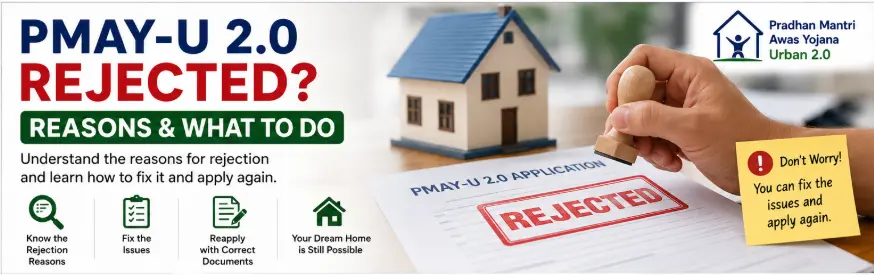
Seeing a PMAY-U 2.0 rejected status can be worrying, especially after completing the application and submitting your documents.
But do not immediately assume that every rejected application means the same thing.
A rejection can occur due to an eligibility issue, incorrect information, document verification issues, or conditions specific to the PMAY-U 2.0 vertical you selected.
The correct next step depends on why the application was rejected.
The first thing to do is find the actual reason for rejection. Do not submit a fresh application blindly.
This guide explains the possible reasons for rejection, what you should check, and the official options available to resolve a genuine problem.
Quick Answer: What to Do If PMAY-U 2.0 Is Rejected
If your PMAY-U 2.0 application is rejected, follow these steps:
- Check your application status on the official portal.
- Look for the available rejection reason or remarks.
- Check whether you actually meet the scheme eligibility criteria.
- Review your documents and application details.
- Contact the concerned Urban Local Body, State authority, or Primary Lending Institution, depending on your selected vertical.
- Use the official grievance mechanism if appropriate.
- Do not submit another application unless you understand why the first one failed.
PMAY-U 2.0 beneficiaries can track their applications through the Unified Web Portal.
Can a PMAY-U 2.0 Application Be Rejected?
Yes.
The official PMAY-U 2.0 verification process allows authorised authorities to verify applications and reject applications that are found ineligible.
For beneficiary applications, the concerned Urban Local Body can verify relevant information and reject an application where the applicant is found ineligible.
However, a rejected application should not automatically be treated as proof of fraud or wrongdoing by the applicant.
The reason matters.
For example, an application may involve:
- Failure to meet an eligibility condition
- Incorrect or inconsistent information
- Document verification issues
- Duplicate or previous housing benefit records
- Selection of an unsuitable scheme vertical
- ISS home loan or subsidy-related conditions
How to Check Whether Your PMAY-U 2.0 Application Is Rejected
Start by checking your application through the official PMAY-U 2.0 system.
Step 1: Open the Official PMAY-U 2.0 Portal
Use the official Unified Web Portal:
The official system provides facilities for beneficiaries to apply and track application status.
Step 2: Log In Using Your Applicant Details
The beneficiary application process uses Aadhaar-related details and OTP verification for applicant access.
After successful verification, the system can display the application submitted by the beneficiary.
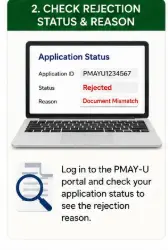
Step 3: Check the Application Status
Look carefully at:
- Application number
- Selected vertical
- Application status
- Available remarks
- Rejection reason, where displayed
Do not rely only on a screenshot forwarded by another person. Check the official system yourself.
Common Reasons Why PMAY-U 2.0 Applications May Be Rejected
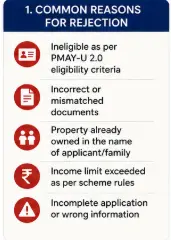
1. You Do Not Meet the Basic Eligibility Criteria
One of the most important eligibility conditions is related to housing ownership.
PMAY-U 2.0 is intended for eligible urban families that do not have a pucca house in the name of the applicant or an eligible family member anywhere in India, subject to the scheme rules.
The scheme defines a beneficiary family as comprising a husband, wife, and unmarried children.
If verification shows that the household does not meet the applicable eligibility criteria, the application may be rejected.
What to Do
Do not try to reapply using incorrect information.
First, confirm the housing ownership records and understand which eligibility condition caused the problem.
2. Previous Government Housing Benefits
Previous housing assistance can affect eligibility.
According to the official PMAY-U 2.0 FAQ, applicants who have availed benefits from a Central Government, State Government, or local government housing scheme during the previous 20 years are not eligible under the stated scheme condition.
What to Do
Check whether you or an eligible family member previously received a housing benefit that falls within the relevant exclusion rule.
Do not assume that every old government benefit automatically causes rejection. Check the exact nature of the previous benefit against the current scheme rules.
3. You Selected the Wrong PMAY-U 2.0 Vertical
PMAY-U 2.0 has four major verticals:
- Beneficiary Led Construction (BLC)
- Affordable Housing in Partnership (AHP)
- Affordable Rental Housing (ARH)
- Interest Subsidy Scheme (ISS)
The selected vertical must match your actual housing requirement and eligibility.
For example:
- BLC is relevant to eligible beneficiaries constructing a house.
- ISS is linked to an eligible home loan.
- AHP and ARH involve their own project or rental arrangements.
Choosing the wrong vertical can create problems during verification.
The official PMAY-U 2.0 FAQ confirms that beneficiaries choose one of the four scheme verticals through the prescribed process.
What to Do
Review your selected vertical before taking further action.
Do not assume that one vertical is automatically better than another because the financial assistance or benefit structure may differ.
4. Incorrect Information in the Application
Your application may be checked against the documents and information provided.
Problems can arise when information is inconsistent, including:
- Name details
- Family information
- Income information
- Address details
- Land details
- Category information
- Bank details
The official verification process involves checking beneficiary information and relevant documents.
What to Do
Compare your submitted application with your original documents.
Check whether the problem was:
- A typing mistake
- An outdated document
- Incorrect information entered in the application
- A genuine mismatch in official records
Do not guess which information caused the rejection.
5. Document Verification Problems
Submitting a document does not automatically mean it will pass verification.
Depending on the application and vertical, authorities may verify documents relating to:
- Income
- Land
- Category
- Other eligibility conditions
The official PMAY-U 2.0 verification process specifically includes verification of relevant application details and documents.
What to Do
Ask the concerned authority which document or information created the issue.
Then determine whether:
- A correct document can be provided
- An official record needs correction
- You do not actually meet the relevant requirement
6. Land Ownership Problems for BLC Applicants
Land ownership documents are particularly important under the BLC vertical.
The official FAQ identifies land ownership documents as relevant for BLC applications.
Potential issues may include:
- The land document does not support the declared ownership
- Ownership details are inconsistent
- The applicant selected BLC without meeting the land-related requirements
- Required verification cannot be completed
What to Do
Take your original property documents to the concerned authority if requested.
Do not rely only on informal advice from a broker or agent.
7. Aadhaar Authentication Problems
Aadhaar authentication can fail for technical or verification-related reasons.
The official FAQ identifies several possible causes, including:
- Missing UIDAI FaceRD application
- Outdated mobile application
- Biometric mismatch
- Locked Aadhaar
The FAQ also provides possible remedies, such as updating the relevant application, retrying face authentication, or addressing Aadhaar-related issues.
Important
An Aadhaar authentication failure and a final application rejection are not necessarily the same thing.
Check the exact status before assuming that your application has been permanently rejected.
8. Duplicate or Conflicting Beneficiary Information
Government housing schemes use verification and de-duplication processes to check eligibility.
Where duplicate or conflicting beneficiary records are identified, this can affect the application.
This is particularly important if:
- More than one application has been submitted
- A family member has already applied
- Previous scheme records exist
What to Do
Do not submit multiple new applications to solve the problem.
First identify the existing application records.
If you believe a duplicate record is incorrect, approach the appropriate official authority with supporting documents.
9. Your Area May Not Fall Under PMAY-U 2.0 Jurisdiction
PMAY-U 2.0 is intended for eligible beneficiaries in urban areas.
Where an area falls near the boundary between rural and urban jurisdiction, the applicable scheme can depend on the jurisdiction.
The official FAQ states that beneficiaries may avail benefits under PMAY-G or PMAY-U 2.0 depending on their jurisdiction.
What to Do
Confirm the jurisdiction with the concerned local authority.
Do not apply under both schemes simply to increase your chances.
10. ISS-Specific Loan Problems
If you applied under the Interest Subsidy Scheme (ISS), rejection or denial can involve additional home loan conditions.
The ISS process is connected to the Primary Lending Institution and the subsidy eligibility process.
The official FAQ specifically states that an ISS subsidy may not be released when:
- The loan account is classified as NPA, or
- The outstanding principal amount falls below the applicable 50% threshold
These are conditions relating to subsidy release and should not automatically be confused with every type of initial PMAY-U 2.0 application rejection.
What to Do
If your issue relates to ISS, ask your Primary Lending Institution for the exact stage and reason.
Check whether the problem relates to:
- Application registration
- Due diligence
- Loan eligibility
- Claim approval
- Subsidy release
The official ISS tracking system can provide information at different stages, including registration, due diligence, claim approval, and subsidy release.
PMAY-U 2.0 Rejected: What Should You Do Next?
The correct response depends on the reason.
Step 1: Find the Exact Reason
Do not immediately submit another application.
Check:
- Official application status
- Remarks
- Rejection reason, where available
- Communication from the concerned authority
If the reason is unclear, contact the authority responsible for the relevant stage.
Step 2: Check Whether the Reason Is Correct
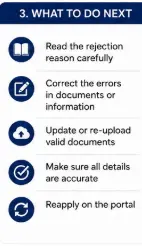
Ask yourself:
- Do I actually meet the scheme eligibility rules?
- Is the document information correct?
- Was a wrong detail entered?
- Did I select the wrong vertical?
- Is the rejection based on a misunderstanding or incorrect record?
Be honest during this review.
If you genuinely do not meet the eligibility criteria, reapplying with the same facts is unlikely to solve the problem.
Step 3: Contact the Correct Authority
The appropriate authority depends on your selected vertical and application stage.
| Your Situation | First Place to Contact |
|---|---|
| General BLC application issue | Concerned ULB/Municipality |
| State-level verification issue | Concerned State/UT authority |
| AHP or ARH issue | Relevant implementing authority |
| ISS home loan or subsidy issue | Primary Lending Institution |
| Portal technical problem | Official PMAY-U 2.0 support |
The official PMAY-U 2.0 framework allows applications through the Unified Web Portal, CSCs, and concerned Urban Local Bodies or Municipalities.
Step 4: Ask Whether Correction Is Possible
This is an important step.
Not every submitted application detail can necessarily be edited after submission.
For example, the official FAQ specifically states that the property address in Annexure-7 cannot be edited after the application has been submitted.
In that particular situation, the beneficiary may withdraw the application before verification and reapply with the correct information.
This does not mean that every rejected application can be withdrawn and corrected.
The available action depends on:
- The type of error
- The application stage
- Whether verification has already occurred
- The selected vertical
Step 5: Use the Official Grievance Mechanism Where Appropriate
If you believe your application has been wrongly handled, you can use the official grievance channels.
The official PMAY-U 2.0 FAQ states that applicants can submit complaints through the PMAY-U 2.0 portal for grievance redressal.
Citizens can also use the Centralised Public Grievance Redress and Monitoring System (CPGRAMS) for grievances relating to public service delivery.
Before filing a grievance, collect:
- Application ID
- Applicant name
- Submission date
- Current status
- Screenshot of the status
- Relevant supporting documents
- A clear explanation of why you believe there is an error
Write a Clear Grievance
Avoid writing:
“My application was rejected. Please approve it immediately.”
Instead, explain:
- Your application number
- The displayed rejection or status
- The specific issue you are disputing
- The supporting information or document
- The clarification you are requesting
A clear grievance is more useful than a general complaint.
Can You Reapply After PMAY-U 2.0 Rejection?
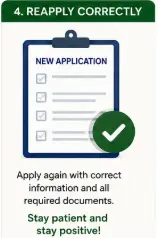
There is no single answer for every applicant.
It depends on why the application was rejected.
You May Need to Correct the Issue First
If the rejection resulted from a genuine mistake that can legally and technically be corrected, follow the applicable official process.
For certain situations, the official FAQ allows withdrawal before verification and reapplication with corrected information.
Do Not Reapply If You Are Clearly Ineligible
Submitting a second application will not overcome a genuine eligibility restriction.
Examples include situations where the applicant clearly fails an applicable scheme condition.
Check Before Creating a Duplicate Application
Multiple applications can create duplicate records and further verification problems.
My recommendation is clear:
Do not submit a fresh PMAY-U 2.0 application until you understand the exact reason the earlier application was rejected.
PMAY-U 2.0 Rejected vs Application Pending
These are different situations.
Application Pending
A pending application generally means processing or verification has not been completed.
Do not treat a long waiting period as proof of rejection.
Application Rejected
A rejected application means that the relevant authority or system has not accepted the application at that stage.
You should then identify the reason before taking further action.
What If No Rejection Reason Is Visible?
Sometimes an applicant may see a status without clearly understanding why the decision was made.
In that situation:
- Save a screenshot.
- Note your application number.
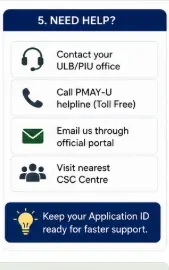
- Contact the concerned ULB, State authority or PLI.
- Ask for clarification through an official channel.
- Use the grievance mechanism if the issue remains unresolved.
Do not pay an unofficial agent who promises to “remove” the rejection.
Important Warning: Beware of Agents Promising Guaranteed Approval
PMAY-U 2.0 is a government scheme.
No private agent can legitimately guarantee that an ineligible applicant will receive approval.
Be cautious if someone asks for money and promises to:
- Change your application status
- Remove a rejection
- Guarantee approval
- Create false eligibility documents
- Bypass verification
Use only official channels.
PMAY-U 2.0 Rejection Checklist
If your application is rejected, check:
- Application number
- Selected PMAY-U 2.0 vertical
- Exact status shown
- Available rejection reason
- Eligibility criteria
- Previous housing scheme benefits
- Housing ownership records
- Income and category information
- Aadhaar verification status
- Land documents, if applying under BLC
- Home loan status, if applying under ISS
- Whether an official grievance is appropriate
Frequently Asked Questions
Q1. Why was my PMAY-U 2.0 application rejected?
The exact reason depends on the application. Possible reasons include ineligibility, verification problems, incorrect information, document issues, duplicate records, or vertical-specific conditions. Official verification authorities can reject applications found ineligible.
Q2. Can I apply again after PMAY-U 2.0 rejection?
It depends on the reason for rejection. Do not reapply until you know whether the problem can be corrected and whether the scheme rules allow the appropriate action.
Q3. Can I correct my PMAY-U 2.0 application after submission?
The answer depends on the field and stage of the application. For example, the official FAQ states that the property address in Annexure-7 cannot be edited after submission; in that situation, withdrawal before verification and reapplication may be possible.
Q4. Does PMAY-U 2.0 rejection mean I can never apply again?
Not necessarily.
It depends entirely on the reason. A correctable information problem is different from a permanent eligibility restriction.
Q5. Can I complain if my PMAY-U 2.0 application was wrongly rejected?
Yes, where appropriate. The official PMAY-U 2.0 system provides a grievance option, and citizens may also use CPGRAMS for grievances related to public service delivery.
Q6. Who can help with a rejected BLC application?
Start with the concerned Urban Local Body or Municipality because BLC applications involve local verification and processing.
Q7. What should ISS applicants do if their subsidy is denied?
First, identify whether the issue relates to application registration, loan eligibility, due diligence, claim approval or subsidy release. Contact the concerned Primary Lending Institution and check the official ISS application status.
Final Takeaway
A PMAY-U 2.0 rejected application is not a situation where you should panic or immediately apply again.
The right approach is:
- Find the exact reason.
- Check whether you genuinely meet the eligibility criteria.
- Identify any document or information problem.
- Contact the correct official authority.
- Use the grievance process when there is a genuine issue.
- Reapply only when the rules and your application stage allow it.
The most important principle is simple: do not try to fix a rejection blindly. Understand the reason first.
For current scheme information, use the official PMAY-U 2.0 FAQ and PMAY-U 2.0 Guidelines page.
Related Benefitomics Guides
- PMAY-U 2.0 Guide (2026): Eligibility, Benefits, Housing Options & How to Apply
- PMAY-U 2.0 Eligibility 2026: Who Can Apply and Who Is Not Eligible?
- PMAY-U 2.0 Documents Required: Complete Checklist
- PMAY-U 2.0 Application Status: How to Check Online
- PMAY-U 2.0 BLC Guide: Eligibility, Land Requirement & How to Apply
- PMAY-U 2.0 AHP Guide: Affordable Housing Projects & How to Apply
- PMAY-U 2.0 ARH Guide: Affordable Rental Housing
- PMAY-U 2.0 ISS Guide: Home Loan Interest Subsidy