
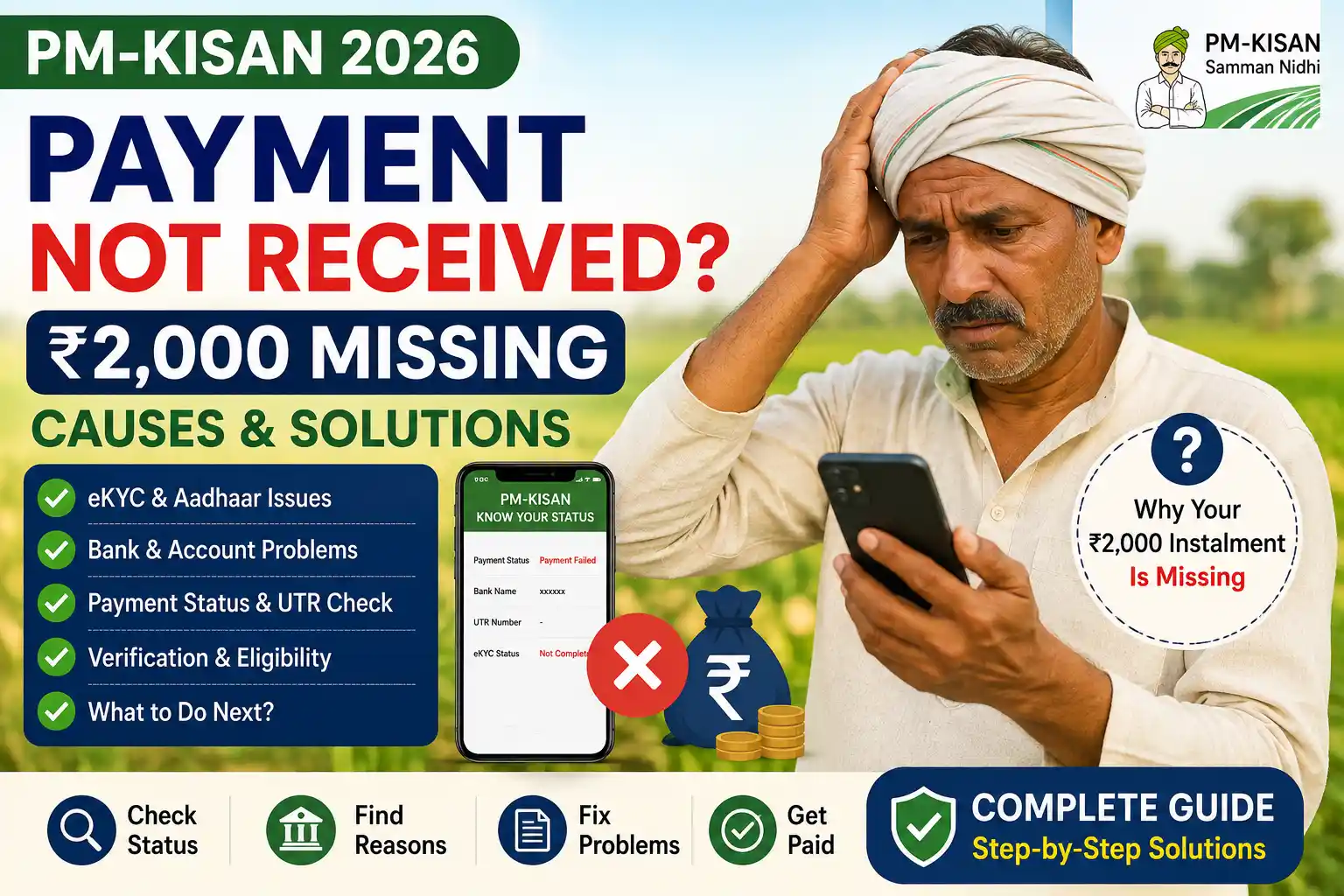
PM-KISAN payment not received? If your expected ₹2,000 instalment has not reached your bank account, don’t immediately submit a new registration.
If the problem with your PM-KISAN payment not being received has not been resolved, don’t immediately submit a new application.
There can be several reasons.
Your eKYC may not be complete, your beneficiary record may require verification, your bank details may need attention, or the payment may already be recorded as credited even though you have not noticed it in your bank account.
The first step is therefore not guessing.
Check your PM-KISAN status and find out what actually happened to the payment.
The official PM-KISAN Know Your Status facility currently displays payment status, bank name, UTR number, payment mode, account-credited status, and credited date.
PM-KISAN Payment Not Received? Check This First
Open the official PM-KISAN Know Your Status facility.
The current system asks for your Registration Number, captcha, and OTP verification through the eKYC-registered mobile number.
Once you enter the status page, look at:
- Payment Status
- Bank Name
- UTR Number
- Payment Mode
- Account Credited
- Credited On
- Financial-year-wise eKYC status
Don’t skip this step.
A farmer who says “PM-KISAN money has not come” may actually have a payment marked as credited, while another farmer may have a pending verification issue.
Those two situations require completely different actions.
Visual Walkthrough 1: Check why PM-KISAN payment of ₹ 2,000 is not received
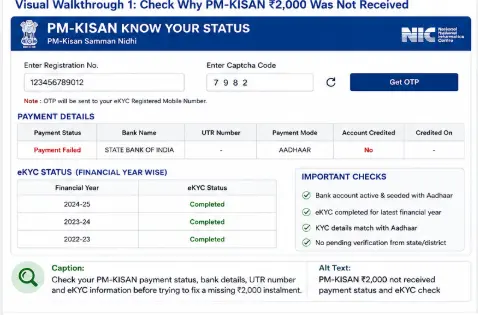
If your PM-KISAN payment is not received, check your beneficiary status, eKYC, bank information, and payment details before raising a grievance.
Reason 1: PM-KISAN eKYC Is Not Complete
This is one of the first things you should check.
The official PM-KISAN portal currently states:
eKYC is mandatory for PM-KISAN registered farmers.
If your eKYC status is still showing as incomplete, complete it using an available official method.
Depending on the current service available to you, PM-KISAN provides eKYC options including OTP, biometric, and mobile-based authentication.
After completing eKYC, check your beneficiary status again.
The official PM-KISAN eKYC material says that eKYC status can be reflected in beneficiary status after processing and directs farmers to the Know Your Status module and Kisan-eMitra for checking status.
Reason 2: Payment Is Actually Credited, But You Have Not Seen It
This situation is different.
Suppose your PM-KISAN status says:
Payment Status: Credited
Account Credited: Yes
UTR: Available
Then don’t immediately raise a complaint saying the payment was not released.
Check the bank account first.
Look at the:
- Bank name
- Credited date
- UTR number
- Bank statement
The current PM-KISAN status page specifically provides these transaction details.
What Is a UTR Number?
UTR is the transaction reference used to identify a banking transaction.
If PM-KISAN provides a UTR number, keep it.
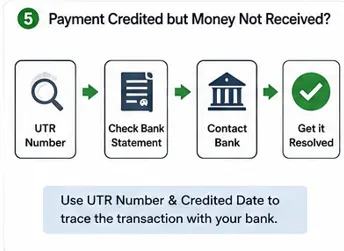
If the amount is not visible in your bank account, contact the bank and ask them to trace the transaction using the UTR and credited date.
That is much more useful than simply telling the bank:
“My PM-KISAN ₹2,000 has not come.”
Visual Walkthrough 2: Payment Credited but Money Not Visible
Reason 3: Your Bank Details May Need Attention
PM-KISAN benefits are transferred directly to beneficiary bank accounts.
If the payment is not reaching the intended account, check the bank information associated with your PM-KISAN record.
Look for:
- Incorrect account details
- Bank account changes
- Bank merger or account changes
- Account-related restrictions
- Aadhaar or banking linkage issues where applicable
Don’t assume that changing your bank account automatically updates your PM-KISAN record.
Use the official PM-KISAN facilities to check and update information where the current portal permits it.
The current Farmers Corner includes Update Mobile Number, Update Missing Information, Edit / Update Self Registration, and other beneficiary services.
Reason 4: Your Beneficiary Record Is Under Verification
This is particularly important in 2026.
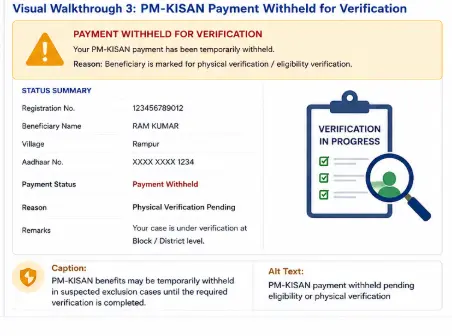
The current PM-KISAN website says that the Department has identified certain suspected cases that may fall under scheme exclusion criteria and that benefits for such cases have been temporarily withheld until physical verification is completed.
The portal currently gives examples including:
- Farmers who acquired land ownership after 1 February 2019
- Cases where more than one family member is receiving PM-KISAN benefits, such as both husband and wife or another combination covered by the scheme rules.
This is why a missing instalment does not necessarily mean that the bank has failed to transfer your money.
Check your eligibility status through the official Know Your Status facility, the PM-KISAN mobile app, or Kisan-eMitra, as advised by the portal.
Reason 5: Your Land Record May Need Verification
PM-KISAN eligibility is linked to landholding farmer families and State/UT identification of eligible beneficiaries.
The official PM-KISAN website states that State Governments and UT administrations identify eligible farmer families according to the scheme guidelines.
If there is a problem with your land record, such as an ownership change that has not been properly reflected, the PM-KISAN record may require attention.
This is especially important after:
- Inheritance
- Sale or purchase of land
- Mutation
- Family partition
- Change in ownership
Don’t assume that the PM-KISAN portal can independently correct a State land record.
If the underlying land record is wrong, the appropriate State/UT land-record authority may need to correct it first.
Reason 6: Your Registration Is Still Pending
If you recently applied for PM-KISAN, you may not yet be an approved beneficiary.
Use the official Status of Self Registered Farmer / CSC Farmers facility to check the registration.
This is different from the payment status of an already established beneficiary.
The current PM-KISAN Farmers Corner specifically provides a separate facility for self-registered and CSC-registered farmers.
So:
New application → Check self-registration status
Existing beneficiary → Check Know Your Status
Don’t confuse the two.
Reason 7: Your Benefits May Be Temporarily Withheld
The official PM-KISAN website currently says that benefits for certain suspected exclusion cases have been temporarily withheld pending physical verification.
If your status indicates a verification issue, repeatedly checking the bank account will not solve it.
You need to understand the reason for the hold and follow the applicable verification process.
Visual Walkthrough 3: PM-KISAN Payment Withheld for Verification
Reason 8: You Are Checking the Wrong Bank Account
This sounds obvious, but it happens.
If you have:
- Changed banks
- Closed an old account
- Multiple bank accounts
- Changed account details after registration
Check which bank information appears in your PM-KISAN status.
The official Know Your Status facility currently displays the Bank Name associated with the payment information.
Compare that with your actual bank accounts.
Reason 9: You Are Relying Only on an SMS
Don’t use the absence of an SMS as proof that the PM-KISAN payment has not arrived.
The proper sequence is:
PM-KISAN status
↓
Bank name
↓
Credited date
↓
UTR
↓
Bank statement
This gives you a much clearer picture.
What to Do If PM-KISAN Shows Payment as Credited
If your status shows:
Payment Status: Credited
and
Account Credited: Yes
Do this:
Step 1
Note the UTR number.
Step 2
Note the credited date.
Step 3
Check the bank name.
Step 4
Check your bank statement.
Step 5
Ask the bank to trace the transaction using the UTR.
Only after these checks should you consider raising a PM-KISAN grievance.
What to Do If PM-KISAN Payment Is Pending
If the status doesn’t show a completed credit, don’t automatically assume that the payment has been rejected.
Check:
- eKYC
- Beneficiary status
- Eligibility
- Land information
- Bank information
- Verification status
Then identify the actual issue.
What to Do If PM-KISAN Payment Has Failed
A failed transaction is different from a pending payment.
Official PM-KISAN operational guidance describes unsuccessful transactions being reported back through the banking system for verification and reprocessing.
For a current case, however, use the status information displayed by the current PM-KISAN system and follow the instructions applicable to your record.
Don’t rely on an old article that tells you exactly what a particular historical payment status meant.
What If My PM-KISAN payment of ₹2,000 Is Still Not Received?
Use this checklist.
PM-KISAN payment of ₹2,000 Missing Checklist
☐ Check PM-KISAN Know Your Status
☐ Check eKYC status
☐ Check beneficiary status
☐ Check bank name
☐ Check payment status
☐ Check UTR number
☐ Check credited date
☐ Check bank statement
☐ Check eligibility or verification status
☐ Raise a grievance if the issue remains unresolved
This is much more effective than repeatedly submitting a new PM-KISAN registration.
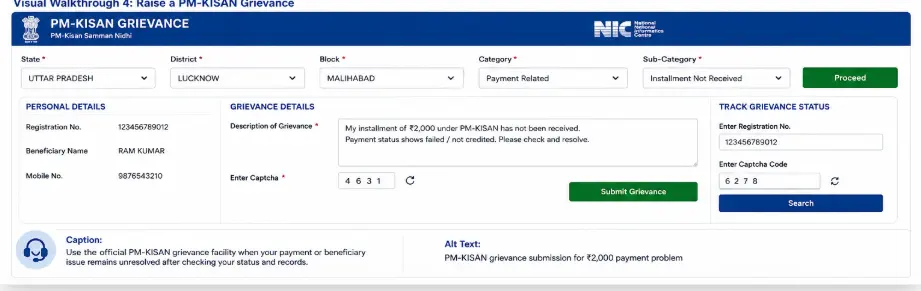
How to Raise a PM-KISAN Grievance
If you have checked your status and still cannot resolve the problem, use the official PM-KISAN grievance facility.
The current grievance page provides options to Raise Grievance and Check Status. It accepts a Temporary Number or Registration Number and asks for the grievance category and description.
The current page also states that a Temporary ID should be used when the registration is new or pending approval at any level.
Visual Walkthrough 4: Raise a PM-KISAN Grievance
What Should You Write in a PM-KISAN Grievance?
Don’t write only:
“My PM-KISAN money has not come.”
Give useful information.
For example:
“My PM-KISAN beneficiary status shows that the instalment has not been credited. I have completed eKYC and checked my bank account. Please verify the payment status and beneficiary record.”
If a UTR is available, mention the relevant transaction information where appropriate.
Keep the description factual and concise.
The current grievance form allows a description of up to 500 words.
Don’t Do These Things When PM-KISAN ₹2,000 Is Missing
Don’t submit a second application immediately
First, check what happened to the existing record.
Don’t pay an unknown person for “payment activation”
Be cautious about anyone promising to release your PM-KISAN payment for a fee.
Don’t share OTPs
Your OTP should remain under your control.
Don’t assume every missing payment is a bank problem
The issue may be related to eKYC, eligibility, land records, or verification.
Don’t trust old screenshots blindly
Government portals change.
Use the current official PM-KISAN portal as your primary source.
Quick Decision Guide
PM-KISAN says “Credited”
Check UTR → Check bank statement → Contact bank
PM-KISAN says eKYC incomplete
Complete eKYC → Check status again
Registration is pending
Check self-registration status → Wait for/resolve verification
Eligibility/verification issue appears
Check Know Your Status → Follow the applicable verification process
Nothing explains the missing payment
Check all records → Raise official grievance
This is the practical way to approach a missing PM-KISAN payment.
Frequently Asked Questions
Why has my PM-KISAN ₹2,000 not been received?
Possible reasons include incomplete eKYC, beneficiary verification, bank-related issues, registration status, land-record issues, or benefits being temporarily withheld in suspected exclusion cases. Check your official PM-KISAN status first.
My PM-KISAN payment shows credited, but I did not receive the money. What should I do?
Check the bank name, credited date, and UTR shown in Know Your Status. Then check your bank statement and ask your bank to trace the transaction using the UTR.
Is eKYC required to receive PM-KISAN?
The current official PM-KISAN portal states that eKYC is mandatory for registered PM-KISAN farmers.
Can PM-KISAN benefits be withheld?
Yes. The current official portal says certain suspected exclusion cases may have benefits temporarily withheld pending physical verification.
What if my PM-KISAN registration is still pending?
Check the official Status of Self Registered Farmer / CSC Farmers facility. If the registration is new or pending approval, the PM-KISAN grievance system specifically provides for using a Temporary ID.
Where can I complain about a missing PM-KISAN payment?
Use the official PM-KISAN grievance facility after checking your beneficiary and payment status. The current grievance page allows you to raise and check a grievance using the relevant Temporary or Registration Number.
Should I register for PM-KISAN again if ₹2,000 has not arrived?
No, not automatically. First, find out whether your existing registration is active, pending, verified, or facing another issue.
Final Takeaway
If your PM-KISAN payment not received issue is still unresolved, check the official payment and beneficiary information before submitting another application.
Start with Know Your Status.
Check your eKYC, payment status, bank name, UTR, credited date, and beneficiary information. The current official PM-KISAN system provides these details specifically so farmers can identify what is happening with their payment.
If the payment is marked as credited, investigate the transaction with your bank.
If eKYC is incomplete, complete it.
If the beneficiary record is under verification, find out why.
If the problem remains unresolved after checking the available information, use the official grievance facility.
The important thing is to identify the reason first and then take the appropriate action.
Related PM-KISAN Guides
Main Guide: PM-KISAN Samman Nidhi Guide India (2026): Eligibility, eKYC, Instalments & Status Check
Supporting Post 1: How to Register for PM-KISAN Online (2026)
Supporting Post 2: How to Complete PM-KISAN eKYC Online (2026)
Supporting Post 3: How to Check PM-KISAN Beneficiary Status & Payment Status
Next: How to Correct PM-KISAN Registration Details