
How to Correct PM-KISAN Registration Errors
Need help with PM-KISAN registration correction? If you have found incorrect or missing information in your PM-KISAN record, don’t immediately submit a new registration.
Maybe your mobile number is outdated. Perhaps some information is missing from your beneficiary record. Or you checked your PM-KISAN status and found that something does not look right.
Don’t submit a fresh PM-KISAN application immediately.
The official PM-KISAN portal currently provides separate facilities for Edit / Update Self Registration, Update Missing Information and Update Mobile Number.
The correct method depends on what information needs to be changed.
This guide explains which PM-KISAN correction facility to use and what you should check before submitting an update.
What PM-KISAN Details Can Be Corrected?
The correction facility you need depends on the type of problem.
The current PM-KISAN portal provides separate options for:
- Editing or updating self-registration
- Updating missing beneficiary information
- Updating the registered mobile number
- Checking beneficiary status
- Checking the status of a self-registered farmer or CSC-registered farmer
Don’t assume that every type of correction can be made through one form.
That is the first mistake to avoid.
Before Correcting Your PM-KISAN Details
Before starting a PM-KISAN registration correction, check your existing beneficiary record carefully so you know exactly which information needs to be changed. Keep these details ready:
- Aadhaar number
- PM-KISAN Registration Number, if available
- Registered mobile number
- Correct mobile number, if changing it
- Relevant land or beneficiary information
- Captcha details shown on the portal
Most importantly, check your existing PM-KISAN status first.
The current Know Your Status facility uses the Registration Number and OTP sent to the eKYC-registered mobile number. It displays account and payment information including bank name, UTR number, payment mode and credited date.
Step 1: Check Your Existing PM-KISAN Record
Before making a correction, open the official PM-KISAN Know Your Status facility.
Enter your Registration Number and complete the verification process.
Look at the information available in your record.
This helps you identify the actual problem instead of changing information unnecessarily.
Visual Walkthrough 1: Check Existing PM-KISAN Details
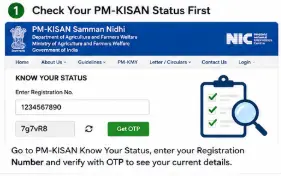
Check your existing PM-KISAN beneficiary record before attempting to correct or update registration details.
Method 1: Edit or Update Self Registration
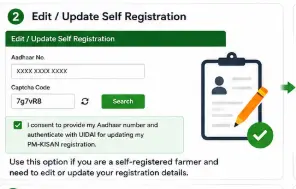
If your issue relates to a self-registered farmer record, the PM-KISAN portal currently provides an Edit / Update Self Registration facility in the Farmers Corner.
This is particularly relevant when you registered yourself online and need to update information associated with that registration.
The current PM-KISAN self-registration update page asks for Aadhaar information and captcha and includes Aadhaar authentication consent.
How to Update Self-Registered PM-KISAN Details
Step 1
Open the official PM-KISAN website.
Step 2
Go to the Farmers Corner.
Step 3
Select:
Edit / Update Self Registration
Step 4
Enter the requested Aadhaar details and captcha.
Step 5
Complete the authentication or verification requested by the current portal.
Step 6
Review the information carefully before confirming the update.
Step 7
Save or note any acknowledgement or updated status provided by the portal.
The exact fields displayed can change when the government updates the portal, so don’t rely on an old screenshot showing a different form.
Visual Walkthrough 2: Edit or Update Self Registration
Method 2: Update Missing PM-KISAN Beneficiary Information
This is a different facility.
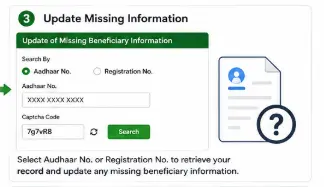
The current official PM-KISAN page is titled Update of Missing Beneficiary Information. It provides a search option using Aadhaar Number or Registration Number, followed by the required verification details.
This facility is useful when information is missing from an existing beneficiary record.
How to Update Missing PM-KISAN Information
Step 1
Open the official PM-KISAN portal.
Step 2
Go to the Farmers Corner.
Step 3
Select:
Update Missing Information
Step 4
Choose the applicable search type.
The current page provides options involving:
Aadhaar No.
or
Registration No.
Step 5
Enter the requested information and captcha.
Step 6
Complete the consent and authentication process displayed by the portal.
Step 7
Review the information carefully.
Step 8
Submit the update if the portal allows the required correction.
The current page includes Aadhaar-authentication consent and explains that Aadhaar and demographic information are collected for authentication and determining eligibility under PM-KISAN.
Visual Walkthrough 3: Update Missing Information
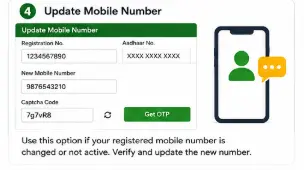
Method 3: How to Update PM-KISAN Mobile Number
If your registered mobile number has changed, the PM-KISAN website currently provides a separate Update Mobile Number option in the Farmers Corner.
This is important because mobile-based authentication and status services can depend on the mobile number associated with your PM-KISAN record.
Don’t keep using an old number simply because it was used during registration.
When Should You Update Your Mobile Number?
Consider updating it if:
- Your old mobile number is no longer active
- You have permanently changed your mobile number
- You cannot receive relevant PM-KISAN OTPs on the old number
- Your PM-KISAN record contains an outdated mobile number
However, don’t change your number merely because an OTP is delayed once.
First rule out a temporary network or service problem.
How to Update Your PM-KISAN Mobile Number
Step 1
Open the official PM-KISAN website.
Step 2
Go to Farmers Corner.
Step 3
Select Update Mobile Number.
Step 4
Enter the information requested by the current portal.
Step 5
Complete the authentication process.
Step 6
Enter the new mobile number where requested.
Step 7
Complete the OTP or other verification displayed by the portal.
Step 8
Check your PM-KISAN status again after the update.
The exact verification screen can change, so follow the instructions displayed by the current official portal rather than an old tutorial.
Visual Walkthrough 4: Update PM-KISAN Mobile Number
What If Your Name Is Wrong in PM-KISAN?
This requires caution.
Don’t assume that every name mismatch can simply be edited from the PM-KISAN website.
PM-KISAN uses Aadhaar authentication and beneficiary information maintained through government systems. The current registration and update pages explicitly involve Aadhaar authentication and demographic information for determining eligibility.
If your name is incorrect because the underlying Aadhaar record itself has an error, correcting the PM-KISAN record alone may not solve the underlying problem.
First identify where the incorrect information originates.
If Aadhaar itself is incorrect
You may need to correct the Aadhaar record through the appropriate UIDAI process.
If Aadhaar is correct but PM-KISAN information is different
Check which PM-KISAN update facility is available for your record.
If the issue relates to land records
The appropriate State/UT land-record authority may need to address the underlying record.
Don’t try to solve every type of mismatch through the PM-KISAN portal alone.
What If Your Aadhaar Details Are Wrong?
This is another situation where you should not blindly edit information.
The current PM-KISAN registration process uses Aadhaar authentication. The official registration page states that the Aadhaar number is authenticated with UIDAI and that registration proceeds only if the Aadhaar is authenticated.
Therefore, if your Aadhaar information itself is incorrect, first determine whether the problem is with Aadhaar or with the PM-KISAN beneficiary record.
What If Your Bank Details Are Wrong?
Bank information matters because PM-KISAN benefits are transferred to beneficiary bank accounts.
If your PM-KISAN status shows a bank name or payment information that you do not recognise, don’t simply assume that the next instalment will automatically reach your current account.
Check the beneficiary record and use the correction/update route applicable to your case.
If the portal does not provide the required correction option, use the appropriate government support or grievance channel rather than entering another registration.
What If Your Land Details Are Wrong?
Land information is particularly important because PM-KISAN eligibility is based on eligible landholding farmer families, with State/UT Governments responsible for identifying beneficiaries under the scheme framework.
If your land record is incorrect because of:
- Inheritance
- Mutation
- Sale or purchase
- Family partition
- Change in ownership
the underlying land record may need correction through the relevant State/UT system.
PM-KISAN cannot necessarily correct a land-record problem that originates in the State’s land database.
What If You Cannot Edit the Information Online?
This is where many people make another mistake.
They submit a completely new PM-KISAN application.
Don’t do that unless you actually need a new registration.
If an existing beneficiary record needs correction but the online facility does not allow the required change, use the official PM-KISAN grievance mechanism or the appropriate local government/CSC channel.
The current grievance system allows users to raise and check grievances using a Temporary or Registration Number. It specifically says that a Temporary ID can be used when a registration is new or pending approval.
How to Check Whether Your Correction Was Updated
After making a correction, don’t assume that it has immediately propagated across every PM-KISAN facility.
Go back to Know Your Status.
Check the information available in your beneficiary record.
For payment-related information, the current status page displays:
- Payment Status
- Bank Name
- UTR Number
- Payment Mode
- Account Credited
- Credited On
- Financial-year-wise eKYC information
If the corrected information is not reflected, give the system reasonable time to update and then check again.
If the issue remains unresolved, use the appropriate grievance route.
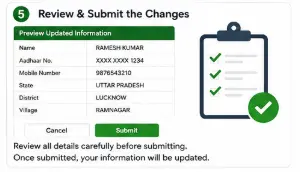
Visual Walkthrough 5: Verify PM-KISAN Correction
PM-KISAN Correction vs New Registration
This distinction is important.
| Situation | What to use |
|---|---|
| You have never registered | New Farmer Registration |
| You made a mistake in self-registration | Edit / Update Self Registration |
| Information is missing from existing record | Update Missing Information |
| Mobile number has changed | Update Mobile Number |
| You want to see your existing record | Know Your Status |
| New application is pending | Status of Self Registered Farmer / CSC Farmers |
| Existing problem cannot be resolved | PM-KISAN Grievance |
These facilities are currently listed separately in the PM-KISAN Farmers Corner.
Common PM-KISAN Correction Mistakes
Mistake 1: Registering again
Don’t create another application simply because one detail is wrong.
Mistake 2: Using an unofficial website
Use the official pmkisan.gov.in domain.
Mistake 3: Changing information without checking the existing record
First find out what is actually wrong.
Mistake 4: Assuming an Aadhaar problem is a PM-KISAN problem
Check the source of the mismatch.
Mistake 5: Ignoring land records
If the problem originates in the State land record, changing a PM-KISAN field may not resolve it.
Mistake 6: Sharing OTP
Never give your OTP to a stranger claiming to correct your PM-KISAN record.
Mistake 7: Paying an unknown person for a correction
Be careful about people promising to “activate” or “release” PM-KISAN benefits in exchange for money.
What Documents Should You Keep Ready?
Depending on the correction, you may need information such as:
- Aadhaar
- PM-KISAN Registration Number
- Mobile number
- Bank account details
- Relevant land or ownership records
- Other information requested by the official portal
Don’t upload unnecessary documents to unofficial websites.
If you still need to correct PM-KISAN registration information after checking your record, use the official update facility applicable to your case.
A successful PM-KISAN registration correction does not automatically guarantee payment. Your beneficiary record must still satisfy the applicable eligibility and verification requirements.
Frequently Asked Questions
Q1. Can the PM-KISAN registration correction process be done online?
Yes, the current PM-KISAN portal provides different update facilities, including Edit / Update Self Registration and Update Missing Information.
Q2. How can I update my PM-KISAN mobile number?
Use the Update Mobile Number facility in the PM-KISAN Farmers Corner and follow the authentication instructions shown on the current portal.
Q3. Can I correct missing information in my PM-KISAN record?
The current portal provides an Update Missing Information facility that allows searching by Aadhaar Number or Registration Number before proceeding with the required authentication and update process.
Q4. Can I change my Aadhaar details directly in PM-KISAN?
Don’t assume that every Aadhaar-related correction can be made directly in PM-KISAN. The portal uses Aadhaar authentication, so first determine whether the error is in your Aadhaar record or the PM-KISAN beneficiary information.
Q5. Can I correct my PM-KISAN bank details online?
The availability of a particular bank-detail correction depends on your beneficiary record and the current portal workflow. Check the available update facilities first rather than submitting a new registration.
Q6. What should I do if PM-KISAN correction is not available online?
Check the existing beneficiary status and use the official PM-KISAN grievance mechanism if the required correction cannot be completed through the available online facility.
Q7. Will correcting PM-KISAN details immediately release my pending ₹2,000?
No.
Updating information does not automatically guarantee payment. The beneficiary still has to satisfy the applicable eligibility and verification requirements.
Q8. How do I know whether my correction was successful?
Check your PM-KISAN record again through Know Your Status after the update has been processed. The current status facility provides beneficiary and payment-related information.
Final Takeaway
If you need PM-KISAN registration correction, use the official update facility that applies to your particular problem instead of submitting a duplicate application. If something is wrong in your PM-KISAN record, don’t start with a new application.
Start by identifying the problem.
If it is a self-registration issue, look for Edit / Update Self Registration.
If information is missing, use Update Missing Information.
If your mobile number has changed, use Update Mobile Number.
If you simply want to verify what the government currently has on record, use Know Your Status. These facilities are currently provided separately through the official PM-KISAN portal.
And if the correction you need cannot be completed online, use the official grievance mechanism rather than submitting duplicate applications.
Correct the existing record first. Register again only when a new registration is genuinely required.
Related PM-KISAN Guides
Main Guide: PM-KISAN Samman Nidhi Guide India (2026): Eligibility, eKYC, Instalments & Status Check
Supporting Post 1: How to Register for PM-KISAN Online (2026)
Supporting Post 2: How to Complete PM-KISAN eKYC Online (2026)
Supporting Post 3: How to Check PM-KISAN Beneficiary Status & Payment Status
Supporting Post 4: PM-KISAN ₹2,000 Not Received? Causes & Solutions
Next Supporting Post: PM-KISAN Beneficiary List: How to Check Your Name