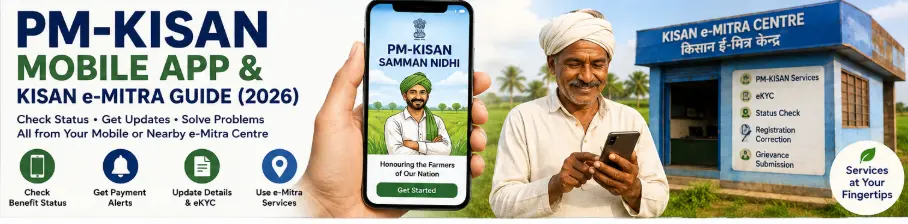
PM-KISAN Mobile App and Kisan e-Mitra: What They Can Do
If you regularly check your PM-KISAN status, you don’t necessarily have to use the website every time.
The official PM-KISAN system currently provides both a PM-KISAN mobile application and Kisan e-Mitra, an AI chatbot that can help farmers access information and check certain PM-KISAN-related details. The official PM-KISAN website specifically directs farmers to the website, mobile app, or Kisan e-Mitra for checking eligibility information in certain cases.
The two services are different.
The PM-KISAN mobile app is an application for accessing PM-KISAN services on a mobile device.
Kisan e-Mitra is an AI-powered chatbot designed to provide information and help users navigate selected scheme-related queries.
This guide explains how to use both without confusing one with the other.
What Is the PM-KISAN Mobile App?
The PM-KISAN mobile application is the official app for the PM-KISAN scheme.
The official PM-KISAN website provides a Download PM Kisan Mobile App option, and its mobile-app privacy policy states that the application is hosted through NIC’s e-Gov Mobile App account in the Google Play Store.
The current official privacy policy also says the PM-KISAN mobile application is geo-fenced and accessible only in India.
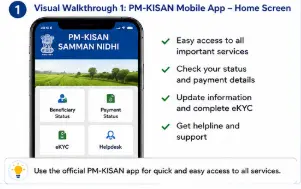
Visual Walkthrough 1: PM-KISAN Mobile App
Where Should You Download the PM-KISAN App?
Don’t download a PM-KISAN application simply because its name appears in a search result.
Start on the official PM-KISAN website and use the “Download PM Kisan Mobile App” link. The official site currently lists this option among its useful links.
This is safer than downloading an APK file from an unknown website.
Important Safety Rule
You should never install a supposedly “PM-KISAN” app from a random website merely because it promises:
- Faster payment
- Instant ₹2,000 release
- Payment activation
- Guaranteed approval
- Guaranteed eKYC
- Special beneficiary status
Those promises are warning signs.
Use official government channels.
What Can You Use the PM-KISAN Mobile App For?
The official PM-KISAN material documents mobile-app access to beneficiary services, including eKYC and status-related functions.
The PM-KISAN website currently states that biometric-based eKYC is available for the PM-KISAN Mobile Application, along with CSC VLE logins and authorised State-user logins.
The official eKYC guidance also describes using the mobile app for face-authentication eKYC.
Depending on the current version of the application and your beneficiary record, available features may change.
That is why you should follow the options displayed in the current app rather than relying on an old screenshot.
How to Log In to the PM-KISAN Mobile App
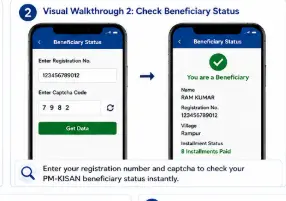
The exact app interface can change with updates, but the official eKYC guidance describes logging into the app using the PM-KISAN registered mobile number.
A typical process is:
- Open the official PM-KISAN mobile application.
- Enter the mobile number associated with your PM-KISAN record.
- Complete the authentication requested by the application.
- Open the relevant beneficiary or status facility.
- Follow the instructions displayed on the current screen.
Visual Walkthrough 2: PM-KISAN Mobile App Login
Can You Complete PM-KISAN eKYC Through the Mobile App?
Yes.
The official PM-KISAN website states that biometric-based eKYC is available through the PM-KISAN Mobile Application.
The official eKYC guidance also describes the face-authentication process through the mobile app.
According to the official instructions, the farmer downloads the PM-KISAN app and Aadhaar Face RD from Google Play, logs in with the PM-KISAN registered mobile number, goes to the beneficiary status page and, when eKYC is shown as “No”, selects eKYC, enters the Aadhaar number, and gives consent for the face scan.
Visual Walkthrough 3: PM-KISAN App eKYC
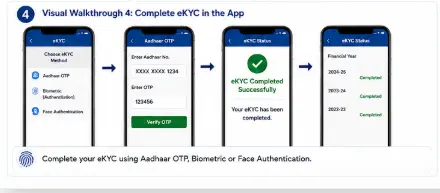
What Is Aadhaar Face RD?
Aadhaar Face RD is a supporting application used for Aadhaar-based face authentication.
The official PM-KISAN eKYC guidance specifically instructs users performing face-authentication eKYC through the mobile app to download the PM-KISAN mobile app and Aadhaar Face RD app from Google Play.
The important point is that you should obtain the required application through the official app store route rather than downloading an APK from an unknown website.
How Does PM-KISAN Face eKYC Work?
The official guidance describes the following basic process:
PM-KISAN Mobile App
↓
Log in with registered mobile number
↓
Beneficiary Status
↓
eKYC
↓
Enter Aadhaar number
↓
Give consent for face scan
↓
Complete face authentication
The official guidance says that after successful face scanning, eKYC is completed.
Visual Walkthrough 4: Face Authentication Flow
How Long Does PM-KISAN eKYC Take to Reflect?
Don’t panic if your eKYC status does not change immediately.
The official PM-KISAN eKYC guidance states that eKYC completed through any available method is reflected in the beneficiary status after 24 hours.
So if you completed eKYC today and the status still shows the previous information immediately afterward, don’t repeat the process unnecessarily.
Check again after the stated update period.
You can check the status through the PM-KISAN portal or Kisan e-Mitra as well.
What Is Kisan e-Mitra?
Kisan e-Mitra is the official PM-KISAN AI chatbot.
The current chatbot is available through the official chatbot.pmkisan.gov.in domain.
The chatbot is designed to help users with selected scheme-related information.
The current interface is powered by Sunbird UCI and BHASHINI and offers multiple Indian-language options, including:
- Hindi
- Bengali
- Telugu
- Marathi
- Tamil
- Odia
- Malayalam
- Gujarati
- Kannada
- English
This multilingual support is particularly useful for farmers who are more comfortable using their regional language.
Visual Walkthrough 5: Kisan e-Mitra Chatbot
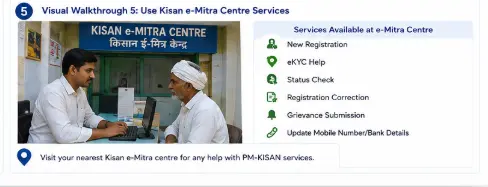
How to Open Kisan e-Mitra
Use the official Kisan e-Mitra website:
Kisan e-Mitra official chatbot
When the chatbot opens, you can select the available language and begin interacting with it.
The current interface includes language options and separate functions such as Information, Translation and Chatbot Functionality.
How Kisan e-Mitra Can Help
The official PM-KISAN website currently tells farmers to use Kisan eMitra or the mobile app for checking eligibility status in certain cases.
It can therefore be useful when you want information about PM-KISAN without searching through multiple pages manually.
However, there is an important limitation.
The chatbot itself states that it provides general information about selected schemes and advises users to contact the relevant authorities for accurate and updated details.
So don’t treat every chatbot response as a final government decision about your eligibility or payment.
Kisan e-Mitra Is Not a Payment Approval System
This distinction is important.
Kisan e-Mitra can provide information and help users navigate scheme-related queries.
It does not mean that typing:
“Release my ₹2,000”
will cause a payment to be released.
Your actual beneficiary record, eligibility, verification, and payment information remain governed by the official PM-KISAN system.
If the chatbot tells you to check your status, follow the relevant official status facility.
Can Kisan e-Mitra Check PM-KISAN Status?
The official PM-KISAN website specifically refers farmers to Kisan eMitra for checking eligibility status in certain cases.
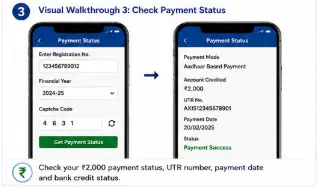
The official eKYC guidance also says farmers can access their status through the KYS module on the PM-KISAN portal and Kisan-eMitra.
However, for detailed payment information, the official Know Your Status page remains particularly useful because it displays fields such as:
- Payment Status
- Bank Name
- UTR Number
- Payment Mode
- Account Credited
- Credited On
- Financial-year-wise eKYC information
So don’t replace the status page completely with the chatbot.
Use each tool for what it does best.
PM-KISAN Website vs Mobile App vs Kisan e-Mitra
| Service | Best use |
|---|---|
| PM-KISAN website | Full range of official scheme services |
| PM-KISAN mobile app | Mobile access and supported app functions, including eKYC |
| Kisan e-Mitra | AI-based information and selected status/help queries |
| Know Your Status | Detailed beneficiary and payment information |
| Beneficiary List | Checking the published village-level beneficiary list |
This distinction will save you from repeatedly trying the wrong service.
What If You Cannot Use the Mobile App?
You don’t have to use the mobile app for everything.
The PM-KISAN website continues to provide the major online facilities.
For example, you can use the official website to:
- Check beneficiary status
- Check payment information
- Check beneficiary list
- Check self-registration status
- Update mobile number
- Access eKYC information
- Submit a grievance
- Access other Farmers Corner services
If you are unable to complete a supported digital process, CSC services may also be relevant for certain authentication processes.
What If Face Authentication Fails?
Don’t keep attempting the face scan repeatedly without checking the basics.
Check:
- Your phone camera
- Lighting
- Camera permission
- App permissions
- Internet connection
- Correct application installation
- Aadhaar details
- PM-KISAN registered mobile number
If the problem continues, use another official eKYC method supported for your situation.
The official PM-KISAN system currently recognises multiple eKYC routes, including biometric-based authentication through CSC and supported mobile-app authentication.
What if Kisan e-Mitra Doesn’t Understand Your Question?
Don’t write a long story.
Ask a specific question.
For example:
Better:
“How can I check my PM-KISAN beneficiary status?”
Instead of:
“I have not received money for many months and my father also has a problem with his Aadhaar and bank account…”
Break the problem into smaller questions.
That makes an AI chatbot much easier to use.
Don’t Share Sensitive Information With Anyone
This is particularly important when using digital government services.
Never share your:
- OTP
- Banking password
- ATM PIN
- UPI PIN
- Internet banking password
with someone claiming to help you use PM-KISAN.
The official PM-KISAN mobile app privacy policy says Aadhaar is used for authentication and that the application does not store the Aadhaar number on the mobile device.
Still, you should follow the principle of entering sensitive information only into the official service you intended to use.
How to Use the Three Services Together
The smartest approach is not to choose only one.
Use them as a sequence.
For a payment problem
PM-KISAN website
↓
Know Your Status
↓
Check payment status, UTR, and bank details
↓
Kisan e-Mitra
↓
Get general information about the issue
↓
Official grievance
↓
Raise a complaint if the issue remains unresolved
For eKYC
PM-KISAN Mobile App
↓
Complete the supported eKYC process
↓
Wait for status update
↓
Know Your Status
↓
Verify eKYC status
This is much more practical than repeatedly switching between random websites.
Visual Walkthrough 6: PM-KISAN Digital Help Path
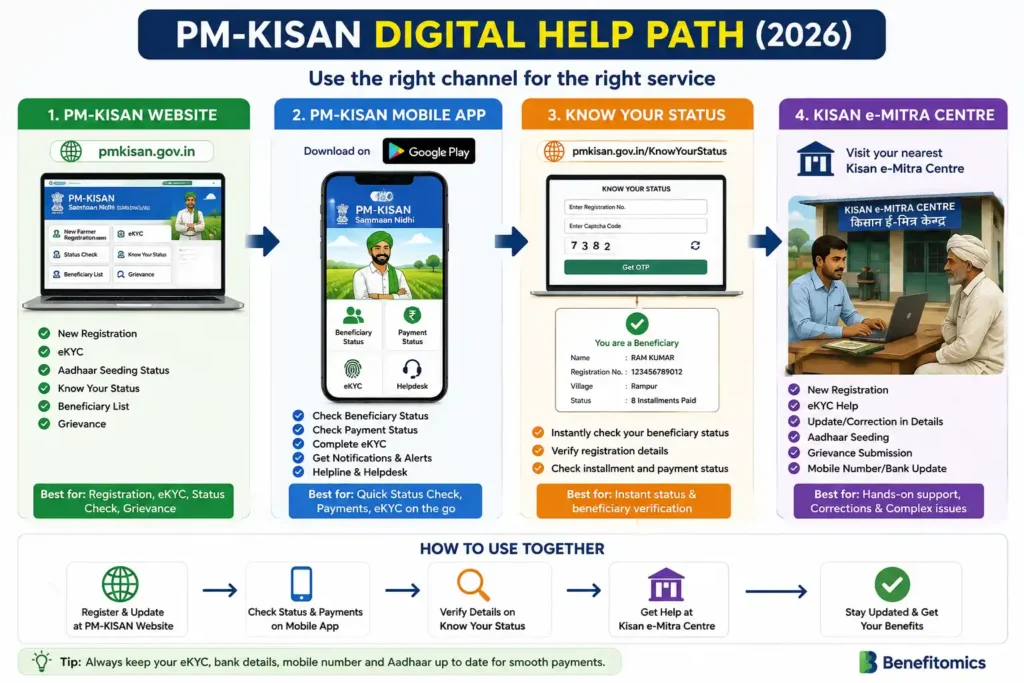
Common Mistakes to Avoid
1. Downloading an unofficial PM-KISAN app
Always start from the official PM-KISAN website.
2. Treating Kisan e-Mitra as a human officer
It is an AI chatbot.
The chatbot itself says its information is general and advises users to contact relevant authorities for accurate and updated details.
3. Assuming the app guarantees payment
It doesn’t.
The app gives access to supported services. Eligibility and payment depend on the official beneficiary record and applicable scheme requirements.
4. Repeating eKYC immediately
The official guidance says eKYC status can take up to 24 hours to reflect in beneficiary status.
5. Installing APKs from random websites
Don’t do it.
Use the official PM-KISAN route to reach the app.
6. Giving your OTP to a CSC operator or stranger
Enter your OTP yourself whenever the official system requests it.
Final Takeaway
The PM-KISAN mobile app and Kisan e-Mitra are useful additions to the official PM-KISAN website, but they are not interchangeable.
Use the mobile app when you need supported mobile services such as app-based eKYC.
Use Know Your Status when you need detailed beneficiary and payment information.
Use Kisan e-Mitra when you want quick, AI-based information or help navigating selected PM-KISAN queries.
And when something involves your actual payment or eligibility, don’t rely on a chatbot answer alone. Check the official PM-KISAN record.
The safest rule is simple:
Use the official PM-KISAN website to access the official app and services, and never install an unknown PM-KISAN APK or share OTPs with anyone.
Frequently Asked Questions
Q1. Is the PM-KISAN mobile app official?
Yes. The official PM-KISAN website provides a Download PM Kisan Mobile App option, and the app’s privacy policy identifies it as hosted through NIC’s e-Gov Mobile App account.
Q2. Can I complete PM-KISAN eKYC through the mobile app?
Yes. The official PM-KISAN website states that biometric-based eKYC is available through the PM-KISAN Mobile Application, and official guidance documents the face-authentication process.
Q3. What is Kisan e-Mitra?
Kisan e-Mitra is the PM-KISAN AI chatbot available through the official PM-KISAN chatbot domain. It provides general information about selected schemes and supports multiple Indian languages.
Q4. Can Kisan e-Mitra check my PM-KISAN status?
The official PM-KISAN website directs farmers to Kisan eMitra for checking eligibility information in certain cases, and official eKYC guidance says status can be accessed through Kisan-eMitra.
Q5. Is Kisan e-Mitra a replacement for the PM-KISAN website?
No. It is better viewed as an additional information and assistance channel. The official Know Your Status page provides detailed payment fields such as UTR, bank name, and credited date.
Q6. Can I use Kisan e-Mitra in my regional language?
Yes. The current chatbot interface lists Hindi, Bengali, Telugu, Marathi, Tamil, Odia, Malayalam, Gujarati, Kannada, and English among its language options.
Q7. What if my PM-KISAN eKYC is completed but the app still shows the old status?
Don’t immediately repeat eKYC. Official PM-KISAN guidance says the status can take up to 24 hours to reflect after eKYC. Check again later through Know Your Status.
Q8. Is the PM-KISAN mobile app available outside India?
The current official mobile-app privacy policy says the application is geo-fenced and accessible only in India.
Related PM-KISAN Guides
Main Guide: PM-KISAN Samman Nidhi Guide India (2026): Eligibility, eKYC, Instalments & Status Check
Supporting Post 1: How to Register for PM-KISAN Online (2026)
Supporting Post 2: How to Complete PM-KISAN eKYC Online (2026)
Supporting Post 3: How to Check PM-KISAN Beneficiary Status & Payment Status (2026)
Supporting Post 4: PM-KISAN Payment Not Received? ₹2,000 Missing Causes & Solutions (2026)
Supporting Post 5: PM-KISAN Registration Correction Online 2026: Update Details
Supporting Post 6: PM-KISAN Mobile App & Kisan e-Mitra Guide (2026)